|

|
Processed through Paypal No account required. |








Buy our over-priced crap to help pay the bills.



|
|
Processed through Paypal No account required. |
| Files | ||||
| File Name | Rating | Downloads | ||
 |
NewFileTime v8.31 NewFileTime v8.31 👉 Easily modify and correct file and folder timestamps in Windows. NewFileTime is a lightweight and portable timestamp utility that allows you to quickly change the creation date, modification date, and access date of files and folders. It is especially useful for correcting incorrect timestamps after copying files, restoring backups, sorting media collections, or organizing archived documents. The program supports drag-and-drop operation and can process multiple files and folders at once, making bulk date changes simple and efficient. NewFileTime features an easy-to-use interface with preset time options, random date generation, and precise manual controls for adjusting timestamps down to the second. The software can also import timestamps from other files, preserve original dates during operations, and work with network drives and external storage devices. Because it is portable, it can run without installation and is ideal for technicians, archivists, photographers, and power users who frequently manage file metadata. Features: • Change creation, modification, and access timestamps for files and folders • Batch process multiple files and directories simultaneously • Drag-and-drop support for quick file handling • Portable application requiring no installation • Copy timestamps from reference files • Set timestamps manually with precise date and time controls • Randomize dates and times for testing or organization purposes • Supports folders, network drives, USB drives, and external media • Easy-to-use interface with preview before applying changes • Optional administrative mode for protected files • Small system footprint and fast processing performance • Compatible with Unicode filenames and long file paths Supported operating systems: • Windows XP, Windows Vista, Windows 7, Windows 8, Windows 10, Windows 11, Windows Server 2000, Windows Server 2003, Windows Server 2008, Windows Server 2012, Windows Server 2016, Windows Server 2019, Windows Server 2022 Supported languages: • English, German, French, Spanish, Italian, Portuguese, Dutch, Polish, Russian, Chinese, Japanese, Korean, Turkish, Greek, Hungarian, Danish, Finnish, Norwegian, Swedish, Czech, Slovak, Romanian, Bulgarian, Arabic, Hebrew, Ukrainian, Indonesian, Vietnamese Changes: v8.31 ... |
 |
7,068 | Oct 12, 2026 Nenad Hrg 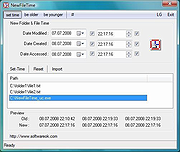 |
| Showing rows 1 to 1 of 1 | Showing Page 1 of 1 | 1 |
OlderGeeks.com Copyright (c) 2026
