|

|
Processed through Paypal No account required. |








Buy our over-priced crap to help pay the bills.



|
|
Processed through Paypal No account required. |
| Files | ||||
| File Name | Rating | Downloads | ||
 |
Betterbird v153.5.0esr-bb11 Betterbird v153.5.0esr-bb11 👉 Fine-tuned Thunderbird-based email client with exclusive features, fixes, and productivity improvements. Betterbird is a soft fork of Mozilla Thunderbird that adds exclusive features, bug fixes, and usability improvements while maintaining compatibility with Thunderbird. It can be installed alongside Thunderbird and can use the same profile, making it easy to switch between the two. Betterbird improves everyday email management with features including multi-line message view, full account colors, advanced searching, regular expression searches, searching encrypted messages, improved system tray integration, attachment handling, calendar and feed improvements, and numerous fixes not yet available in Thunderbird. Features: • Fine-tuned Mozilla Thunderbird-based email client • Multi-line message view similar to Outlook, Lotus Notes and Postbox • Full account colors support • Vertical tabs • Attachments displayed on top • Complex search terms • Regular expression searching • Search within encrypted messages • Improved Windows and Linux system tray integration • Minimize to tray and close to tray support • Can be installed alongside Thunderbird • Can use the same profile as Thunderbird • Advanced message and folder management • Improved calendar functionality • Improved feed handling • Enhanced compose and attachment handling • Windows portable version available • Native builds for Windows, Linux and macOS • Intel and Apple Silicon macOS builds available • Language packs work across all supported platforms Supported operating systems: • Windows 10 64-bit, Windows 11 64-bit • Linux Mint 22, Ubuntu 22, Debian 12 Bookworm, compatible 64-bit Linux distributions with GLIBC 2.35 or newer • Linux ARM64 distributions with GLIBC 2.36 or newer • macOS Catalina or higher on Intel x86-64 processors • macOS Catalina or higher on Apple Silicon ARM64 processors, including macOS Ventura, macOS Sonoma 14, macOS Sequoia 15 and later Supported languages: • English (US), English (GB), German, Dutch, French, Italian, Japanese, Spanish (Spain), Portuguese (Brazil), Portuguese (Portugal), Russian, Chinese (Simplified), Czech, Polish, Swedish, Ukrainian Changes: v153.5.0esr-bb11 10-13-26 Based on Thunderbird 153.5.0esr Fixed in this version: FIXED - Regression: Activity Indicator in Unified Toolbar and progress bar in ... |
 |
3,994 | Oct 16, 2026 betterbird.eu & Jorg Knobloch 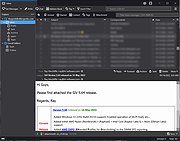 |
|
Easy Email Extractor v1.2 Easy Email Extractor v1.2 Easy Email Extractor is a handy Windows OS software application which allows you to easily extract email addresses from files, folders and urls. You can extract email addresses from entire folders or hard disks by filtering file extensions to search. You can copy the found email addresses to the Windows clipboard, export the email addresses in a text file, extract emails from plain text (txt) files. For Windows XP, Vista, 7, 8, 10 (32\64-bit) Extract Emails from Files, Folders, URLs This tool can help you extract email addresses from text files (i.e .txt, .log, etc), from folders, from a web page URL and from text snippets. If you saved an important email address in a text file that you don't know anymore where it is located, you can use this tool to accurately scan your entire hard disk or USB for text files and extract all the emails found, so you can find the lost email addresses. Extract Email Addresses Extract emails from files, folders, web page URL and text snippets. Scan Folders Scan a folder (and sub-folders), filtering file extensions, to extract emails from files. Find Lost Emails Find lost email addresses by scanning text files on your hard disk or USB devices. Exclude Emails You can use wildcard rules to exclude a particular email from being extracted. Fast File Scanning This tool can quickly scan files, also big text files, without using too much memory. Export Emails List With a mouse click you can copy the emails to the clipboard or export them to a file. Simple Interface The program interface is well organized and simple to use also for beginner users. No Spyware/Adware The program is free from spyware, adware or other pests, nothing extra is installed. Free to Use This software is completely free to use for anyone, at home and at work. Click here to visit the author's website. |
|
5,435 | Mar 15, 2019 NoVirusThanks 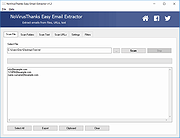 |
 |
Email Password Dump 1.0 Email Password Dump 1.0 Email Password Dump is the free command-line based all-in-one tool to instantly recover all your passwords from popular email clients and other desktop applications. Currently it can recover your lost email passwords from following applications: Microsoft Outlook Express Microsoft Outlook 2002/XP/2003/2007/2010/2013 Mozilla Thunderbird Windows Live Mail 2012 IncrediMail Foxmail v6.x - v7.x Windows Live Messenger MSN Messenger Google Talk GMail Notifier PaltalkScene IM Pidgin (Formerly Gaim) Messenger Miranda Messenger Windows Credential Manager |
 |
9,914 | Feb 24, 2014 SecurityXploded |
|
LostMyPassword v1.02 LostMyPassword v1.02 👉 Recover lost passwords stored by software installed on your Windows system. LostMyPassword is a Windows tool that allows you to recover a lost password if it is stored by software installed on your system. It can extract passwords from popular web browsers, including Chrome, Firefox, Microsoft Edge, Brave, Internet Explorer, and Opera, as well as POP3/IMAP/SMTP passwords stored by email software such as Microsoft Outlook, Thunderbird, and Windows Mail. It can also recover Dialup/VPN passwords stored by Windows and login passwords for remote computers stored by Windows. The program can run as a normal user or as Administrator, with Administrator mode required for some password types that cannot be decrypted without elevated privileges. Features: • Recovers passwords stored by installed Windows software • Extracts passwords from web browsers including Chrome, Firefox, Microsoft Edge, Brave, Internet Explorer, and Opera • Recovers POP3, IMAP, and SMTP passwords from email programs including Microsoft Outlook, Thunderbird, and Windows Mail • Retrieves Dialup and VPN passwords stored by Windows • Recovers remote computer login passwords stored by Windows • Can run in normal user mode or Administrator mode • Standalone utility that does not require installation or additional DLL files Supported operating systems: • Windows XP, Windows Vista, Windows 7, Windows 8, Windows 8.1, Windows 10, Windows 11 • Windows 32-bit, Windows 64-bit Supported languages: English, Brazilian Portuguese, Dutch, French, German, Greek, Hungarian, Italian, Japanese, Korean, Polish, Russian, Simplified Chinese, Slovak, Spanish, Traditional Chinese Changes: v1.02 Updated to decrypt the passwords for the encryption change of Firefox 144 and Thunderbird 146. Notice: On the latest update of Windows 11 (24H2), LSA protection is enabled by default, and this feature blocks LostMyPassword from retrieving passwords stored by Windows operating system. You can disable the LSA protection by following the instructions on this Microsoft Web page: Disable LSA protection WARNING: Your antivirus SHOULD block this program. Think of it as a ... |
|
5,530 | Mar 16, 2026 Nirsoft 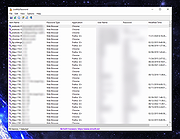 |
|
MailStore Home v26.3.0 MailStore Home v26.3.0 👉 Free email archiving software for home users to securely back up and search emails. MailStore Home is a free email archiving solution designed for private users who want to back up, preserve, and search their emails securely. It allows you to archive emails from various sources into a single, centralized database on your PC, helping protect against data loss while significantly reducing mailbox size. MailStore Home supports archiving from email clients such as Microsoft Outlook, Mozilla Thunderbird, and Windows Mail, as well as directly from POP3 and IMAP mailboxes. Archived emails can be browsed in a structured folder tree or located instantly using a powerful full-text search. MailStore Home preserves the original MIME structure of emails to ensure data integrity and compliance. The program can also create email archives from PST files and other email formats, and it allows users to export archived messages back to email clients or standard file formats if needed. Features: • Archive emails from Microsoft Outlook, Mozilla Thunderbird, Windows Mail, and other clients • Archive directly from POP3 and IMAP mailboxes • Create and manage multiple archive profiles • Fast full-text search across the entire archive • Preserve original email structure and attachments • Reduce mailbox size by deleting archived emails from the server • Export archived emails back to email clients or file formats • Secure storage in a central local archive • Create backup copies of the email archive A Central Archive for All Your Emails Internet mailboxes such as Gmail or Yahoo! Mail Any mailbox via POP3 or IMAP Outlook 2003, 2007, 2010, 2013, 2016 and 2019 Microsoft Exchange Server 2003, 2007, 2010, 2013, 2016 and 2019 mailboxes Mozilla Thunderbird and SeaMonkey PST, EML and other file formats Supported operating systems: • Windows 10 (64-bit), Windows ... |
|
10,779 | Jul 11, 2026 deepinvent Software 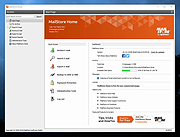 |
 |
Password Expiry Email Notification v2.9 Password Expiry Email Notification v2.9 This script will email an Active Directory user in the event that their password is due to expire in X number of days. EXAMPLE PasswordChangeNotification.ps1 -smtpServer mail.domain.com -expireInDays 21 -from "IT Support <support@domain.com>" -Logging -LogPath "c:\logFiles" -testing -testRecipient support@domain.com This example will use mail.domain.com as an smtp server, notify users whose password expires in less than 21 days, send mail from support@domain.com Logging is enabled, log path is c:\logfiles Testing is enabled, and test recipient is support@domain.com EXAMPLE PasswordChangeNotification.ps1 -smtpServer mail.domain.com -expireInDays 21 -from "IT Support <support@domain.com>" -reportTo myaddress@domain.com -interval 1,2,5,10,15 This example will use mail.domain.com as an smtp server, notify users whose password expires in less than 21 days, send mail from support@domain.com Report is enabled, reports sent to myaddress@domain.com Interval is used, and emails will be sent to people whose password expires in less than 21 days if the script is run, with 15, 10, 5, 2 or 1 days remaining untill password expires. Youtube Channel for hints and tips on how to configure the script. https://www.youtube.com/user/robtitlerequired Right-click on download below and choose to save link. Otherwise it will open the script instead of downloading. Click here to visit the author's website. |
|
3,852 | Dec 28, 2020 Robert Pearman 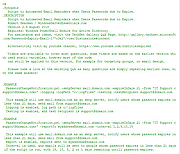 |
|
Pelton v2026.3.2 Pelton v2026.3.2 👉 A privacy-focused open-source email client that keeps your mail under your control. Pelton is a free, open-source desktop email client designed around privacy, speed, and simplicity. Instead of routing your email through third-party services, Pelton connects directly to your existing IMAP and SMTP accounts while storing your data locally in an SQLite database. There is no telemetry, no tracking, and no cloud service standing between you and your email. Built with a modern interface and a keyboard-friendly workflow, Pelton offers fast local searching, offline access, scheduled sending, message snoozing, built-in document previews, customizable themes, and portable configuration backups. Everything runs locally, making it equally suitable for everyday email users and privacy-conscious professionals who want complete control over their communications. Features: • Fast local search using a local SQLite database for instant results, even with large mailboxes. • Cross-platform support for Windows, macOS, and Linux. • Zero telemetry with no tracking or crash reporting. • Connects directly to standard IMAP and SMTP mail providers. • Stores email locally while remaining synchronized with your existing mail provider. • Download messages for offline reading by pinning messages or selecting a date range. • Immediate synchronization using IMAP IDLE for prompt delivery of new mail. • Native desktop notifications for Windows, macOS, and Linux. • Built-in previewer for PDFs, images, and text files. • Snooze messages to return unread at a scheduled time. • Schedule outgoing messages with Send Later. • Export accounts, preferences, and layouts into a portable configuration file. • Eight colored message flags stored locally or synchronized using IMAP keywords. • Extensive customization including themes, layouts, display density, and custom CSS. • Import themes safely with selective importing and automatic removal of remote references. Supported operating systems: • Windows 10, Windows 11 • macOS 13 Ventura or higher (Intel and Apple Silicon) • Linux x86-64 (Debian/Ubuntu, Fedora, and other modern distributions) Supported languages: English, German, French, Dutch, Spanish, Polish Changes: v2026.3.2 08-01-26 • Added ... |
|
256 | Aug 05, 2026 Arne K. 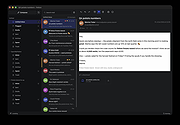 |
|
SmartTextCrypter v1.03 SmartTextCrypter v1.03 👉 A tiny portable tool for password-encrypting text before sending it through messaging apps, email or SMS. SmartTextCrypter is a free, portable Windows utility designed to encrypt text messages with a password before they are sent through services such as WhatsApp, Telegram, email or SMS. The recipient pastes the encrypted text into SmartTextCrypter and enters the same password to decrypt and read the original message. Everything is processed locally on your computer without uploading your text to a cloud service or server. The program uses the author's proprietary multi-layer encryption method consisting of password-based key generation, XOR encryption, position-dependent mixing, bit rotation and a checksum for detecting errors or incorrect passwords. It supports Unicode text, including Asian, Cyrillic and Arabic characters. SmartTextCrypter requires no installation and can be run directly from a USB drive, external drive or ordinary folder without creating registry entries. Features: • Password-based encryption and decryption of text • Send encrypted text through WhatsApp, Telegram, email, SMS and other services • Proprietary multi-layer encryption using XOR, positional mixing and bit rotation • Generates a 32-byte key from your password • Checksum detects errors and incorrect passwords • Unicode support for Asian, Cyrillic, Arabic and other characters • Completely local operation with no cloud service or server uploads • Portable and requires no installation • Can run directly from a USB drive, external drive or any folder • Does not create registry entries • Low CPU usage • Adjustable text sizes for improved readability • Free for private use Supported operating systems: • Windows XP, Windows Vista, Windows 7, Windows 8, Windows 8.1, Windows 10, Windows 11, Windows Server 2012-2025 • 32-bit and 64-bit Windows Supported languages: German, English, Italian, Chinese-Traditional, Dutch, Russian, Japanese, Korean, Spanish, Portuguese, Malay Changes: v1.03 08-26-26 • SmartTextCrypter language file update • Minor fine-tuning in SmartTextCrypter for all Windows operating systems. Click here to visit the author's website. |
|
169 | Sep 03, 2026 Nenad Hrg 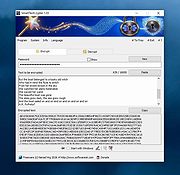 |
|
Vivaldi v8.2.4133.52 Vivaldi v8.2.4133.52 👉 Highly customizable web browser built for power users, privacy, and productivity. Vivaldi is a feature-rich Chromium-based web browser designed for users who want extensive control over their browsing experience. Created by former Opera developers, Vivaldi focuses on customization, efficiency, privacy, and integrated productivity tools rather than simplified mainstream browsing. It combines advanced tab management, built-in communication tools, customizable interface layouts, and strong privacy protections into a single browser package. Vivaldi allows users to tailor nearly every aspect of the interface, including tab placement, themes, keyboard shortcuts, gestures, toolbars, and panel layouts. The browser includes built-in features such as Mail, Calendar, Feed Reader, Notes, screenshot capture, ad and tracker blocking, Workspaces, split-screen tab tiling, and powerful session management tools. Unlike many browsers that rely heavily on extensions for advanced functionality, Vivaldi includes many professional-grade tools directly within the browser itself. Features: • Chromium-based browser engine for broad website compatibility • Highly customizable menus, toolbars, themes, and browser interface • Advanced tab management with Tab Stacks and multiple tab placement options • Tab Tiling for viewing multiple webpages side by side • Workspaces for separating tabs by projects, activities, or interests • Built-in Mail client • Built-in Calendar • Integrated Feed Reader for RSS and Atom feeds • Notes manager for saving text and information while browsing • Built-in tracker and ad blocker • Web Panels for displaying websites alongside the main browser window • Custom keyboard shortcuts and mouse gestures • Quick Commands for quickly accessing browser commands and content • Command Chains for combining multiple browser actions • Extensive theme customization • Bookmark and browsing history management • Built-in screenshot and webpage capture tools • Session saving and restoration • Sync for supported browser data across devices • Reader View for simplified webpage reading • Reading List for saving pages to read later • Custom search engines • Customizable Start Page and Speed Dials • Private browsing windows • Supports extensions from the Chrome Web ... |
|
6,724 | Sep 13, 2026 Vivaldi Technologies 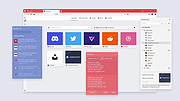 |
| Showing rows 1 to 9 of 9 | Showing Page 1 of 1 | 1 |
OlderGeeks.com Copyright (c) 2026
