|

|
Processed through Paypal No account required. |








Buy our over-priced crap to help pay the bills.



|
|
Processed through Paypal No account required. |
| Files | ||||
| File Name | Rating | Downloads | ||
 |
BrowserAddonsView v1.25 BrowserAddonsView v1.30 👉 View installed browser addons and plugins in one simple list. BrowserAddonsView is a simple NirSoft tool that displays details for Web browser addons and plugins installed on your system. It can scan Chrome, Firefox, Internet Explorer, and Microsoft Edge, and it detects multiple Chrome and Firefox profiles when present. Features: • Displays installed browser addons, plugins, and extensions • Supports Chrome, Firefox, Internet Explorer, and Microsoft Edge • Detects multiple Chrome and Firefox profiles • View addons from all Windows profiles • View Chrome and Firefox addons from an external drive or remote computer • Export selected items to text, CSV, tab-delimited, XML, HTML, or JSON • Copy addon information to the clipboard for use in spreadsheets • Quick Filter for instantly filtering the addon list • Command-line options for exporting, sorting, selecting columns, and loading profiles • Portable; no installation required Supported operating systems: • Windows XP, Windows Vista, Windows 7, Windows 8, Windows 10, Windows 11 • 32-bit and 64-bit systems Supported languages: English, Arabic, Brazilian Portuguese, Dutch, French, German, Greek, Hungarian, Italian, Japanese, Persian, Polish, Romanian, Russian, Simplified Chinese, Slovak, Spanish, Traditional Chinese, Turkish Changes: v1.30 07-20-24 Added 'Black Background' option (Under the View menu). When it's turned on, the main table is displayed in black background and white text, instead of default system colors. This download is for the Windows 64bit version (very bottom of page). If you need the Windows 32bit version, download here. Click here to visit the author's website. |
 |
6,457 | May 31, 2026 Nir Sofer 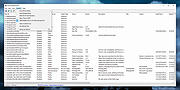 |
|
Edge Blocker v2.0 Edge Blocker v2.0 A free tool to block Microsoft Edge from being used. Microsoft Edge is a “Trusted” UI App and a core part of the Windows 11-10 Operating System it sets itself to not only be the default browser, but the default PDF reader too it is integrated in Windows 11, Edge is clearly the application that Microsoft wants you to use by any means. And yet, there are many reasons to stay away from Edge and continue using Other Browsers . There is no option to block it but sometimes it can be necessary. To block Microsoft EDGE use “Block” button and to unblock it click “Unblock” button , once you’ve blocked the browser, it won’t load even if you – or an app – tries to launch , we recommend to change the default browser first if you have no other browser installed (use default browser link). Edge icon on the GUI will show the status of the Microsoft Edge , if it is grayed out mean it is blocked. In a command prompt, running “EdgeBlock_x64.exe /?” or “EdgeBlock.exe /?” (no quotes) will list all available parameters. Supported operating systems: Windows 7, 8, 10, 11 Supported languages: English Changes: v2.0 [ Added ] – Option to block Only Ms EDGE via cmd [ Added ] – Option to block Only Webview2 via cmd [ Added ] – Some code improvements Important Notes: • If your Windows user account has administrator privileges, the restriction takes place at the system level, so all users are impacted. • If Edge is open during blocking process, it will be closed forcefully. Before you block Edge , you must change your default browser. • Some programs may use “EdgeWebView” or Edge components. These programs may not work properly if you block EdgeWebView or Edge. • ... |
|
7,261 | Nov 19, 2025 Sordum.org 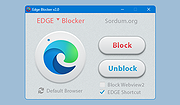 |
 |
Microsoft Edge Browser (Latest) Microsoft Edge Browser (Latest) The browser for business is here. Built on Chromium open source, backed by Microsoft security and innovation. Supports IE Apps and sites Open Internet Explorer-based legacy apps and sites—and the modern web—all while staying in Microsoft Edge. Protects your users and data Microsoft Edge has the highest-rated protection against phishing and malware to help protect your network from external threats. Empowers productivity Microsoft Edge turns every new tab into a portal for productivity with quick access to Office apps, files, sites and built-in Microsoft Search. Unlocks remote work Use Microsoft Edge across your devices whether at home or work with cross-platform support and profiles that sync. Access legacy Internet Explorer-based sites in Microsoft Edge Microsoft Edge with Internet Explorer (IE) mode is the only browser with built-in compatibility for legacy sites and apps. Set up IE mode Improve compatibility, retain value, and streamline productivity with Microsoft Edge and Internet Explorer mode. LEARN MORE Harness Microsoft 365 Microsoft Edge seamlessly works with Microsoft 365 management, security, and productivity tools. Work across platforms Available on supported versions of Windows, macOS, iOS, Android, and Linux (coming soon). Easy sync Have your favorites, passwords, settings, and more with you on home, work, or mobile devices. Security and Protection for your users and data With built-in tools and support for Microsoft 365 security, Microsoft Edge provides a comprehensive approach to browser security on your endpoints. SmartScreen Microsoft Edge has the highest-rated protection against phishing and malware. Conditional Access Single-sign on and native Azure Active Directory Conditional Access allow IT to securely manage access to corporate data using identity. Application Guard Run Microsoft Edge in an isolated container to help prevent bad actors from infiltrating the device OS or corporate network. Information Protection Separate corporate data and control how it’s copied, pasted, or otherwise used with native support for Windows Information Protection. Data Loss Prevention (DLP) Microsoft Endpoint DLP is natively supported so organizations can easily extend their control over data when accessed from the browser. Tracking Prevention Control how ... |
|
5,042 | May 29, 2022 Microsoft Corp. 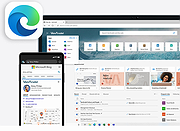 |
|
Microsoft Edge Remover v2.6 Microsoft Edge Remover v2.6 Remove Microsoft Edge Chromium , and Microsoft Edge UWP (<20H1) from Windows PC. Microsoft Edge Remover is a tool designed to help Windows users remove Microsoft Edge Chromium and Edge UWP from their devices. By removing Microsoft Edge, users can free up space on their devices and eliminate any unwanted software. IMPORTANT NOTES: 1) Right-click on the file after downloading and choose to "Run as Administrator". 2) This will remove Edge as soon as you run the file. It won't ask... it will just do it. Be sure you want to do this before running the file. 3) If you want Edge back, go here: https://www.microsoft.com/en-us/edge/download?form=MA13FJ System Requirements The Microsoft Edge Remover tool requires a Windows operating system to function. It is compatible with Windows 10 (all versions) and Windows 11. Before using the tool, it is important to ensure that the user's device meets the system requirements. This will ensure that the tool runs smoothly and effectively removes Microsoft Edge Chromium and Edge UWP. The tool may also require administrator permission to run, depending on the user's version of Windows. By having the correct system requirements, users can be confident that the Microsoft Edge Remover tool will work efficiently on their device. Changes: v2.6 NEW! Removing the GUI and make the script simplifier! FIX Using the ShadowWhisperer's way to remove UWP Edge. ATTENTION! Because of breaking of some apps, Edge WebView will not be removed in this script. Also EdgeUpdate its not removed because updating of Edge Webview and it don't download Edge. Click here to visit the author's website. |
|
2,658 | May 17, 2023 John Bar  |
|
uBlock Origin Lite v2026.628.2035 uBlock Origin Lite v2026.628.2035 👉 Lightweight Manifest V3 content blocker that blocks ads, trackers, and other unwanted web content. uBlock Origin Lite is a lightweight, Manifest V3-based content blocker designed to efficiently block ads, trackers, cryptominers, and other unwanted web content while using minimal CPU and memory. Unlike the original uBlock Origin, uBlock Origin Lite relies on the browser's declarative filtering engine, allowing filtering to occur without a continuously running background process. This approach improves efficiency while remaining compatible with modern browser extension requirements. Users can select different filtering modes and enable additional filter lists through the extension's options page to increase protection. uBlock Origin Lite includes the standard uBlock Origin filter set by default, including EasyList, EasyPrivacy, Peter Lowe's Ad and Tracking Server List, and uBlock's own built-in filters. It is ideal for Chromium-based browsers that require Manifest V3-compatible extensions while also supporting Firefox and Safari versions built for the new extension architecture. Features: • Blocks advertisements, trackers, cryptominers, and malicious domains • Built on the Manifest V3 extension platform • Uses the browser's declarative filtering engine for low resource usage • No permanent background process required • Includes uBlock Origin default filter lists • Supports additional optional filter lists • Multiple filtering modes for different levels of protection • Fast startup with minimal CPU and memory consumption • Open source under the GPL-3.0 license • Available for Chromium-based browsers, Firefox, Microsoft Edge, and Safari Supported operating systems: • Windows 10, Windows 11 • macOS 13.7 or higher • Linux (via supported Chromium-based browsers or Firefox) • ChromeOS • iOS 18.6 or higher (Safari) • iPadOS 18.6 or higher (Safari) Supported languages: English Changes: v2026.628.2035 06-28-26 Updated filter lists. This download is for the Firefox version (very bottom of page). If you need the Google Chrome version, download here. If you need the Microsoft Edge version, download here. If you need the Apple Safari version, download here. Click here to visit the author's website. |
|
488 | Jul 05, 2026 Raymond Hill 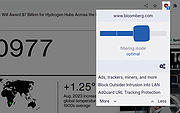 |
|
uBlock Origin v1.72.0 uBlock Origin v1.72.0 👉 Efficiently block ads, trackers, malware, and other unwanted web content. uBlock Origin is a free, open-source, wide-spectrum content blocker designed to improve privacy, security, and browsing performance while using minimal CPU and memory. Rather than focusing only on advertisements, it blocks trackers, malicious domains, cryptocurrency miners, popups, anti-adblock scripts, and many other forms of unwanted web content. It supports multiple filter lists out of the box, while also allowing advanced users to create custom filtering rules and import additional lists. uBlock Origin is known for its efficiency, making it one of the lightest and fastest content blockers available. Note: Google Chrome has removed support for Manifest V2 extensions. The full version of uBlock Origin is best supported on Firefox. Chromium-based browsers need uBlock Origin Lite. Features: • Blocks ads, trackers, malware sites, popups, cryptocurrency miners, and other unwanted content • Lightweight design with low CPU and memory usage • Includes EasyList, EasyPrivacy, Peter Lowe's Blocklist, Online Malicious URL Blocklist, and uBlock Origin filter lists by default • Supports additional community filter lists and custom filters • Dynamic filtering for advanced users • Cosmetic filtering to hide unwanted page elements • Supports hosts files • Import and export custom settings and filter lists • Per-site blocking controls • Free and open source (GPLv3) Supported operating systems: • Windows 10, Windows 11 • macOS • Linux • Firefox for Android Supported languages: English, Arabic, Bulgarian, Catalan, Chinese (Simplified), Chinese (Traditional), Croatian, Czech, Danish, Dutch, Estonian, Finnish, French, German, Greek, Hebrew, Hindi, Hungarian, Indonesian, Italian, Japanese, Korean, Lithuanian, Norwegian Bokmål, Persian, Polish, Portuguese, Portuguese (Brazil), Romanian, Russian, Serbian, Slovak, Slovenian, Spanish, Swedish, Thai, Turkish, Ukrainian, Vietnamese, Welsh, and others. Changes: v1.72.0 06-28-26 Fix broken rendering of final URL in strict-block page. Fix potential exception in set-attribute scriptlet. Improve parsing and interpretation of consecutive $$ in network filters. Improve googlesyndication_adsbygoogle shim. Add edit-object-on-getter and edit-object-on-setter scriptlets. Improve JSONPath support, including regex selectors, RFC9535 conformance, double-quoted names, and ... |
|
474 | Jul 05, 2026 Raymond Hill  |
|
Uninstall Edge v1.0 Uninstall Edge v1.0 Free tool to remove the Microsoft Edge browser and prevent it from returning. This program does the following. It looks for the “setup.exe” program in “C:\Program Files (x86)\Microsoft\Edge\Application\”. That program is used to uninstall Microsoft Edge using command arguments “–uninstall –system-level –verbose-logging –force-uninstall” when you click ‘Uninstall Edge” button. The ‘Prevent Edge” button adds the following registry key: “Computer\HKEY_LOCAL_MACHINE\SOFTWARE\Microsoft\EdgeUpdate\” with key: “DoNotUpdateToEdgeWithChromium” with value “1”. This will prevent Edge from installing. INSTRUCTIONS Your browser may block you from downloading the program and running because it is an executable and writes to registry. So please allow it if you want to run this program and make these changes. Once downloaded run it. Allow program to run. Click “Uninstall Edge” to uninstall Edge. Click “Prevent Edge” to prevent Edge web browser from installing again. Click here to visit the author's website. |
|
3,330 | Nov 26, 2021 FreeTimeTech 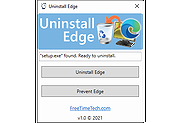 |
| Showing rows 1 to 7 of 7 | Showing Page 1 of 1 | 1 |
OlderGeeks.com Copyright (c) 2026
