|

|
Processed through Paypal No account required. |








Buy our over-priced crap to help pay the bills.



|
|
Processed through Paypal No account required. |
| Files | ||||
| File Name | Rating | Downloads | ||
 |
TimVer v0.14.1 TimVer v0.14.1 👉 Displays Windows version, hardware, drive, graphics, environment, and build history information. TimVer displays the same Windows version information as the built-in Winver command, along with additional system details that Winver does not provide. It can show information about Windows, the computer's hardware, processors, BIOS, memory, disk drives, graphics controllers, environment variables, and Windows build history. TimVer also provides extensive appearance and language options, clipboard functions, portable versions, and settings backup and restore. Features: • Displays Windows version, build number, build branch, architecture, and installation date • Shows computer manufacturer, model, computer name, processor, BIOS, physical memory, and last boot information • Displays logical drive information with optional physical drive details • Shows graphics controller information including adapter name, type, description, resolution, refresh rate, and number of colors • Supports systems with multiple graphics controllers and lets you select each adapter from a dropdown • Displays current environment variables with filtering by variable name • Optionally keeps a history of installed Windows build numbers • Copies an entire supported information page to the clipboard • Copies individual values to the clipboard by right-clicking • Lets you choose the display language • Provides selectable themes, accent colors, fonts, UI sizing, and row spacing • Supports automatic light and dark theme selection when using the System theme • Exports and imports application settings for backup or transfer to another computer • Can open or list the current application settings • Includes an optional check for newer TimVer releases • Runs without elevation for normal system information gathering Supported operating systems: • Windows 10 64-bit, Windows 11 64-bit Supported languages: • English (United Kingdom), English (United States), Spanish, French, Italian, Japanese, Korean, Dutch, Slovak, Thai Changes: v0.14.1 07-25-26 Fixed an issue where mismatched information could be displayed on the Graphics (Video) Information page when two or more video controllers were present. Cleaned up and optimized video controller information retrieval and UI handling. Inactive controllers may show "Not ... |
 |
2,259 | Aug 24, 2026 Tim Kennedy 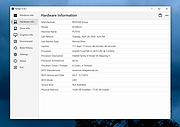 |
 |
USB Flash Drives Control 4.1.0.0 USB Flash Drives Control 4.1.0.0 USB Flash Drives Control is a freeware program that runs in system tray, next to the system clock, and provides access to control the way in which the USB removable drives are used on your computer. These options are available through the right click context menu on the system tray icon of the program. It also displays the connected drives. Use left click context menu to view the list of connected drives and explore the content of them. USB Flash Drives Control contains two parts, a GUI interface which is used for configuration and a Windows service which ensures that the program options are applied to all user accounts from the local computer: Read Mode - By disabling this option, USB removable drives will not be mounted and will not be accessible to the user. The reading of data from USB removable drives will not be available. Write Mode - By disabling this option, write access will be denied on all USB removable drives used on the current computer. All USB removable drives become read-only and copying data on them is not possible. Execute Mode - By disabling this option, execute access will be denied for all executable files on all USB removable drives used on the current computer, for all user accounts. This ensures a plus of security to the system against dangerous and malicious software, like worms, backdoors or password stealers. This setting is not available in Windows Vista. All the above options are not applied to the existing connected drives. Connected drives must be first removed and then reconnected in order to make these options apply to them. Program Features √ Intuitive and easy accessible user interface in the system tray. √ Enable or disable USB removable drives with just a mouse click. √ Deny write access on all USB removable ... |
|
6,197 | Mar 07, 2017 BiniSoft.org 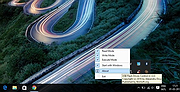 |
|
WinDirStat v2.8.0 WinDirStat v2.8.0 👉 Disk usage analyzer and cleanup assistant for Microsoft Windows. WinDirStat is a disk usage analyzer and cleanup assistant for Microsoft Windows. It scans local drives, selected drives, individual folders, and command-line targets, then shows where storage is being used through a sortable directory tree, an extension/type breakdown, and an interactive treemap where larger files and folders take up larger areas. Features: • Scan local drives, selected drives, individual folders, and command-line targets • View disk usage with All Files, Largest Files, Duplicate Files, Search Results, File Watcher, Extension, and Treemap views • Interactive treemap navigation with zooming and logical or physical sizing • Sortable file details including size, percentages, item counts, owner, modified time, hardlinks, and hash prefixes • Search, duplicate detection, and filtering with regular expressions • Configurable hash algorithms • File watching and reporting for created, deleted, modified, and renamed events • CSV scan import/export and duplicate CSV export • Built-in actions for opening items, copying paths, selecting in Explorer, moving files, deleting files, and emptying folders or the Recycle Bin • Windows cleanup and maintenance shortcuts • User-defined cleanup actions • Dark mode, portable settings, Explorer context-menu integration, localization, configurable columns, larger toolbar icons, and high-DPI aware UI Supported operating systems: • Windows 7, Windows 8, Windows 8.1, Windows 10, Windows 11 • Windows Server 2008 R2, Windows Server 2012, Windows Server 2012 R2, Windows Server 2016, Windows Server 2019, Windows Server 2022, Windows Server 2025 Supported languages: English, Chinese (Simplified), Chinese (Traditional), Czech, Danish, Dutch, Estonian, Finnish, French, German, Hungarian, Italian, Japanese, Korean, Norwegian Bokmεl, Polish, Portuguese, Russian, Slovenian, Spanish, Swedish, Turkish, Ukrainian Changes: v2.8.0 08-02-26 Enhancements Added flame graph as an alternative visualization view (thanks @P403n1x87) Added sunburst graph as an alternative visualization view Added Hilbert and Moore treemap visualization layouts Added additional window layouts Added per-user Explorer ... |
|
2,657 | Aug 07, 2026 WinDirStat Team 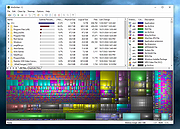 |
| Showing rows 1 to 3 of 3 | Showing Page 1 of 1 | 1 |
OlderGeeks.com Copyright (c) 2026
