|

|
Processed through Paypal No account required. |








Buy our over-priced crap to help pay the bills.



|
|
Processed through Paypal No account required. |
| File - Download WinDirStat v2.8.0 | ||||||||
| Description | ||||||||
|
A plea... Deanna and I have been running this site since 2008 and lately we're seeing a big increase in users (and cost) but a decline in percentage of users who donate. Our ad-free and junkware-free download site only works if everyone chips in to offset the revenue that ads on other sites bring in. Please donate at the bottom of the page. Every little bit helps. Thank you so much. Sincerely, your Older Geeks: Randy and Deanna Always scroll to the bottom of the page for the main download link. We don't believe in fake/misleading download buttons and tricks. The link is always in the same place. WinDirStat v2.8.0 👉 Disk usage analyzer and cleanup assistant for Microsoft Windows. WinDirStat is a disk usage analyzer and cleanup assistant for Microsoft Windows. It scans local drives, selected drives, individual folders, and command-line targets, then shows where storage is being used through a sortable directory tree, an extension/type breakdown, and an interactive treemap where larger files and folders take up larger areas. 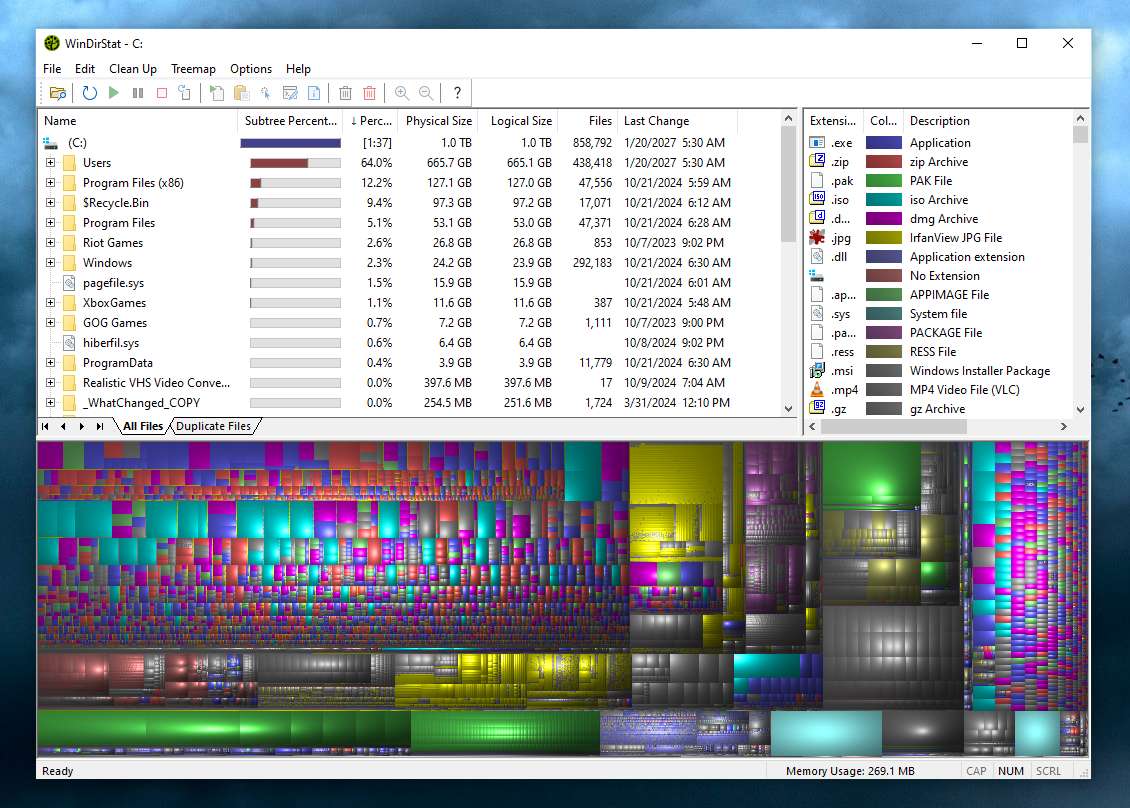 Features: • Scan local drives, selected drives, individual folders, and command-line targets • View disk usage with All Files, Largest Files, Duplicate Files, Search Results, File Watcher, Extension, and Treemap views • Interactive treemap navigation with zooming and logical or physical sizing • Sortable file details including size, percentages, item counts, owner, modified time, hardlinks, and hash prefixes • Search, duplicate detection, and filtering with regular expressions • Configurable hash algorithms • File watching and reporting for created, deleted, modified, and renamed events • CSV scan import/export and duplicate CSV export • Built-in actions for opening items, copying paths, selecting in Explorer, moving files, deleting files, and emptying folders or the Recycle Bin • Windows cleanup and maintenance shortcuts • User-defined cleanup actions • Dark mode, portable settings, Explorer context-menu integration, localization, configurable columns, larger toolbar icons, and high-DPI aware UI Supported operating systems: • Windows 7, Windows 8, Windows 8.1, Windows 10, Windows 11 • Windows Server 2008 R2, Windows Server 2012, Windows Server 2012 R2, Windows Server 2016, Windows Server 2019, Windows Server 2022, Windows Server 2025 Supported languages: English, Chinese (Simplified), Chinese (Traditional), Czech, Danish, Dutch, Estonian, Finnish, French, German, Hungarian, Italian, Japanese, Korean, Norwegian Bokmεl, Polish, Portuguese, Russian, Slovenian, Spanish, Swedish, Turkish, Ukrainian Changes: v2.8.0 08-02-26 Enhancements Added flame graph as an alternative visualization view (thanks @P403n1x87) Added sunburst graph as an alternative visualization view Added Hilbert and Moore treemap visualization layouts Added additional window layouts Added per-user Explorer context menu registration Added configurable process CPU and I/O priority Added absolute/relative percentage display modes Added confirmation prompt for potentially destructive actions Added list-header column choosers Added File Watcher toolbar controls Added cancellable file hashing progress (thanks @harryytm) Added folder frames color customization and draw threshold (thanks @harryytm) Improved populating large message box lists (thanks @harryytm) Improved File Watcher defaults and autoscroll behavior (thanks @harryytm) Improved percentage progress messages Improved message box dialog performance for massive lists (thanks @harryytm) Improved logical/physical size menu item generalization Improved font refresh behavior after settings changes Improved remote volume scanning performance using smaller buffers Modernized locale string retrieval functions (thanks @harryytm) Bug Fixes Corrected archive compatibility issues Corrected indeterminate progress dialog repainting Corrected layout view type identifiers (thanks @harryytm) Corrected menu mnemonic conflicts across translations Corrected OLE dependency on context menu Corrected optional pane resizing across window layouts Corrected shell context menu clipboard operations Corrected some argument passing issues Corrected time accounting when scan is paused Corrected keyboard focus navigation between data panes Restored the option to hide the visualization pane Click here to visit the author's website. Continue below for the main download link. |
||||||||
| Downloads | Views | Developer | Last Update | Version | Size | Type | Rank | |
| 2,656 | 10,831 | WinDirStat Team | Aug 07, 2026 - 11:53 | 2.8.0 | 5.42MB | ZIP |  , out of 41 Votes. , out of 41 Votes. |
|
| File Tags | ||||||||
| disk WinDirStat usage storage analyzer cleanup treemap files folders drives space visualization scanner Windows freeware open-source management | ||||||||
Click to Rate File Share it on Twitter → Tweet
|


