|

|
Processed through Paypal No account required. |








Buy our over-priced crap to help pay the bills.



|
|
Processed through Paypal No account required. |
| Files | ||||
| File Name | Rating | Downloads | ||
 |
DocFetcher v1.1.27 DocFetcher v1.1.27 👉 Fast, open-source desktop search tool for finding text inside documents. DocFetcher is an open-source desktop search application that allows you to quickly search the contents of documents on your computer. Instead of only searching filenames, DocFetcher indexes the full text of supported file types, making it easy to locate information buried deep inside PDFs, Word files, spreadsheets, and more. Once indexed, searches are nearly instantaneous and results are displayed with highlighted matches for quick context. Basic Usage The screenshot below shows the main user interface. Queries are entered in the text field at (1). The search results are displayed in the result pane at (2). The preview pane at (3) shows a text-only preview of the file currently selected in the result pane. All matches in the file are highlighted in yellow. You can filter the results by minimum and/or maximum filesize (4), by file type (5) and by location (6). The buttons at (7) are used for opening the manual, opening the preferences and minimizing the program into the system tray, respectively. DocFetcher requires that you create so-called indexes for the folders you want to search in. What indexing is and how it works is explained in more detail below. In a nutshell, an index allows DocFetcher to find out very quickly (in the order of milliseconds) which files contain a particular set of words, thereby vastly speeding up searches. The following screenshot shows DocFetcher's dialog for creating new indexes: Clicking on the "Run" button on the bottom right of this dialog starts the indexing. The indexing process can take a while, depending on the number and sizes of the files to be indexed. A good rule of thumb is 200 files per minute. While creating an index takes time, it has to be done only once per folder. Also, updating an index ... |
 |
5,956 | Jun 18, 2026 DocFetcher Development Team 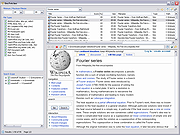 |
| Showing rows 1 to 1 of 1 | Showing Page 1 of 1 | 1 |
OlderGeeks.com Copyright (c) 2026
