|

|
Processed through Paypal No account required. |








Buy our over-priced crap to help pay the bills.



|
|
Processed through Paypal No account required. |
| Files | ||||
| File Name | Rating | Downloads | ||
 |
Alternate File Shredder v3.100 Alternate File Shredder v3.100 👉 Securely and permanently erase files, folders, and free disk space to prevent data recovery. Alternate File Shredder is a freeware, open-source utility designed to securely destroy files and folders so they cannot be recovered with standard undelete or forensic recovery tools. Instead of simply removing file references from the file system, it repeatedly overwrites the contents using configurable methods before deleting them, making recovery extremely difficult or impossible. The program can also overwrite unused free space on a drive to eliminate remnants of files that were previously deleted without secure wiping. Additional options allow you to overwrite data with random values, a fixed value, or the contents of another file, giving you flexibility for different security requirements. Because secure deletion is permanent, the author recommends carefully reviewing all selected items before proceeding. Features: • Permanently erase files and folders by securely overwriting data before deletion • Wipe free disk space to remove recoverable traces of previously deleted files • Choose overwrite methods using random values, fixed values, or a template file • Configure multiple overwrite iterations for increased security • Optionally overwrite file names before deletion • Ignore write protection when desired • Drag-and-drop support for quickly adding files and folders • Displays detailed file information before shredding • Processing log for completed operations • Open source and free to use Supported operating systems: • Windows Vista, Windows 7, Windows 8, Windows 8.1, Windows 10, Windows 11, Windows Server Supported languages: • English, German, Spanish, French, Italian, Chinese, Japanese, Korean, Swedish, Arabic, Greek, Russian, Czech, Hungarian, Turkish, Polish, Portuguese, Slovenian, Danish, Dutch Changes: v3.100 02-13-26 Added custom colors Options extended Note: This file has four hits on VirusTotal. We have confirmed these to be false positives. The file is safe. Click here to visit the author's website. |
 |
7,428 | Jul 07, 2026 Alternate Tools 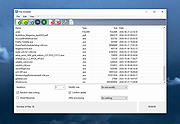 |
 |
AlternateStreamView v1.58 AlternateStreamView v1.58 👉 View, copy, export and delete hidden NTFS alternate data streams. AlternateStreamView is a small utility that scans NTFS drives or folders and finds hidden alternate streams stored in the file system. After scanning, you can extract streams to a selected folder, delete unwanted streams, or save the stream list as text, HTML, CSV or XML. Features: • Scan NTFS drives or folders for hidden alternate data streams • View stream name, file name, stream size and related file details • Export selected streams to a folder • Delete unwanted alternate streams • Save results as TXT, HTML, CSV, XML and other report formats • Scan subfolders with optional folder-depth control • Supports file wildcard filtering • Explorer context menu option for checking a single file • Command-line options for scanning and exporting results • Portable utility with no installation required Supported operating systems: • Windows 2000 through Windows 11 • 32-bit and 64-bit systems Supported languages: Arabic, Brazilian Portuguese, Czech, Dutch, Finnish, French, German, Greek, Hungarian, Italian, Japanese, Persian, Polish, Romanian, Russian, Simplified Chinese, Slovak, Spanish, Traditional Chinese, Turkish, Ukrainian, Valencian Changes: v1.58 Updated to stop the file system scan when you press the Esc key. This download is for the Windows 64bit version (very bottom of page). If you need the Windows 32bit version, download here. Click here to visit the author's website. |
|
10,318 | Jun 04, 2026 Nir Sofer  |
|
Blank And Secure v8.44 Blank And Secure v8.44 👉 Securely delete files to prevent recovery. Blank And Secure is a small, portable tool designed to securely delete files so they cannot be recovered by any data recovery software. It overwrites selected files multiple times using different patterns, ensuring that sensitive data is permanently erased. The program is lightweight, requires no installation, and is ideal for users who want a quick and reliable way to securely remove confidential files. Features: • Secure file deletion with multiple overwrite passes • Prevents recovery by standard and advanced recovery tools • Adjustable overwrite count for customizable security • Drag-and-drop support for quick file handling • Portable, no installation required • Very small footprint and low system resource usage • Simple and user-friendly interface Supported operating systems: • Windows 7, Windows 8, Windows 10, Windows 11 Supported languages: German, English, Russian, Dutch, Romanian, Swedish, French, Italian, Turkish, Arabic, Spanish, Bulgarian, Greek, Portuguese (Brazil), Chinese Simplified, Czech, Korean, Chinese Traditional, Polish, Thai, Indonesian, Japanese, Hungarian, Norwegian, Portuguese, Danish, Irish, Vietnamese, Spanish (Venezuela), Hebrew, Malay, Filipino, Finnish, Afrikaans, Bosnian, Ukrainian Changes: v8.44 08-27-2026 • BlankAndSecure language file update • Minor fine-tuning in BlankAndSecure for all Windows operating systems This download is for the Windows 64bit version (very bottom of page). All other download assets are below: Other Windows: BlankAndSecure.zip (32bit) BlankAndSecure_Win98.zip (Windows 98) Click here to visit the author's website. |
|
7,380 | Sep 07, 2026 Nenad Hrg 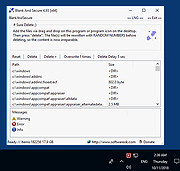 |
|
DeadLock v1.5.1 DeadLock v1.5.1 👉 Unlock files and folders that Windows refuses to release. DeadLock can be used to unlock files and folders that are locked by the system or other applications. This is especially useful when Windows will not let you delete, move, copy or rename something because it claims the file is still in use. DeadLock can unlock files and folders, take ownership, and help remove stubborn items without digging through Task Manager or command-line tools. DeadLock also supports command-line arguments, so advanced users can unlock files or folders directly from PowerShell or CMD without opening the full graphical interface. It is open source, lightweight, free to use and designed specifically for Windows. Features: • Unlock files and folders locked by Windows or other applications • Delete, move or copy locked files and folders • Take full ownership of stubborn files and folders • Command-line support for PowerShell and CMD use • Optional Windows Explorer integration • Theme and preference settings • Optional automatic update functionality • Open-source GPL-3.0 licensed software • No ads, trackers or user data collection Supported operating systems: • Windows 7 SP1, Windows 8, Windows 8.1, Windows 10, Windows 11 • Windows Server 2008 R2 SP1, Windows Server 2012, Windows Server 2012 R2, Windows Server 2016, Windows Server 2019, Windows Server 2022, Windows Server 2025 Supported languages: English, Chinese Simplified, Chinese Traditional, Russian, Bulgarian Changes: v1.5.1 02-15-26 Create Chinese simp. locale. Create a language file for Traditional Chinese. Fix Chinese Traditional locale. Updated russian translate. Added OS + updated link to HTTPS. Create bg.xml. Note: This file has two hits on VirusTotal. We have confirmed these to be false positives. The file is safe. Click here to visit the author's website. |
|
7,682 | Jun 11, 2026 CodeDead 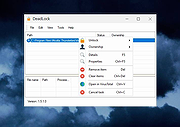 |
|
Delete ALL Temp Delete ALL Temp This script will delete temporary files in all user accounts including the Windows Temp folder. To run it, unzip it anywhere (not to a temp folder, obvies) and right click DELALLTEMP.cmd and run as administrator. Note: There will be no questions asked, the script will just begin. Also, while running you will see a lot of Access Denied errors. This is normal. These are just temp files the script cannot delete because they are being used by running processes. Click here to visit the author's website. |
|
3,633 | Apr 01, 2021 Kakihara73 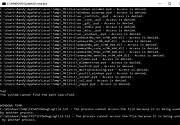 |
|
Delete Empty v1.0 Delete Empty v1.0 A command-line utility to remove or review empty files and folders on a Windows/Windows Server computer. Here are the options: DelEmpty.exe OPTIONS [PATH] -f delete files of size zero -d delete empty directories -v verbose mode -c confirm mode (Shows what was deleted) -s include sub directories -l list what would be deleted (Will not delete) -y delete without (y/n) prompt So, for example, if we wanted to remove all empty folders from c:\DataFolder, including sub folders – We would call it like this: DelEmpty.exe -d -s c:\datafolder If you wanted it to delete them without prompting you: DelEmpty.exe -d -s -y c:\datafolder Better yet, if we wanted to see what it would delete before taking any action: DelEmpty.exe -d -s -l c:\datafolder Finally, we can also remove any files that have a zero size too using the -f option: DelEmpty.exe -d -s -y -f c:\datafolder Please – Please be careful with this utility. It only deletes empty files and folders, but it is always possible that you have a program that *needs* those empty folders. So make sure you throughly test before using it. |
|
4,473 | Feb 21, 2020 IntelliAdmin 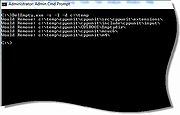 |
|
Delete Multiple Files v1.1 Delete Multiple Files v1.1 Batch delete tool Bulk delete utility Vovsoft Delete Multiple Files enables batch file/folder deletion through a simple process. It permits you to get rid of multiple files or folders from your computer without the need to go through and manually delete them. It presents a simplified user interface without overly complex settings. Multiple file eraser When you want to get rid of many files on your computer, you typically need to browse any location and manually erase the items. Alternatively, you can try "Delete Multiple Files", an application that does exactly what its title suggests. The overall look and feel of this software utility is minimalist, as its GUI is not cluttered with redundant menus and buttons. Instead, you get a simple window where you can add files or folders you want to remove, along with some additional features meant to simplify the whole process. Delete files or folders from different places on the computer The application is meant to allow you to efficiently add the items you want to delete and complete the job with minimal hassle. It supports drag'n'dropping of the selected items for removal. It can be used for individual files, folders, subfolders, or recursive subfolders. You can choose between "Send to Recycle Bin" and "Permanently Delete" options. You can also specify file mask when dealing with directories. It is the perfect addition to your toolset without wasting time when multiple files need to be deleted. It can come in handy when you want to save both time and energy when removing numerous files at the same time. Supports: Windows 10/8.1/8/7/Vista/XP (32-bit and 64-bit) Language: English, Deutsch, Espaρol, Franηais, Italiano, Magyar, Nederlands, Polski, Portuguκs, Pусский, Shqip, Slovenščina, Svenska, Tόrkηe, български, العربية, 中文, 日本語, 한국어 License: Freeware — no nags, no ads, fully functional Note from the OlderGeeks: There are some false ... |
|
3,270 | Dec 21, 2021 Vovsoft 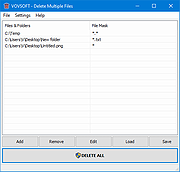 |
|
ShelfLife v0.7.1 ShelfLife v0.7.1 👉 Automatically clean, organize, and manage your folders based on customizable rules. ShelfLife is an open-source folder maintenance utility designed to keep commonly cluttered locations such as your Desktop and Downloads folder organized automatically. It can monitor selected folders and perform actions based on rules you define, including moving, deleting, or sorting files according to their age. This makes it ideal for keeping temporary files, old downloads, and accumulated clutter under control without constant manual cleanup. The program is designed with a straightforward interface that allows you to configure multiple folder management rules while providing enough flexibility for different cleanup workflows. Whether you want to archive older files, remove temporary items, or keep your Downloads folder tidy, ShelfLife automates the process in the background. Features: • Automatically organize folders using customizable rules • Monitor multiple folders simultaneously • Move files based on file age • Delete old or unwanted files automatically • Ideal for managing Desktop and Downloads folders • Helps reduce clutter and improve file organization • Simple, modern user interface • Open source Supported operating systems: • Windows 10, Windows 11 Supported languages: English Changes: v0.7.1 07-06-26 • Fix issue causing notifications to repeatedly appear after changing notification settings. • Improve notification handling behavior. Click here to visit the author's website. |
|
474 | Jul 07, 2026 LogicDX342 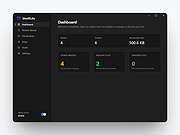 |
|
ThisIsMyFile v4.51 ThisIsMyFile v4.51 👉 Easily unlock or delete locked files and folders on Windows. ThisIsMyFile is a lightweight Windows utility designed to help users unlock, delete, rename, or move files that are locked or in use by the operating system or another application. When Windows refuses to delete or modify a file because it is currently being used, ThisIsMyFile can identify the process that is locking the file and allow you to release the lock so the file operation can proceed. The program provides a simple and portable interface where you can drag and drop a locked file to quickly determine which process is using it. From there, you can unlock the file, terminate the locking process, or delete the file immediately or at the next system restart. ThisIsMyFile is especially useful for troubleshooting stubborn files, removing leftovers from uninstalled software, or handling files that Windows reports as “access denied” or “in use.” ThisIsMyFile does not require installation and can be run directly as a portable tool, making it convenient for technicians and advanced users who need a quick way to deal with locked files without installing additional software. Features: • Unlock files that are currently in use by Windows or other programs • Identify the process that is locking a file or folder • Delete, move, or rename locked files • Option to delete files immediately or on next system restart • Drag-and-drop support for quick file analysis • Portable application with no installation required • Simple and lightweight interface designed for fast troubleshooting Supported operating systems: • Windows 7, Windows 8, Windows 10, Windows 11 Supported languages: German, English, French, Spanish, Hungarian, Turkish, Czech, Chinese Traditional, Russian, Romanian, Polish, Greek, Dutch, Portuguese, Korean, Chinese Simplified, Brazilian Portuguese, Arabic, Italian, Spanish Venezuela, Hindi, Thai, Vietnamese, Welsh, Persian, Hebrew, Malay, Indonesian, Filipino, Norwegian, Ukrainian Changes: v4.51 04-24-26 • Minor bug fixes in the ThisIsMyFile application for Windows 11 ... |
|
7,201 | May 01, 2026 Nenad Hrg 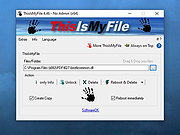 |
| Showing rows 1 to 9 of 9 | Showing Page 1 of 1 | 1 |
OlderGeeks.com Copyright (c) 2026
