|

|
Processed through Paypal No account required. |








Buy our over-priced crap to help pay the bills.



|
|
Processed through Paypal No account required. |
| Files | ||||
| File Name | Rating | Downloads | ||
 |
ItsPaint v0.16.1 ItsPaint v0.16.1 👉 A lightweight, free and open source MS Paint-style image editor for Mac. ItsPaint is a native image editor designed to provide the simple, quick drawing and editing experience of Microsoft Paint on macOS. It can create a blank canvas at any size, draw and paint with multiple tools, paste images directly onto the canvas, crop and resize artwork, annotate screenshots, remove backgrounds, add text and shapes, and export to numerous common image formats. It is intentionally lightweight, requires no account or subscription, contains no telemetry or networking code, and is released under the MIT license. Features: • Create blank canvases at custom sizes • Pencil, brush, highlighter and eraser drawing tools • Round, square, soft and spray brush tips • Draw lines, curves, arrows, rectangles, rounded rectangles, ellipses, triangles, diamonds, polygons, stars and speech bubbles • Solid, dashed and dotted shape outlines with optional fills • Add text with a contrasting rim that remains readable against light and dark backgrounds • Automatic numbered step badges for annotating instructions and screenshots • Pixelate areas for visual de-emphasis • Spotlight tool darkens everything outside a selected area • Clone tool copies pixels from one part of an image to another • Soften tool blends cloned or repaired areas into their surroundings • Instant Alpha selects connected pixels by color • One-command background removal without AI, cloud processing or an Internet connection • Capture a signature with a trackpad, mouse or tablet, or import one from an image • Rectangle, ellipse, lasso and Instant Alpha selection modes • Move selected pixels directly on the canvas • Paste images as floating objects that can be moved and scaled before committing • Automatically expands the canvas when pasted content is larger than the current image • Drag the current selection or entire canvas directly into another application or Finder • Pointer-centered zoom and pixel grid • Snap shapes, selections and pasted content to an 8, ... |
 |
198 | Aug 13, 2026 Josh Lin 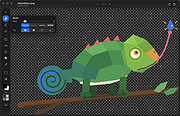 |
| Showing rows 1 to 1 of 1 | Showing Page 1 of 1 | 1 |
OlderGeeks.com Copyright (c) 2026
