|

|
Processed through Paypal No account required. |








Buy our over-priced crap to help pay the bills.



|
|
Processed through Paypal No account required. |
| Files | ||||
| File Name | Rating | Downloads | ||
 |
CSVMusic v1.3.9 CSVMusic v1.3.9 👉 Convert playlists from music services into fully tagged MP3 or M4A audio files. CSVMusic is a free and open source tool that converts playlists from various music services into downloadable audio files. It works by taking a playlist exported as a CSV file (such as from TuneMyMusic) and automatically locating matching tracks on YouTube Music, downloading the audio, and organizing it into properly tagged files with album artwork. CSVMusic processes playlist data and outputs ready-to-use audio files while preserving playlist order. It can also generate playlist files for easy importing into media players. How It Works: • Open the app (first launch may take ~10–15 seconds) • Click the TuneMyMusic link in the top-left • Import your playlist (Spotify, Apple Music, etc.) • Export to file → CSV file • Load the CSV in CSVMusic • Choose an output folder • Click Start • Wait for downloads to finish • If a song cannot be matched well: It will appear highlighted in yellow. Click Alternatives to choose a better version What You Get: • Audio files with: • Correct artist/title • Album information • Embedded artwork • Optional playlist files: • .m3u • .m3u8 Features: • Converts playlists from Spotify, Apple Music, YouTube, SoundCloud, Deezer, and more • Downloads audio from YouTube Music • Outputs M4A (AAC) or MP3 files • Automatically adds metadata and album artwork • Generates .m3u and .m3u8 playlist files • Preserves playlist order Important Notes: • Keep all files in the extracted folder together • Includes bundled tools: ffmpeg and yt-dlp • Some antivirus software may flag the program (false positives) • Your CSV file stays local • Only YouTube Music is contacted for downloading audio Supported Sources (via TuneMyMusic): • Spotify • Apple Music • YouTube • Deezer • And most others Supported operating systems: • Windows, Linux, macOS Supported languages: • English Changes: v1.3.9 04-20-26 Added an equalizer. This allows you to normalize volume between songs on a playlist, as well as controlling bass and treble. This download is for the Windows version (very bottom of ... |
 |
258 | Apr 21, 2026 angall1 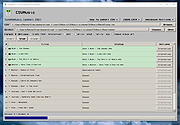 |
|
SMPlayer v25.6 SMPlayer v25.6 👉 A free media player with built-in codecs that plays virtually all video and audio formats. SMPlayer is a free media player for Windows, Linux and Mac OS with built-in codecs, YouTube playback, subtitle search and download, a thumbnail generator, and audio and video filters. Features: • Plays virtually all video and audio formats • Built-in codecs, no external codec packs required • Remembers playback position and settings for each file • Supports YouTube video playback • Searches and downloads subtitles • Includes video and audio filters • Playback speed control • Audio and subtitle delay adjustment • Video equalizer • Skins and icon themes • Supports Chromecast • Free and open source Supported operating systems: • Windows 8 and above • Windows XP and other 32-bit systems via alternative package • Linux • Mac OS 10.15 and above Supported languages: English, Espaρol, Franηais, Portuguκs, Portuguκs (Brasil), Euskara, Galego, Catalΰ, Lietuvių, Русский, Українська, Hrvatski, Polski, Deutsch, 日本語, 正體中文, 简体中文, 한국어, Bahasa Indonesia, Bahasa Melayu, Tόrkηe, Български, العربية, Dansk, Nederlands Changes: v25.6 • Various bug fixes and stability improvements. Use 7-Zip to unzip this file. This download is for the Windows 64bit version (very bottom of page). All other download assets are below: Other Windows: smplayer-25.6.0-win32-qt5.6-unsigned.exe (Windows XP and other 32-bit systems) smplayer-portable-25.6.0.0-x64.7z smplayer-portable-25.6.0.0-win32-qt5.6.7z macOS: smplayer-25.6.0.dmg Linux: SMPlayer-25.6.0-x86_64.AppImage Snap package sudo snap install smplayer Flatpak package sudo flatpak install smplayer*.flatpak Packages for Ubuntu sudo add-apt-repository ppa:rvm/smplayer sudo apt-get update sudo apt-get install smplayer smplayer-themes smplayer-skins Click here to visit the author's website. |
|
2,908 | May 20, 2026 Ricardo Villalba  |
|
Youtube Downloader HD v5.9.9.9 Youtube Downloader HD v5.9.9.9 👉 Download YouTube videos and convert them to HD video formats. Youtube Downloader HD is a simple tool designed to download videos from YouTube and convert them into high-quality video files that can be played locally on your computer or other devices. It focuses on easy downloading and converting of HD content while keeping the interface straightforward and lightweight. Youtube Downloader HD allows users to paste a YouTube video link, select the desired output format, and download the video directly to their computer. The program supports several video formats and resolutions, including HD options, making it useful for users who want to watch YouTube content offline or store videos locally for later viewing. The program is designed to be easy for beginners while still offering useful format choices for more advanced users. It can automatically detect the video URL from the clipboard and provides quick conversion to formats compatible with PCs, media players, and mobile devices. Features: • Download videos directly from YouTube using a simple URL paste • Supports high-definition video downloads • Convert downloaded videos to AVI or MP4 formats • Choose different video quality levels including HD • Automatically detects video URLs copied to the clipboard • Simple and lightweight interface designed for quick downloads Supported operating systems: • Windows 7, Windows 8, Windows 10, Windows 11 Supported languages: English Changes: v.5.9.9.9 03-06-26 Improvements to the downloading procedure: use of Deno (JavaScript runtime). This download is for the Windows 10/11 version (very bottom of page). If you need the Windows 7/8 version, download here. Click here to visit the author's website. |
|
6,321 | Mar 09, 2026 YoutubeDownloaderHD.com 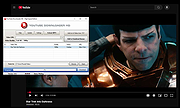 |
 |
YouTube Free Downloader v1.6.0.0 YouTube Free Downloader v1.6.0.0 YouTube Free Downloader is a simple application to quickly capture and download MP4 video files from YouTube. Just launch the program, open the YouTube video in your browser and copy its link. The program will automatically take the link from the clipboard. It allows you to download multiple YouTube videos all at once for free and save the downloaded MP4 videos to your hard drive. With this YouTube Free Downloader, you can download your favorite YouTube videos (include HD quality) on Windows with only a few clicks. This free MP4 YouTube downloader also supports to download multiple YouTube videos all at once for free. Key features of YouTube Free Downloader: Free download YouTube videos Absolutely clean and safe to install and run, No Spyware, No Adware, No Virus Download YouTube MP4 videos for portable devices Lets's you choose video quality before downloading Preview video title, screenshot, duration and file size Download YouTube HD videos Supports batch downloader Very easy to use Cutting-edge burst technology accelerate the downloading speed No need to worrying about video buffering when using YouTube to MP4 conversion Supported OS: Windows 2000, Windows XP, Windows 2003, Windows Vista, Windows 7, Windows 8 Note: from time to time YouTube changes their video files hosting routine. So our YouTube download program stop working. We work hard and usually fix such problems within a day or so. We strongly recommend to use Check Updates function if program work incorrect! I've always been looking for an easy way to download my favourite videos from YouTube. I find free YouTube Downloader the best application for a ... |
|
6,261 | Feb 21, 2019 Abyssmedia 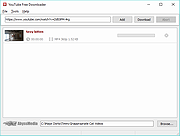 |
 |
YouTube Survival Guide v1.02 YouTube Survival Guide v1.02 94 page PDF book of programs and tips to start your very own YouTube channel. This book was written by: Obiel DeNook |
|
5,459 | Feb 18, 2019 Obiel DeNook  |
|
YouTube to MP3 Converter v3.9.9.33 YouTube to MP3 Converter v3.9.9.33 You like to listen to music on YouTube or SoundCloud and want to save it for offline playing. Or you want to download soundtrack of a new movie. Then we recommend you to try out this software developed specifically for this purpose. Downloads all music from playlist or channel Downloads highest available quality up to 320 kbps Supports YouTube, Vimeo, SoundCloud, Dailymotion, VEVO, etc. Downloads simultaneously several tracks Includes simple tag editor with cover art image support Works on all modern platforms (macOS, Windows, Ubuntu) Exports to iTunes Main Features: Playlists and channels The software supports downloading all videos of a playlist or a channel. And there is also an option for subscribing to and downloading only newly uploaded tracks. iTunes support In the preferences of the application you can select an option to add downloaded tracks into iTunes automatically. You can also specify iTunes playlist, where the converted track should be added. Saves your time & traffic The app detects audio track in YouTube video clip and downloads it, skipping the video part. As a result download speed increases dramatically, especially on HD-quality content. Simple tag editor Application automatically detects artist name and track title of the video and saves it in the downloaded file. But at the same time, you can easily change tags to whatever you want. You can even change a cover art image. Original format, no conversions You can save audio tracks in original quality without any conversion. It means that there will be no loss of quality and it greatly reduces the downloading time. Free music There is a great amount of music on YouTube. And our app will help you to convert YouTube videos to MP3 or save it on ... |
|
4,208 | Feb 24, 2020 MediaHuman 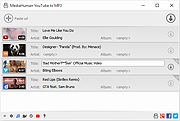 |
| Showing rows 1 to 6 of 6 | Showing Page 1 of 1 | 1 |
OlderGeeks.com Copyright (c) 2026
