|

|
Processed through Paypal No account required. |








Buy our over-priced crap to help pay the bills.



|
|
Processed through Paypal No account required. |
| Files | ||||
| File Name | Rating | Downloads | ||
 |
CSVMusic v1.6.6 CSVMusic v1.6.6 👉 Convert playlists and albums from music services into fully tagged audio files. CSVMusic is a free and open source tool that converts playlists and albums from supported music services into ready-to-use audio files. You can paste a supported playlist or album link directly into the program, or import a playlist exported as a CSV file. CSVMusic finds the best matching tracks on YouTube Music, downloads the audio, and adds metadata such as artist, album and artwork. Audio can be saved as M4A or MP3, with optional native Opus output available in Settings. CSVMusic can also create M3U and M3U8 playlist files so the original track order can be retained when the music is imported into iTunes, a phone, MP3 player or local music library. Features: • Import supported playlist and album links directly without first creating a CSV file • Direct link support for Spotify, Apple Music, YouTube Music, YouTube playlists, SoundCloud sets, Deezer and Amazon Music when public track data is available • CSV importing remains available for services supported by TuneMyMusic • First-class Exportify CSV support • Automatically finds matching tracks on YouTube Music • Downloads and converts audio to M4A or MP3 • Optional native Opus output remuxes Opus streams without lossy re-encoding • Automatically adds artist/title, album information and embedded artwork • Optionally creates M3U and M3U8 playlist files • Library Mode maintains multiple public Spotify playlists in a persistent local catalog • Library Mode can scan playlists, identify tracks missing from disk and let you select individual tracks • Rescanning the library preserves track selections and manually corrected YouTube matches while reporting added and removed tracks • Alternatives lets you select a better result when CSVMusic is not confident about an automatic match • Listen lets you preview an alternative candidate in your browser • Paste URL lets you download a specific YouTube or YouTube Music video when choosing an ... |
 |
1,012 | Aug 26, 2026 angall1 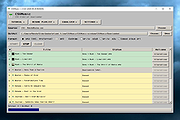 |
|
SMPlayer v26.8.29 SMPlayer v26.8.29 👉 A free media player with built-in codecs that plays virtually all video and audio formats. SMPlayer is a free media player for Windows, Linux and Mac OS with built-in codecs, YouTube playback, subtitle search and download, a thumbnail generator, and audio and video filters. Features: • Plays virtually all video and audio formats • Built-in codecs, no external codec packs required • Remembers playback position and settings for each file • Supports YouTube video playback • Searches and downloads subtitles • Includes video and audio filters • Playback speed control • Audio and subtitle delay adjustment • Video equalizer • Skins and icon themes • Supports Chromecast • Free and open source Supported operating systems: • Windows 8 and above • Windows XP and other 32-bit systems via alternative package • Linux • Mac OS 10.15 and above Supported languages: English, Español, Français, Português, Português (Brasil), Euskara, Galego, Català, Lietuvių, Русский, Українська, Hrvatski, Polski, Deutsch, 日本語, 正體中文, 简体中文, 한국어, Bahasa Indonesia, Bahasa Melayu, Türkçe, Български, العربية, Dansk, Nederlands Changes: v26.8.29 Added an option to show a thumbnail preview when hovering over the seek bar (Preferences -> Interface). Playlist positions/progress are now remembered between sessions. Added a pause button to the playlist. Added an option to enable/disable secondary subtitles. Fixed zoom behavior. Fixed playlist item numbering after removing items. Playlist is now re-sorted automatically after adding files. Fixed the add black borders option. Improved retrieval of the track (song) title for internet radio streams (icy-title). Fixed video aspect ratio override support. Added support for additional network URI schemes (KDE integration). Forced the xcb backend on Linux to avoid display issues. macOS builds are now available for arm64 (Apple Silicon), in addition to the existing x86_64 builds. Experimental packages compiled with Qt 6 are now available for Windows and macOS. Various translation updates (German, Italian, Spanish, English UK/US, and others) Use 7-Zip to unzip this file. 👉 This download is for the Windows 64bit version (very bottom of page). All other download assets are below: Other Windows: smplayer-26.8.29-win32-qt5.6-unsigned.exe ... |
|
3,468 | Sep 28, 2026 Ricardo Villalba  |
 |
YouTube Free Downloader v1.6.0.0 YouTube Free Downloader v1.6.0.0 YouTube Free Downloader is a simple application to quickly capture and download MP4 video files from YouTube. Just launch the program, open the YouTube video in your browser and copy its link. The program will automatically take the link from the clipboard. It allows you to download multiple YouTube videos all at once for free and save the downloaded MP4 videos to your hard drive. With this YouTube Free Downloader, you can download your favorite YouTube videos (include HD quality) on Windows with only a few clicks. This free MP4 YouTube downloader also supports to download multiple YouTube videos all at once for free. Key features of YouTube Free Downloader: Free download YouTube videos Absolutely clean and safe to install and run, No Spyware, No Adware, No Virus Download YouTube MP4 videos for portable devices Lets's you choose video quality before downloading Preview video title, screenshot, duration and file size Download YouTube HD videos Supports batch downloader Very easy to use Cutting-edge burst technology accelerate the downloading speed No need to worrying about video buffering when using YouTube to MP4 conversion Supported OS: Windows 2000, Windows XP, Windows 2003, Windows Vista, Windows 7, Windows 8 Note: from time to time YouTube changes their video files hosting routine. So our YouTube download program stop working. We work hard and usually fix such problems within a day or so. We strongly recommend to use Check Updates function if program work incorrect! I've always been looking for an easy way to download my favourite videos from YouTube. I find free YouTube Downloader the best application for a ... |
|
6,644 | Feb 21, 2019 Abyssmedia 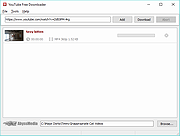 |
 |
YouTube Survival Guide v1.02 YouTube Survival Guide v1.02 94 page PDF book of programs and tips to start your very own YouTube channel. This book was written by: Obiel DeNook |
|
5,904 | Feb 18, 2019 Obiel DeNook  |
|
YouTube to MP3 Converter v3.9.9.33 YouTube to MP3 Converter v3.9.9.33 You like to listen to music on YouTube or SoundCloud and want to save it for offline playing. Or you want to download soundtrack of a new movie. Then we recommend you to try out this software developed specifically for this purpose. Downloads all music from playlist or channel Downloads highest available quality up to 320 kbps Supports YouTube, Vimeo, SoundCloud, Dailymotion, VEVO, etc. Downloads simultaneously several tracks Includes simple tag editor with cover art image support Works on all modern platforms (macOS, Windows, Ubuntu) Exports to iTunes Main Features: Playlists and channels The software supports downloading all videos of a playlist or a channel. And there is also an option for subscribing to and downloading only newly uploaded tracks. iTunes support In the preferences of the application you can select an option to add downloaded tracks into iTunes automatically. You can also specify iTunes playlist, where the converted track should be added. Saves your time & traffic The app detects audio track in YouTube video clip and downloads it, skipping the video part. As a result download speed increases dramatically, especially on HD-quality content. Simple tag editor Application automatically detects artist name and track title of the video and saves it in the downloaded file. But at the same time, you can easily change tags to whatever you want. You can even change a cover art image. Original format, no conversions You can save audio tracks in original quality without any conversion. It means that there will be no loss of quality and it greatly reduces the downloading time. Free music There is a great amount of music on YouTube. And our app will help you to convert YouTube videos to MP3 or save it on ... |
|
4,610 | Feb 24, 2020 MediaHuman 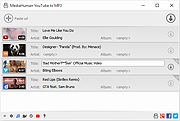 |
| Showing rows 1 to 5 of 5 | Showing Page 1 of 1 | 1 |
OlderGeeks.com Copyright (c) 2026
