|

|
Processed through Paypal No account required. |








Buy our over-priced crap to help pay the bills.



|
|
Processed through Paypal No account required. |
| Files | ||||
| File Name | Rating | Downloads | ||
 |
Griddy McGridFace v0.1.1 Griddy McGridFace v0.1.1 👉 Create high-quality photo collages with intelligent automatic layouts. Griddy McGridFace is an open-source desktop application for creating professional-looking photo collages quickly and easily. Simply import a folder of images, choose a page size, and let the application generate attractive layouts automatically. Built with Tauri, Rust, and SvelteKit, it runs natively across multiple platforms while providing a responsive interface and high-quality export options. The software includes intelligent face-aware cropping to help keep people properly framed, along with tools for repositioning, swapping, locking, and resizing individual photos. Projects can be saved and reopened later, making it suitable for both casual users and print-ready collage creation. Features: • Automatically generates photo collage layouts • Face-aware cropping helps keep subjects properly framed • Drag-and-drop image importing • Supports custom page sizes • Lock individual photos in place • Zoom, reposition, and swap photos within the layout • Create larger featured center images • Shuffle layouts instantly • Save and reopen projects • Autosave and crash recovery • Sort images by color, including dark-to-light and rainbow order • Export to PNG, JPEG, WebP, and PDF • Built with Tauri 2, Rust, and SvelteKit • Open source Supported operating systems: • Windows 10, Windows 11 • macOS 13 Ventura or higher • Linux (64-bit Debian-based distributions, 64-bit Arch Linux) Supported languages: English Changes: v0.1.1 07-09-26 Added drag-and-drop image import. Improved layout generation speed for larger image collections. Added per-photo fit controls. Added autosave and recovery. Added color sorting, including dark-to-light and rainbow ordering. Various bug fixes and improvements. Note: This file has two hits on VirusTotal. We have confirmed these to be false positives. The file is safe. This download is for the Windows setup version (very bottom of page). All other download assets are below: Other Windows: Griddy-McGridFace_0.1.1_x64_en-US.msi macOS: Griddy-McGridFace_0.1.1_aarch64.dmg Linux: Griddy-McGridFace_0.1.1_amd64.deb Click here to visit the author's website. |
 |
467 | Jul 10, 2026 g33kphr33k 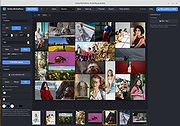 |
 |
ImageConverter v2.0.0 ImageConverter v2.0.0 👉 Change image formats in one click. ImageConverter lets you quickly convert image files by dragging them into the list and clicking Convert. It supports multiple popular formats, resizing by width, high-compression JPG saving with MozJPEG, and can recognize images by file signature even when they do not have an extension. Features: • Change various image formats • Save JPG with higher compression using MozJPEG • Resize images by specifying the width • Supports PDF, SVG, AI, PSD, PNG, JPG, GIF, WEBP, and TGA • Recognizes images with file signature information even without an extension • Simple drag-and-convert workflow Supported operating systems: • Windows 10, Windows 11 Supported languages: English, German, Esperanto, French, Italian, Japanese, Polish, Portuguese, Russian, Slovak, Swedish, Thai, Turkish, Vietnamese, Chinese Changes: v2.0.0 09-22-26 - Redesigned ImageConverter with a more convenient way to start converting - Improved image size selection for easier use - Improved the update experience so you can keep using your existing settings - Improved right-click conversion in Windows - Prepared support for more operating systems Usage: • Drag the image files you want to change into the list. • Click the Convert button below. Click here to visit the author's website. |
|
1,089 | Oct 06, 2026 kilho.net 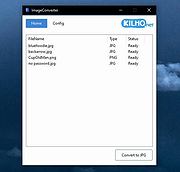 |
|
ImageGlass v10.0.6.906 ImageGlass v10.0.6.906 👉 A lightweight, versatile image viewer for Windows. ImageGlass is a feature-rich, simple-to-use image viewer with a clean, modern interface and support for over 90 image formats, including WEBP, GIF, SVG, PNG, JXL, HEIC, RAW formats and more. Features: • Supports over 90 common image formats • Fast image switching with a clean, minimal interface • Supports animated formats including GIF, WEBP, APNG and SVG • Multi-frame image support with frame navigation tools • Drag-and-drop and clipboard image opening • Six zoom modes including Auto Zoom, Lock Zoom, Scale to Width, Scale to Height, Scale to Fit and Scale to Fill • Full screen, frameless and window-fit viewing modes • Slideshow view with countdown timer • Fast thumbnail previews • Built-in color picker • EXIF metadata viewing with ExifGlass • Basic editing tools including rotate, flip, crop, resize and lossless compression • Custom themes, language packs, icon packs, layout and toolbar options • Keyboard and mouse action customization • External app integration through custom hotkeys • Color management and color channel viewing Supported operating systems: • Windows 10 64-bit version 1809 or later, Windows 11 64-bit Supported languages: Arabic, Armenian, Asturian, Azerbaijani, Belarusian, Bengali, Bulgarian, Catalan, Chinese Simplified, Chinese Traditional, Croatian, Czech, Danish, Dutch, Esperanto, Finnish, French, German, Greek, Hebrew, Hungarian, Icelandic, Indonesian, Irish, Italian, Japanese, Khmer, Korean, Kurmanji Kurdish, Kyrgyz, Lithuanian, Malay, Mongolian, Norwegian Bokmal, Persian, Polish, Portuguese, Brazilian Portuguese, Romanian, Russian, Serbian Cyrillic, Serbian Latin, Sinhala, Slovak, Slovenian, Spanish, Swedish, Tamil, Thai, Turkish, Ukrainian, Vietnamese Changes: v10.0.6.906 09-05-26 New • ImageGlass.SDK updated to 1.2.0 • Bumped plugin ABI version from 1.0.0 to 1.2.0 • Added IGHdrTransferFn.ScRgb photo metadata support for rendering HDR images from codec plugins • Added DecodeStaticRasterScaled API for requesting scaled thumbnail images from codec plugins • Added Linux AppImage package support Improvements • Updated Avalonia to 12.1.2 • Updated Magick.NET to 14.17.1 ... |
|
4,490 | Oct 06, 2026 Duong Dieu Phap 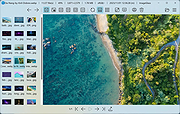 |
|
Shell WebP Converter v2.5.1 Shell WebP Converter v2.5.1 👉 Lightweight Windows shell extension for fast WebP image conversion directly from the right-click menu. Shell WebP Converter is a simple and efficient Windows shell extension that allows you to convert images to and from the WebP format directly from the Windows context menu. Once installed, it integrates seamlessly into File Explorer, enabling quick conversions without opening a separate application. Designed to be lightweight and easy to use, Shell WebP Converter supports bulk image processing and preserves image quality through configurable settings. It is ideal for users who regularly work with WebP images and want a fast, no-nonsense way to convert formats straight from the desktop. Features: • Adds right-click context menu integration in Windows Explorer • Convert images to WebP format • Convert WebP images to common formats such as PNG and JPEG • Batch conversion support for multiple selected files • Lightweight and fast performance • Simple, user-friendly operation • Maintains image quality with configurable compression options Supported operating systems: • Windows 10, Windows 11 Supported languages: English, Russian, Arabic, German, Spanish, French, Hindi, Hungarian, Italian, Japanese, Korean, Portuguese, Slovak, Turkish, Chinese Changes: v2.5.1 05-08-26 GUI fixes Note: This file has one hit on VirusTotal. We have confirmed this to be a false positive. The file is safe. Click here to visit the author's website. |
|
758 | Jun 27, 2026 SchwarzFuchs 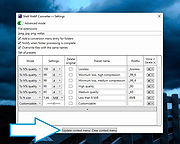 |
|
Webp Converter v1.2.0 Webp Converter v1.2.0 Convert hundreds of WebP images to JPG/JPEG/PNG/GIF, or from any other image formats to WebP on your Win/Mac computer! This program converts other image formats into .webp or converts .webp images to jpg, png or ico. Features: Convert .webp to .jpg/.png/.ico Convert .jpg/.png/.ico/.bmp/.svg/.gif to .webp Free free to use and no limitations at all Add hundreds of .webp or other image files for conversion This download is for the Windows version. If you need the MacOS version, download here. Click here to visit the author's website. |
|
3,598 | Sep 20, 2021 AnyWebP 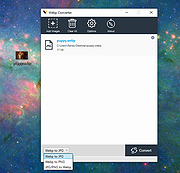 |
| Showing rows 1 to 5 of 5 | Showing Page 1 of 1 | 1 |
OlderGeeks.com Copyright (c) 2026
