|

|
Processed through Paypal No account required. |








Buy our over-priced crap to help pay the bills.



|
|
Processed through Paypal No account required. |
| Files | ||||
| File Name | Rating | Downloads | ||
 |
86 DOS Version 0.1 C Serial # 11 ( ORIGINAL DISK) 86 DOS Version 0.1 C Serial # 11 ( ORIGINAL DISK) by: Seattle Computer Products - year: 1980 This is the precursor to MS-DOS and is likely the oldest known version to survive. This disk can be booted with the SIMH emulator. Instructions can be found here: https://web.archive.org/web/20181002215506/http://www.86dos.org/index.htm Media: 8" Floppy Disk Physical: 250K SS500kbps FM encoded disk with IBM sector structure. 26 x 128 byte sectors per track. Format: == DISK MAP ==================================== 00000000000000001111111111111111222222222222222233333333333333334444444444444 0123456789ABCDEF0123456789ABCDEF0123456789ABCDEF0123456789ABCDEF0123456789ABC 01 ............................................................................. 02 ............................................................................. 03 ............................................................................. 04 ............................................................................. 05 ............................................................................. 06 ............................................................................. 07 ............................................................................. 08 ............................................................................. 09 ............................................................................. 0A ............................................................................. 0B ............................................................................. 0C ............................................................................. 0D ............................................................................. 0E ............................................................................. 0F ............................................................................. 10 ............................................................................. 11 ............................................................................. 12 ............................................................................. 13 ............................................................................. 14 ............................................................................. 15 ............................................................................. 16 ............................................................................. 17 ............................................................................. 18 ............................................................................. 19 ............................................................................. 1A ............................................................................. Image and scan of disk created by: f15sim Click here to visit the author's website. |
 |
1,599 | Jan 05, 2024 Seattle Computer Products/f15sim 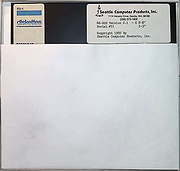 |
 |
Background Generator v1.1.0 Background Generator v1.1.0 👉 Create custom backgrounds quickly and easily. Background Generator is a desktop application that allows users to create custom backgrounds for their projects. It provides a simple and straightforward interface designed to generate backgrounds without the need for complex design software. The program is intended for users who want to quickly create visually appealing backgrounds for use in websites, presentations, graphics, or other creative work. With its focused design and ease of use, Background Generator makes background creation accessible to users of all experience levels. Features: • Creates large material and random background images • High resolution output in PNG and JPG formats • Includes 7 background generating programs (including Colorful and Graphics generators) • Portable ZIP version available Supported operating systems: • Windows 7, Windows 8, Windows 10 (32/64) and later Supported languages: English, Franηais, Deutsch, Italiano, Espaρol, Dutch, Portuguκs, Polski, 简体中文, 繁體中文, 日本語, 한국어 Click here to visit the author's website. |
 |
4,544 | Jun 27, 2026 BgGenerator.com 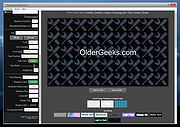 |
|
Bluetooth Version finder v1.7 Bluetooth Version Finder v1.7 👉 Quickly find the Bluetooth version supported by your Windows computer. Bluetooth Version Finder is a portable freeware tool that displays your computer's Bluetooth version number without manually checking Device Manager or matching LMP firmware numbers by hand. Features: • Shows the Bluetooth version number quickly • Helps avoid manual Device Manager lookup • Displays Bluetooth adapter details under the main version number • Supports Bluetooth versions up to 6.2 • Portable, unzip and run • Includes command-line parameter support • Can show a question mark icon if detection fails Supported operating systems: • Windows 11, Windows 10 Supported languages: English Changes: v1.7 02-11-26 [ ADDED ] - Bluetooth version 6.2 support. [ ADDED ] - Bluetooth version 6.1 support. [ ADDED ] - Improvements in program codes. Click here to visit the author's website. |
|
6,429 | May 08, 2026 Sordum.org 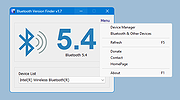 |
|
System Explorer Portable Version 6.4.3 System Explorer portable Version 6.4.3 System Explorer is free, awards winning software for exploration and management of System Internals. This small software includes many useful tools which help you Keep Your System Under Control. With System Explorer You get also fast access to File Database which help you to determine unwanted processes or threats. System Explorer is translated into 21 languages and is available for download in installer and portable version. Features: Detailed information about Tasks, Processes, Modules, Startups, IE Addons, Uninstallers, Windows, Services, Drivers, Connections and Opened Files. Easy check of suspicious files via VirusTotal, Jotti service or our File Database. Easy monitoring of processes activities and System changes. Usage graphs of important System resources. Tray Hint with detailed System and Battery status WMI Browser and System Additional Info Multilanguage Support Change Info: System Explorer Version 6.4.3 Changes Bugfixes |
|
10,793 | Jul 28, 2015 Mister Group  |
|
TimVer v0.14.1 TimVer v0.14.1 👉 Displays Windows version, hardware, drive, graphics, environment, and build history information. TimVer displays the same Windows version information as the built-in Winver command, along with additional system details that Winver does not provide. It can show information about Windows, the computer's hardware, processors, BIOS, memory, disk drives, graphics controllers, environment variables, and Windows build history. TimVer also provides extensive appearance and language options, clipboard functions, portable versions, and settings backup and restore. Features: • Displays Windows version, build number, build branch, architecture, and installation date • Shows computer manufacturer, model, computer name, processor, BIOS, physical memory, and last boot information • Displays logical drive information with optional physical drive details • Shows graphics controller information including adapter name, type, description, resolution, refresh rate, and number of colors • Supports systems with multiple graphics controllers and lets you select each adapter from a dropdown • Displays current environment variables with filtering by variable name • Optionally keeps a history of installed Windows build numbers • Copies an entire supported information page to the clipboard • Copies individual values to the clipboard by right-clicking • Lets you choose the display language • Provides selectable themes, accent colors, fonts, UI sizing, and row spacing • Supports automatic light and dark theme selection when using the System theme • Exports and imports application settings for backup or transfer to another computer • Can open or list the current application settings • Includes an optional check for newer TimVer releases • Runs without elevation for normal system information gathering Supported operating systems: • Windows 10 64-bit, Windows 11 64-bit Supported languages: • English (United Kingdom), English (United States), Spanish, French, Italian, Japanese, Korean, Dutch, Slovak, Thai Changes: v0.14.1 07-25-26 Fixed an issue where mismatched information could be displayed on the Graphics (Video) Information page when two or more video controllers were present. Cleaned up and optimized video controller information retrieval and UI handling. Inactive controllers may show "Not ... |
|
2,285 | Aug 24, 2026 Tim Kennedy 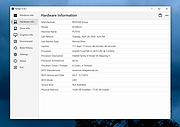 |
|
Tweaking.com - Simple System Tweaker PORTABLE VERSION v2.2.0 ==Official Mirror== Tweaking.com - Simple System Tweaker PORTABLE VERSION v2.2.0 Tweaking.com - Simple System Tweaker is designed to bring only the safest tweaks to your system to increase speed and stability. Windows is setup in a default configuration. By fine tuning your Windows configuration you can increase the speed and snappiness of the operating system. These tweaks are the ones that are safe and shown to cause no side effects with any programs. Each tweak only gives a small performance boost. But they all add up, so the more tweaks you do the more performance you get. For Windows XP, 2003, Vista, 7, 8, 2008 (Supports 32 & 64 bit) What can you expect with this program? It all depends on your current system. You can get faster boot & shutdown times, faster network file sharing, snappier feel to opening Windows and programs, and more stability. The system in all should feel smoother. These tweaks are the same ones I put on my customers machines and have found them to not cause any problems with any programs. Only safe tweaks are in this program. The program also supports a silent command so you can run the program silently. Set the options you want, which will save to the settings.ini file. Run the program with /silent command and the program will apply based on your saved settings then close. When the program is ran for the first time it will backup all the regkeys it changes into a backup.reg file. This way if you ever want to put things back the way they where a double click of that reg file and your good to go. v2.2.0 Updated Registry backup to v2.0.0 Updated multiple controls. Multiple code changes and tweaks. Added the new default v2 color scheme to the program and also changed it to the new default for a new install of the program. ... |
|
10,328 | Jan 28, 2015 Tweaking.com |
| Showing rows 1 to 6 of 6 | Showing Page 1 of 1 | 1 |
OlderGeeks.com Copyright (c) 2026
