|

|
Processed through Paypal No account required. |








Buy our over-priced crap to help pay the bills.



|
|
Processed through Paypal No account required. |
| Files | ||||
| File Name | Rating | Downloads | ||
 |
Bluefin v20261006 Bluefin v20261006 👉 A modern Fedora-based Linux workstation built for everyday use and cloud-native development. Bluefin is a next-generation Linux desktop operating system based on Fedora Atomic and the Universal Blue project. It is designed to provide a stable, secure, and maintenance-friendly workstation experience while still offering modern development tools, gaming support, multimedia features, and a polished GNOME desktop environment. Unlike traditional Linux distributions that rely heavily on manual package management and upgrades, Bluefin uses an immutable image-based system architecture. This allows the operating system to update atomically, reducing the risk of broken updates and making system recovery significantly easier through built-in rollback capabilities. Bluefin is focused on delivering an “install and use” Linux experience with many essential tools already configured. The system integrates Flatpak applications, Homebrew package management, containerized development environments, and modern virtualization technologies directly out of the box. It also includes developer-oriented workflows for Docker, Podman, devcontainers, and cloud-native software development. Features: • Fedora Atomic based immutable operating system • Built on Universal Blue technology stack • Modern GNOME desktop environment with user-friendly layout • Separate standard images for AMD/Intel graphics and NVIDIA graphics hardware • Atomic image-based updates with rollback support • Automatic operating system updates and maintenance • Integrated Flatpak application ecosystem with Flathub support • Homebrew package manager preconfigured for command-line software • Developer-ready environment with container-first workflows • Built-in Podman and Docker support • Devcontainer and cloud-native development integration • Distrobox support for running software from other Linux distributions • Tailscale support for secure mesh networking • WireGuard VPN tools included • Virtualization and container management support • Optimized multimedia codec support • Secure Boot compatible • Wayland-based modern graphics stack • Gaming-friendly Mesa and NVIDIA driver support • Integrated terminal enhancements including Starship prompt • Flatpak management utilities included • Rollback functionality for safer upgrades and experimentation • Designed for developers, power users, creators, and advanced desktop users • Minimal manual maintenance required after installation • Fast deployment and recovery ... |
 |
1,116 | Oct 08, 2026 Project Bluefin and Universal Blue 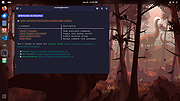 |
 |
CloverBootloader v5172g CloverBootloader v5172g 👉 Boot macOS, Windows and Linux in UEFI or legacy mode. CloverBootloader is an open source bootloader for macOS, Windows and Linux on Mac or PC hardware with UEFI or BIOS firmware. Features: • Boot macOS, Windows and Linux in UEFI mode • Boot in legacy mode on Mac or PC with UEFI or BIOS firmware • Boot using UEFI firmware directly • CloverEFI UEFI firmware emulation • Customizable GUI with themes, icons, fonts, background images, animations and mouse pointers • Native screen resolution in GUI • Multilingual help from the boot GUI, depending on configuration • Save preboot logs from the GUI • Show hidden boot entries • Save original OEM ACPI tables • Test DSDT patching • Save screenshots from the GUI • Reset NVRAM • Create custom boot entries • Launch EFI command shell from the GUI Supported operating systems: • Bootloader support: macOS, Windows, Linux • Firmware support: UEFI, legacy BIOS Supported languages: Multilingual interface and help system. The project does not publish an official list of supported languages. Changes: v5172 03-22-26 The release corresponds to commit 6645e05. The release updated for compilation by gcc-15.2 because Xcode compilation is not fully correct. Fix errors in string usage. Changed XString8 -> XStringW for FullTitle and LoaderTitle. Explicit conversion from XString8 and XStringW. Restore old fixes abandoned at 5171. Restore laptop brightness fix. This download is for the ISO version (very bottom of page). A bootable ISO image (compressed with 7-Zip) containing Clover. Typically used to create a bootable CD/DVD or virtual machine boot image. All other download assets are below: EFI file: BOOTX64.efi.zip Contains the standalone BOOTX64.efi UEFI bootloader file. Useful for manually repairing or replacing the EFI boot file on a USB drive or EFI System Partition. macOS installer: Clover_r5172.pkg The macOS installer package. This is what most Hackintosh users running macOS would use to install or update Clover directly from macOS. Clover distribution archive: CloverV2-5172.zip The main Clover distribution archive. Contains the Clover bootloader files for manual installation or updating an existing Clover ... |
|
6,614 | Jun 15, 2026 CloverHackyColor 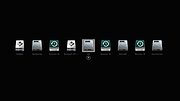 |
|
Fido v1.70 Fido v1.70 👉 PowerShell tool for downloading official Microsoft Windows retail ISO and UEFI Shell images. Fido is a PowerShell script designed primarily for use with Rufus, but it can also be used standalone to automate access to official Microsoft Windows retail ISO download links and provide convenient access to bootable UEFI Shell images. It helps simplify the process of obtaining official Windows installation media directly from Microsoft, while also offering command-line options for selecting Windows version, release, edition, language, architecture, or just retrieving the direct download URL. Features: • Automates access to official Microsoft Windows retail ISO download links • Can also download bootable UEFI Shell images • Works as a standalone PowerShell script or alongside Rufus • Supports command-line mode as well as GUI operation • Lets you choose Windows version, release, edition, language, and architecture • Can display the direct download URL instead of starting the download automatically • Attempts to match the system locale for language selection when not specified • Attempts to match the current system architecture when not specified Supported operating systems: • Windows 8, Windows 8.1, Windows 10, Windows 11 Supported languages: • English Changes: v1.70 03-30-26 Add Windows 11 23H2 v2 downloads (with thanks to @ave9858) 1 👉 2 👉 3 👉 4 👉 5 👉 6 👉 Click here to visit the author's website. |
|
4,417 | Apr 23, 2026 Pete Batard 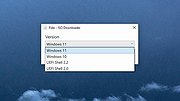 |
 |
Rufus v4.15 Rufus v4.15 👉 Create bootable USB drives easily and quickly. Rufus is a small utility that helps format and create bootable USB flash drives, such as USB keys, memory sticks, and other removable media. It is especially useful for cases where you need to create USB installation media from bootable ISOs, including Windows, Linux, and other operating systems, or when working on systems that lack an optical drive. Rufus is known for its speed and reliability, offering advanced options for power users while remaining simple enough for beginners. It supports UEFI and legacy BIOS, allows selection of partition schemes and file systems, and includes options for handling ISO images with custom settings. Features: • Create bootable USB drives from ISO images • Supports UEFI and legacy BIOS • MBR and GPT partition schemes • FAT32, NTFS, exFAT, UDF, and ReFS file systems • Detects USB devices automatically • Advanced formatting and drive options • Portable, no installation required Supported operating systems: • Windows 8, Windows 8.1, Windows 10, Windows 11 Supported languages: English, French, German, Italian, Spanish, Portuguese, Russian, Chinese (Simplified), Chinese (Traditional), Japanese, Korean, Arabic, Polish, Dutch, Greek, Turkish, Czech, Hungarian, Romanian, Vietnamese, Thai, Indonesian, Ukrainian, Bulgarian, Slovak, Slovenian, Danish, Finnish, Norwegian, Swedish, Hebrew, Persian Changes: v4.15 06-30-26 Add RISC-V 64 support to UEFI:NTFS. Improve the guards for using the "silent" Windows installation option. Improve the ability to cancel during write retries. Improve progress reporting for compressed image extraction. Fix unrestricted XML entity expansion and integer overflow in ezxml parser (courtesy of Eric Sadowski). Fix "silent" Windows installation failing at 75% in most cases. Fix a crash during boot when using UEFI:NTFS on Snapdragon X based ARM64 platforms. Fix first WUE option always being checked by default. Fix an infinite loop when using Windows ISOs that contain multiple WIMs. Fix "Enable runtime UEFI media validation" checkbox not always being properly enabled. Other WUE improvements/fixes for OneDrive removal and username validation (with thanks to @christian8641). Non exhaustive ... |
|
14,359 | Jul 02, 2026 Pete Batard/Akeo 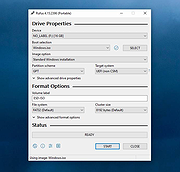 |
| Showing rows 1 to 4 of 4 | Showing Page 1 of 1 | 1 |
OlderGeeks.com Copyright (c) 2026
