|

|
Processed through Paypal No account required. |








Buy our over-priced crap to help pay the bills.



|
|
Processed through Paypal No account required. |
| Files | ||||
| File Name | Rating | Downloads | ||
 |
Homedale v2.25 Homedale v2.25 👉 Wi-Fi and WLAN monitor for scanning access points and tracking signal strength. Homedale scans for Wi-Fi / WLAN / IEEE 802.11 access points and monitors their signal strength. It shows available access points with details such as security type, network name (SSID), BSSID, vendor based on MAC address, channel, supported data rates, and more. Homedale also parses and displays information elements advertised by access points, graphs signal strength over time, analyzes channel usage to help find the optimal channel for your access point, and can use detected access points with Google Geolocation to help locate your position. Features: • Scans for Wi-Fi 7 / WLAN / IEEE 802.11 access points • Supports 802.11a/b/g/n/ac/ax/be wireless networks • Works with 2.4 GHz, 5 GHz, and 6 GHz frequency bands • Supports 20, 40, 80, 160, and 320 MHz channel widths • Shows signal strength, SSID, BSSID, vendor, channel, security, and supported data rates • Parses and displays advertised information elements and decoded data • Graphs signal strength of selected access points over time • Can log signal data to a text file • Can create screenshots from the signal graph • Analyzes channel usage to help identify the best Wi-Fi channel • Lets you connect to and disconnect from Wi-Fi / WLAN access points from the interface Supported operating systems: • Windows 2000, Windows XP, Windows Vista, Windows 7, Windows 8, Windows 10, Windows 11, Windows Server • macOS 10.10 or higher through macOS 15 Supported languages: • English, French, German, Greek, Italian, Japanese, Korean, Norwegian, Polish, Portuguese, Russian, Simplified Chinese, Slovenian, Spanish, Swedish, Thai, Traditional Chinese, Ukrainian Changes: v2.25 08-02-26 Windows: Rx and Tx Bitrates shown on Adapter Overview tab macOS: New: 6 GHz support added This download is for the Windows version (very bottom of page). If you need the MacOS version (1.18), download here. Click here to visit the author's website. |
 |
5,757 | Aug 14, 2026 The SZ Development 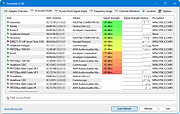 |
 |
Signal v8.12.0 Signal v8.12.0 Speak Freely Say "hello" to a different messaging experience. An unexpected focus on privacy, combined with all of the features you expect. Why use Signal? Explore below to see why Signal is a simple, powerful, and secure messenger Share Without Insecurity State-of-the-art end-to-end encryption (powered by the open source Signal Protocol) keeps your conversations secure. We can't read your messages or listen to your calls, and no one else can either. Privacy isn’t an optional mode — it’s just the way that Signal works. Every message, every call, every time. Say Anything Share text, voice messages, photos, videos, GIFs and files for free. Signal uses your phone's data connection so you can avoid SMS and MMS fees. Speak Freely Make crystal-clear voice and video calls to people who live across town, or across the ocean, with no long-distance charges. Make Privacy Stick Add a new layer of expression to your conversations with encrypted stickers. You can also create and share your own sticker packs. Get Together with Groups Group chats make it easy to stay connected to your family, friends, and coworkers. No ads. No trackers. No kidding. There are no ads, no affiliate marketers, and no creepy tracking in Signal. So focus on sharing the moments that matter with the people who matter to you. Free for Everyone Signal is an independent nonprofit. We're not tied to any major tech companies, and we can never be acquired by one either. Development is supported by grants and donations from people like you. "I use Signal every day." Edward Snowden Whistleblower and privacy advocate "I trust Signal because it’s well built, but more importantly, because of how it’s built: open source, peer reviewed, and funded entirely by grants and donations. A refreshing model for how critical services should be built." Jack Dorsey CEO of Twitter and Square "Signal is ... |
|
7,224 | May 29, 2026 Signal  |
|
WifiInfoView v3.00 WifiInfoView v3.00 👉 Scan and analyze nearby wireless networks with detailed Wi-Fi information. WifiInfoView is a free, portable utility that scans all wireless networks within range and displays detailed technical information about each one. It provides network names (SSID), MAC addresses, signal strength, channel numbers, frequencies, PHY types, maximum supported speeds, security status, router manufacturer, and other useful details for troubleshooting or optimizing wireless networks. Advanced users can also inspect the raw Wi-Fi information elements transmitted by each access point in hexadecimal format. WifiInfoView includes a summary mode that groups detected networks by channel, router manufacturer, PHY type, or maximum speed, making it easy to identify congested channels and optimize wireless performance. Features: • Portable application requiring no installation • Scans and displays nearby wireless networks in real time • Shows SSID, MAC address, PHY type, RSSI, signal quality, frequency, and channel • Displays router manufacturer, model, and name when available • Shows network security status and maximum supported connection speed • Summary mode groups networks by channel, manufacturer, PHY type, or speed • View raw Wi-Fi information elements in hexadecimal format • Export selected information to multiple file formats • Filter, sort, and search detected wireless networks • Supports both 32-bit and 64-bit Windows systems Supported operating systems: • Windows Vista, Windows Server 2008, Windows 7, Windows 8, Windows 10, Windows 11 Supported languages: • Arabic, Basque, Bulgarian, Catalan, Chinese Simplified, Chinese Traditional, Croatian, Czech, Danish, Dutch, English, Finnish, French, German, Greek, Hebrew, Hungarian, Italian, Japanese, Korean, Norwegian, Persian, Polish, Portuguese, Portuguese (Brazil), Romanian, Russian, Slovak, Slovenian, Spanish, Swedish, Thai, Turkish, Ukrainian, Vietnamese Changes: v3.00 06-10-26 • Added "Keep Selected Item Visible" option. When enabled, the selected item always remains visible. Note: This file has two hits on VirusTotal. We have confirmed these to be false positives. The file is safe. This download is for the Windows 64bit version (very bottom of page). If you need the Windows 32bit version, ... |
|
6,745 | Jun 23, 2026 Nir Sofer 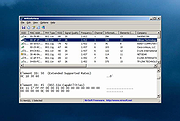 |
| Showing rows 1 to 3 of 3 | Showing Page 1 of 1 | 1 |
OlderGeeks.com Copyright (c) 2026
