|

|
Processed through Paypal No account required. |








Buy our over-priced crap to help pay the bills.



|
|
Processed through Paypal No account required. |
| Files | ||||
| File Name | Rating | Downloads | ||
 |
AOMEI Cyber Backup Free v4.5.0 AOMEI Cyber Backup Free v4.5.0 👉 Free centralized backup and disaster recovery solution for virtual machines, Windows systems, and SQL Server databases. AOMEI Cyber Backup Free is an enterprise-class backup and recovery platform that allows administrators to protect virtual machines, physical computers, servers, and databases from a single web-based management console. Designed for businesses, IT departments, MSPs, and home labs, it simplifies backup scheduling, monitoring, restoration, and storage management across multiple systems. The free edition provides a surprisingly comprehensive feature set for small environments. It supports up to 3 Hyper-V virtual machines, 3 VMware ESXi virtual machines, unlimited VMware Free ESXi virtual machines, 3 Microsoft SQL Server databases, 3 Windows PCs, and 1 Windows Server. Included at no cost are agentless VM backups, full, incremental, and differential backup methods, automated scheduling, Amazon S3 backup archiving, task monitoring, log management, role-based management, and point-in-time recovery. While some advanced enterprise capabilities require a paid license, the free edition delivers powerful centralized backup protection suitable for many small business and lab deployments. Features: • Centralized web-based backup management console • Protect up to 3 Hyper-V virtual machines • Protect up to 3 VMware ESXi virtual machines • Unlimited VMware Free ESXi virtual machine support • Protect up to 3 Microsoft SQL Server databases • Protect up to 3 Windows PCs • Protect 1 Windows Server • Agentless backup for VMware and Hyper-V virtual machines • Full backup support • Incremental backup support • Differential backup support • Automated backup scheduling and execution • Backup to local storage devices • Backup to network shares and NAS devices • Archive backups to Amazon S3 cloud storage • Flexible retention policy configuration • Restore entire virtual machines • Restore from any available backup point • Restore workloads to their original location • Backup task monitoring dashboard • Backup log management and reporting • Email notification support • Role-based management controls • Centralized monitoring of all protected workloads • Browser-based administration from any supported system • Free ... |
 |
1,138 | Jun 12, 2026 AOMEI Technology Co., Ltd  |
|
Letos v4.0.0 Letos v4.0.0 (Formerly SQLiteStudio) 👉 Free, open source cross-platform SQLite database manager with an advanced SQL editor and visual ERD designer. Letos is a free, open source SQLite database manager for creating, editing, and browsing SQLite databases. Formerly known as SQLiteStudio, Letos provides a powerful SQL editor with syntax highlighting, code formatting, query history, and intelligent code assistance. Version 4.0.0 introduces a completely new visual ERD (Entity Relationship Diagram) editor, native ARM64 builds, a Qt 6-based interface, and numerous improvements for database browsing, editing, importing, exporting, scripting, and overall workflow. It also supports encrypted SQLite databases, plugins, custom SQL functions, and portable operation without installation. Features: • Advanced SQL editor with syntax highlighting, formatting, code assistance, and query history • Visual ERD (Entity Relationship Diagram) editor for designing and reverse-engineering databases • Supports SQLCipher, WxSQLite3, and System.Data.SQLite encrypted databases • Execute queries across multiple attached databases • Custom SQL functions and aggregate functions using JavaScript, Python, or Tcl • Custom collation sequence support • Drag and drop database objects between databases • Built-in data import and export for SQL, CSV, HTML, XML, PDF, and JSON • Data population tools with random, sequence, dictionary, and script-based generators • Plugin architecture for scripting languages, import/export formats, formatters, renderers, and more • Portable edition requiring no installation • Extensive interface customization and docking options • Native ARM64 builds and signed Windows and macOS packages • High-DPI aware Qt 6 interface with scalable SVG icons • Command Palette for quick access to commands and settings • Built-in image rendering and JSON editor for data browsing Supported operating systems: • Windows 10, Windows 11 (x64, ARM64) • macOS (Intel and Apple Silicon) • Linux (x64, ARM64) Supported languages: Afrikaans, Arabic, Belarusian, Catalan, Czech, Danish, Dutch, English, Greek, Hungarian, Japanese, Korean, Norwegian, Polish, Portuguese, Romanian, Serbian, Slovak, Swedish, Turkish and additional updated translations. Changes: v4.0.0 06-23-26 Added a new visual ERD editor. Renamed the project from SQLiteStudio to Letos. Migrated the application to Qt ... |
|
2,637 | Jun 24, 2026 Pawel Salawa 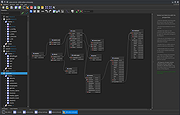 |
 |
MDB Viewer Plus v2.82 MDB Viewer Plus v2.82 👉 View, edit, search, and export Microsoft Access databases without installing Access. MDB Viewer Plus is a portable viewer and editor for Microsoft Access MDB and ACCDB files. It lets you inspect tables, edit records, run SQL queries, search and filter data, and import or export information in a range of formats. It can also create databases and change table structures. Opening ACCDB files requires the Microsoft Access Database Engine when a suitable version of Access is not installed. Features: • Open MDB and ACCDB database files without installing Microsoft Access. • View and edit table records in a tabbed interface. • Search records, including partial word searches, and filter or sort by field. • Run SQL select queries and save SQL statements to files. • View field types, print table structures, and copy field names to the clipboard. • Create databases and create, rename, or delete tables. • Add, remove, rename, or alter fields and manage indexes. • Import data from formats including CSV, TXT, XLS, DBF, MDB, and XML. • Export to TXT, HTML, XML, DBF, XLS, XLSX, RTF, PDF, and SQLite. • Open databases using workgroup files and link to external tables. • Run without installation. alexnolan.net Supported operating systems: • Windows 95, Windows 98, Windows ME, Windows NT, Windows 2000, Windows XP, Windows Vista, Windows 7, Windows 8, Windows 10, Windows 11 Supported languages: English. Changes: v2.82 09-24-26 Not provided. Note: This file has one hit on VirusTotal. We have confirmed this to be a false positive. The file is safe. Click here to visit the author's website. |
|
6,890 | Sep 25, 2026 Alex Nolan 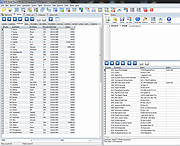 |
|
PHP Mini SQL Admin v1.9.240801 PHP Mini SQL Admin v1.9.240801 Lightweight alternative to heavy phpMyAdmin for quick and easy MySQL databases access. PHP Mini SQL Admin - Lightweight alternative to heavy phpMyAdmin. Extremely small (~30Kb) standalone php script. Easy to Install, simple to use. No SQL knowledge required for basic operations. Features • full MySQL support • extremely small (~42Kb) • just in one php file How to Install 1) Download phpminiadmin.php file (very bottom of page) 2) Copy/Upload it to your webserver public directory (www or public_html or etc.) 3) Open in your browser https://yoursite.com/phpminiadmin.php Recommended: For additional security you may edit phpminiadmin.php file and set some password (see $ACCESS_PWD variable) Dependencies: • The only required php extension is mysqli. Therefore if you got a white screen install it: • sudo apt-get install php-mysql on Debian or enable extension=php_mysqli.dll in php.ini on Windows Config file (optional) You can also create phpminiconfig.php in the same directory as phpminiadmin.php with database credentials or password. This way you can easily install future releases of phpminiadmin.php In the directory samples you'll find phpminiconfig.php for known OpenSource packages • See phpminiconfig.php for an empty example • See phpminiconfig.magento.php to read Magento its app/etc/local.xml ($ACCESS_PWD is required) • See phpminiconfig.sugarcrm.php to read SugarCRM its config.php ($ACCESS_PWD is required) • See phpminiconfig.wordpress.php to read Wordpress its wp-config.php ($ACCESS_PWD is required) • See phpminiconfig.vtiger.php to read Vtiger its config.inc.php ($ACCESS_PWD is required) IMPORTANT: Right-click on the download link below and choose to save the link. Otherwise you will just be opening the php file and that will not work. Click here to visit the author's website. |
 |
1,756 | Aug 02, 2024 Oleg Savchuk 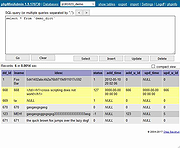 |
| Showing rows 1 to 4 of 4 | Showing Page 1 of 1 | 1 |
OlderGeeks.com Copyright (c) 2026
