|

|
Processed through Paypal No account required. |








Buy our over-priced crap to help pay the bills.



|
|
Processed through Paypal No account required. |
| Files | ||||
| File Name | Rating | Downloads | ||
 |
AV block remover (AVbr) v4 AV block remover (AVbr) v4 👉 A free malware-removal and system-repair tool designed to restore computers whose security software and Windows functions have been blocked by malware. AV block remover (AVbr) is a free utility designed to help clean Windows computers infected with malware that interferes with antivirus programs, security utilities and normal system operation. AVbr automates a collection of diagnostic and remediation procedures and uses Oleg Zaitsev's AVZ antivirus utility as part of its operation. It can help remove malware, restore Windows settings altered by malicious software, remove malicious policies and restrictions, and address infections that deliberately prevent security programs from running. Features: • Designed to remove active malware and repair changes made to Windows by malicious software • Helps when malware blocks antivirus and other security programs • Performs automated system diagnostics and remediation • Uses the AVZ antivirus utility during its malware detection and cleanup procedures • Includes AVZ Toolkit • Searches for malicious and suspicious system activity • Helps detect and remove malware that interferes with normal Windows operation • Removes malicious system policies and restrictions • Helps restore system settings modified by malware • Can assist with infections that prevent security and diagnostic utilities from launching • Generates diagnostic information that can be used when investigating an infected computer • Portable utility that does not require conventional installation Supported operating systems: Windows Vista, Windows 7, Windows 8, Windows 8.1, Windows 10, Windows 11 Supported languages: English, Russian Changes: v4 and AVZ Toolkit v6.12, dated 08-31-26 Now helps in the case of blocking antivirus signatures through systemic equipment. Added removal of the start-up of antivirus start-up, added by CertLock viruses blocking... Complementary functionality 1) AppLocker policy check and reset if working policies are found. 2)... Update 1) Check the existence of the Hosts file added. If it is not, it creates a pure Hosts... Note: This file has two hits on VirusTotal. We have confirmed these to be false positives. The file ... |
 |
252 | Sep 01, 2026 safezone.cc / Oleg Zaitsev 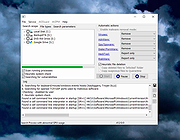 |
 |
McAfee Rootkit Remover 0.8.9.209 McAfee Rootkit Remover 0.8.9.209 McAfee Rootkit Remover is a stand-alone utility used to detect and remove complex rootkits and associated malware. Currently it can detect and remove ZeroAccess, Necurs and TDSS family of rootkits. McAfee Labs plans to add coverage for more rootkit families in future versions of the tool. How do you use RootkitRemover? Download the latest version of RootkitRemover When prompted, choose to save the file to a convenient location on your hard disk, such as your Desktop folder. When the download is complete, navigate to the folder that contains the downloaded RootkitRemover file, and run it. It is best to run the tool in Administrator mode. The tool then runs a window which shows the status of the process. The various stages are: Initializing Scanning Cleaning When the process is completed, it prompts the user to press any key to exit the tool. It is recommended to reboot the system and perform a full scan with the McAfee VirusScan to remove remnants of the infection that might still be left on the system. Frequently Asked Questions Q: What is the need for the RootkitRemover tool? A: RootkitRemover is not a substitute for a full anti-virus scanner. It is designed to detect and remove specific rootkit infections. Q: How to use the RootkitRemover tool? A: The tool can be run by either double clicking it or through the command-line. It is advisable to run a full system scan using McAfee VirusScan after removing any infection with the tool. Q: How do I save the scan results to a log file? A: The tool is designed to automatically save the report in the same folder as the tool is placed. Q: Why do I need to rescan with McAfee VirusScan? Would I need ... |
|
7,407 | Nov 13, 2019 McAfee Labs 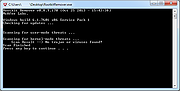 |
|
Spybot Free Edition v2.9.85.5 Spybot Free Edition v2.9.85.5 👉 Free on-demand malware and spyware scanner with system immunization tools. Spybot Free Edition is a security utility designed to detect and remove spyware, malware, and other unwanted software from your computer. It provides on-demand scanning to identify threats and includes system immunization features that help block known malicious websites and tracking cookies before they can affect your system. The program also offers tools for managing startup entries and repairing system issues caused by malware, giving users additional control over system security and performance. Features: • On-demand malware and spyware scanning • Detection and removal of tracking cookies • System immunization to block known malicious sites • Startup tools to manage boot entries • Secure file shredding • Rootkit scanning • Detailed scan reports and logs Supported operating systems: • Windows 7, Windows 8, Windows 10, Windows 11 Supported languages: • English, German Changes: v2.9.85.5 Not provided. This download is for the Windows 7-11 version (very bottom of page). If you need the Windows XP version, download here. Click here to visit the author's website. |
|
10,309 | Feb 26, 2026 Safer Networking Ltd. 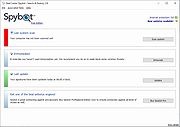 |
|
Trend Micro Rootkit Buster v5.00.1212 32bit Trend Micro Rootkit Buster v5.00.1212 32bit Trend Micro RootkitBuster scans hidden files, registry entries, processes, drivers, services, ports, and the master boot record (MBR) to identify and remove rootkits. Malicious software called rootkits can manipulate the components of the Microsoft Windows operating system to conceal how they cause harm. Rootkits can hide drivers, processes, and registry entries from tools using common system application programming interfaces (APIs). What's New ======================================================================== a. RootkitBuster now works on computers running Microsoft Windows 10. b. New enhancements now prevent some known scanning errors. Click here to visit the author's website. |
|
7,185 | Dec 01, 2019 Trend Micro Inc. 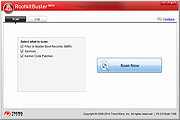 |
|
Trend Micro Rootkit Buster v5.00.1212 64bit Trend Micro Rootkit Buster v5.00.1212 64bit Trend Micro RootkitBuster scans hidden files, registry entries, processes, drivers, services, ports, and the master boot record (MBR) to identify and remove rootkits. Malicious software called rootkits can manipulate the components of the Microsoft Windows operating system to conceal how they cause harm. Rootkits can hide drivers, processes, and registry entries from tools using common system application programming interfaces (APIs). What's New ======================================================================== a. RootkitBuster now works on computers running Microsoft Windows 10. b. New enhancements now prevent some known scanning errors. Click here to visit the author's website. |
|
7,685 | Dec 01, 2019 Trend Micro Inc. |
| Showing rows 1 to 5 of 5 | Showing Page 1 of 1 | 1 |
OlderGeeks.com Copyright (c) 2026
