|

|
Processed through Paypal No account required. |








Buy our over-priced crap to help pay the bills.



|
|
Processed through Paypal No account required. |
| File - Download McAfee Rootkit Remover 0.8.9.209 | ||||||||
| Description | ||||||||
|
A plea... Deanna and I have been running this site since 2008 and lately we're seeing a big increase in users (and cost) but a decline in percentage of users who donate. Our ad-free and junkware-free download site only works if everyone chips in to offset the revenue that ads on other sites bring in. Please donate at the bottom of the page. Every little bit helps. Thank you so much. Sincerely, your Older Geeks: Randy and Deanna Always scroll to the bottom of the page for the main download link. We don't believe in fake/misleading download buttons and tricks. The link is always in the same place. McAfee Rootkit Remover 0.8.9.209 McAfee Rootkit Remover is a stand-alone utility used to detect and remove complex rootkits and associated malware. Currently it can detect and remove ZeroAccess, Necurs and TDSS family of rootkits. McAfee Labs plans to add coverage for more rootkit families in future versions of the tool. How do you use RootkitRemover? Download the latest version of RootkitRemover When prompted, choose to save the file to a convenient location on your hard disk, such as your Desktop folder. When the download is complete, navigate to the folder that contains the downloaded RootkitRemover file, and run it. It is best to run the tool in Administrator mode. The tool then runs a window which shows the status of the process. The various stages are: Initializing Scanning Cleaning When the process is completed, it prompts the user to press any key to exit the tool. It is recommended to reboot the system and perform a full scan with the McAfee VirusScan to remove remnants of the infection that might still be left on the system. Frequently Asked Questions Q: What is the need for the RootkitRemover tool? A: RootkitRemover is not a substitute for a full anti-virus scanner. It is designed to detect and remove specific rootkit infections. Q: How to use the RootkitRemover tool? A: The tool can be run by either double clicking it or through the command-line. It is advisable to run a full system scan using McAfee VirusScan after removing any infection with the tool. Q: How do I save the scan results to a log file? A: The tool is designed to automatically save the report in the same folder as the tool is placed. Q: Why do I need to rescan with McAfee VirusScan? Would I need to reboot the system after scanning with the RootkitRemover tool? A: Stinger Rebooting the system helps the product kill the infectious threads injected into various processes leading to effective cleaning. Running a rescan of the system with McAfee VirusScan post cleaning is advisable to remove any remnants of an infection. Q:I know I have a virus, but RootkitRemover did not detect one. Why is this? A: RootkitRemover is not a substitute for a full anti-virus scanner. It is only designed to detect and remove specific rootkit infections. Q: How can I get support for RootkitRemover? A: RootkitRemover is being provided as a free tool to detect and clean specific rootkit families. It is not a supported tool. McAfee Labs makes no guarantees about this tool. Q: Is there a more proactive solution for detecting and removing rootkits and other hidden threats? A: McAfee also provides real-time, hardware-enhanced rootkit protection for enterprises. McAfee Deep Defender, unlike traditional security and post infection tools operates beyond the operating system to provide real-time kernel monitoring to reveal and remove advanced, hidden attacks. This solution is managed by McAfee ePO for complete enterprise manageability. For more information, click here: http://www.mcafee.com/us/products/deep-defender.aspx 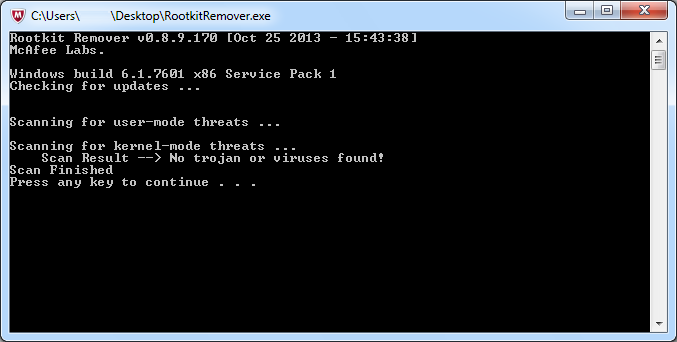 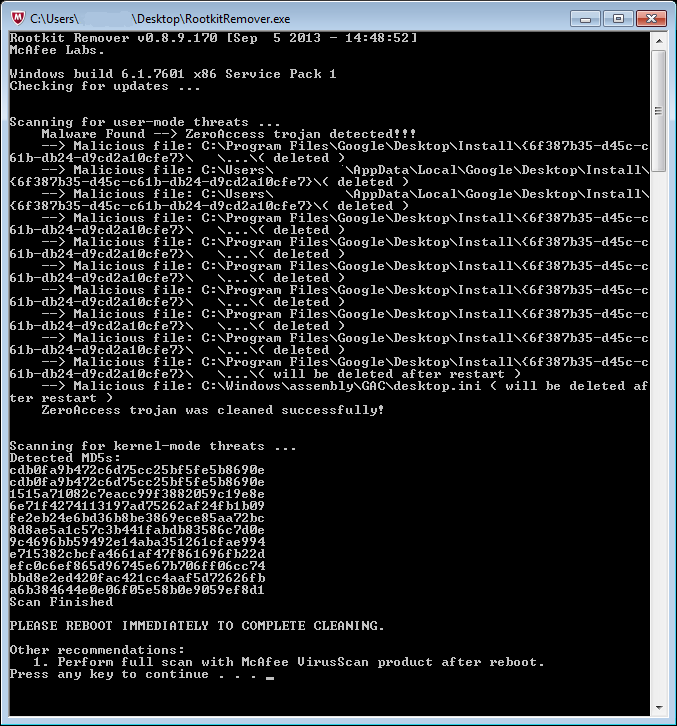
Continue below for the main download link. |
||||||||
| Downloads | Views | Developer | Last Update | Version | Size | Type | Rank | |
| 7,399 | 17,228 | McAfee Labs | Nov 13, 2019 - 20:19 | 0.8.9.209 | 765.8KB | EXE |  , out of 75 Votes. , out of 75 Votes. |
|
| File Tags | ||||||||
| McAfee Rootkit Remover 0.8.9.209 | ||||||||
Click to Rate File Share it on Twitter → Tweet
|


