|

|
Processed through Paypal No account required. |








Buy our over-priced crap to help pay the bills.



|
|
Processed through Paypal No account required. |
| Files | ||||
| File Name | Rating | Downloads | ||
 |
FreePlane v1.13.3 FreePlane v1.13.3 👉 Free and open-source mind mapping, knowledge management and project planning software. Freeplane is a free and open-source application for mind mapping, knowledge management, project management, note taking, outlining and organizing ideas. It helps you capture thoughts, structure information, analyze relationships, create visual maps and manage personal, school or work projects. Features: • Create and edit mind maps, concept maps and information maps • Organize ideas, notes, tasks, projects and research • Navigate large maps with folding, filtering and searching • Add links, notes, icons, attributes and formatted content • Supports add-ons and scripting for extended functionality • Can run installed or from removable storage • AI integration support in newer Java environments • Open-source and community-developed Supported operating systems: • Windows with Java 8 to 22, or Windows installer with embedded Java • macOS Intel and Apple Silicon using DMG builds with embedded Java • Linux using DEB installer or ZIP archive, requires Java 11 to 21 Supported languages: Multilingual, English source language, Freeplane is translated into 40 languages using Weblate Changes: v1.13.3 07-14-26 Tag category AI tools Tag category scripting API Copying selected chat messages as markdown Options to show root node text or bookmark titles on tab titles and map menu labels - Preferences…->Appearance->Look and Feel->Tab titles - Preferences…->Appearance->Look and Feel->Maximum tab title length Bookmarks outline and bookmark toolbar can follow the view root Switch AI Chat tool availability between reading, editing and disabled Add reusable AI prompts that are managed in a dialog like assistant profiles, exposed as dynamic actions - Tools->AI prompts->Edit prompts... Thinking effort and temperature configuration Search and filter AI model selectors in chat, reusable prompts and assistant profiles - Keep one session-wide filter across selectors - Navigate filtered models with Up and Down and confirm a model with Enter Configure OpenAI, OpenRouter, Requesty, custom OpenAI-compatible, Gemini and Ollama providers concurrently - Manage provider and model settings in the separate AI models ... |
 |
6,136 | Oct 02, 2026 Dimitry Polivaev 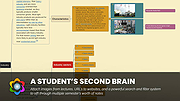 |
 |
Horodruin v2026.07.841.0 Horodruin v2026.07.841.0 👉 Advanced file synchronizer for keeping two or more folders updated. Horodruin is a freeware file synchronizer designed to update folders by taking files from multiple different folders and synchronizing two or more sources with just a few clicks. It builds a virtual folder using the newest and missing files, then applies that result to each source so the folders contain the same updated files. The author notes that this tool is intended for advanced users and recommends reading the included documentation. Features: • Synchronizes two or more folders • Handles multiple folder sources in one project • Uses local full paths and UNC network paths • Analyzes folders to determine outdated or missing files • Builds a virtual folder from the newest and missing files • Lets you tune folder analysis to your needs • Saves and loads settings using project files • Export Delta feature saves source changes to a separate folder • Multi-threaded operation • Multi-threaded copy engine using temporary files and/or overwriting files • Can integrate with a text editor, hex editor, and diff viewer • Minimal registry usage, only for Explorer integration • Includes HTML Help • Small, fast, and clean • Freeware licensed under Creative Commons Attribution-NoDerivs 4.0 Supported operating systems: • Windows 10 or higher, 64-bit Supported languages: English Changes: v2026.07.841.0 07-19-26 • Now uses the new Visual Studio 2026 Segmented Heap, a faster and improved internal heap implementation. Click here to visit the author's website. |
|
6,376 | Sep 14, 2026 Stefano Bordoni 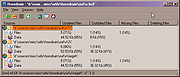 |
|
Open Industry Project v1.3.3 Open Industry Project v1.3.3 Free and open-source warehouse/manufacturing simulation. The goal of Open Industry Project is to provide an open platform for developers to contribute to the creation of virtual industrial equipment/devices and for people to be able to test their ideas or simply educate themselves while using standard industrial platforms. Importing Models Although this project has a few models, you maybe interested in adding more. This is a good resource for free industrial parts CAD models: 3dfindit It is recommended to export the files in their native format (usually STEP), modify them if needed for usage in Godot in any CAD software and then export as FBX for additional work in Blender, or to be imported straight into Godot. Alternatively most manufacturers provide the CAD files directly on their own website. Changes: v1.3.3 Added the ability to manipulate parts with the gizmo after the simulation has started Added the ability to use a collisions detection ray to reposition parts already in scene, including while the simulation has started (uses 'C' key by default). Added build .NET project button to the top right corner of the editor Fixes and better error handling Click here to visit the author's website. |
|
1,360 | Jun 02, 2025 Open Industry Project 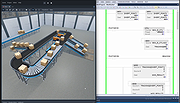 |
|
ToDoList v9.2.0 ToDoList v9.2.0 👉 Flexible and powerful task management software for organizing projects of any size. ToDoList is a highly configurable task management application that helps you organize everything from simple daily to-do lists to complex, multi-level projects. It lets you create unlimited task hierarchies with subtasks, allowing even the largest projects to remain organized and easy to navigate. ToDoList includes a wide range of customizable task attributes such as priorities, categories, tags, due dates, start dates, dependencies, recurrence, risk levels, percentages complete, file links, comments, and time tracking. Multiple task views, advanced filtering, searching, sorting, and reporting tools make it easy to focus on your work and monitor progress. Support for plugins, numerous import and export formats, and a portable edition make ToDoList suitable for both personal and professional project management. Features: • Unlimited task hierarchy with nested subtasks • Fully customizable task attributes and layouts • Priorities, categories, tags, status, and risk tracking • Start dates, due dates, recurring tasks, and dependencies • Built-in time tracking and time estimates • Powerful filtering, searching, sorting, and reporting • File attachments, links, and rich text comments • Multiple import and export formats • Plugin support for additional functionality • Portable version available Supported operating systems: • Windows 7, Windows 8, Windows 8.1, Windows 10, Windows 11 Supported languages: English Changes: v9.2.0 06-22-26 • Added new task creation options, including creating subtasks within existing tasks. • Added single-click editing to the Attribute Editor. • Added sub-expressions to Find Task rulesets. • Added Persian (Jalali) calendar support. • Added counters for remaining User Defined Tools and Custom Task Attributes. • Added spell checking support for Markdown comments. • Added drag-and-drop reordering of Task View tabs. • Added improved keyboard navigation for Week Planner and Logged Time. • Added drag-and-drop and paste support for files, images, and content in HTML and Markdown comments. • Added Cut, Copy, and Paste icons to the Rich Text Comments toolbar and context menu. • Added a UI Language ... |
|
10,946 | Jun 29, 2026 AbstractSpoon Software 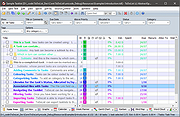 |
| Showing rows 1 to 4 of 4 | Showing Page 1 of 1 | 1 |
OlderGeeks.com Copyright (c) 2026
