|

|
Processed through Paypal No account required. |








Buy our over-priced crap to help pay the bills.



|
|
Processed through Paypal No account required. |
| Files | ||||
| File Name | Rating | Downloads | ||
 |
Pocket Radio Player v250414 Pocket Radio Player v250414 👉 A lightweight portable internet radio player for streaming thousands of stations worldwide. Pocket Radio Player is a compact and portable internet radio application that lets you listen to online radio stations from around the world without installation. Designed to be fast and resource-friendly, it runs directly from its executable and stores all settings locally, making it ideal for USB drives or use on multiple systems. Despite its small size, it offers powerful station management, recording capabilities, and customizable playback options in a clean, straightforward interface. Features: • Portable application with no installation required • Streams thousands of online radio stations • Record live radio streams to MP3 files • Customizable station lists and favorites • Built-in search and filtering for stations • Supports multiple audio formats and streaming protocols • Minimal CPU and memory usage • Command line support for advanced users Supported operating systems: • Windows 7, Windows 8, Windows 10, Windows 11 Supported languages: English, German, Spanish, French, Italian, Portuguese, Russian, Polish, Dutch Changes: v240113 01-13-24 Updated station list and minor improvements. Note: This file has four hits on VirusTotal. We have confirmed these to be false positives. The file is safe. |
 |
11,820 | Jun 27, 2026 Stefan Sarbok 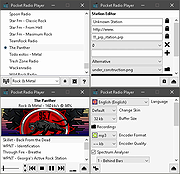 |
 |
Tab Pocket v1.0.0 Tab Pocket v1.0.0 A browser extension for saving every tab in your current window into a tidy “pocket” you can restore later. With Tab Pocket you can clear your cluttered browser while keeping full, one-click restore capability. Features: • Store Tabs instantly saves every tab in your active window into a dated “pocket.” • Auto cleanup removes pockets automatically when their last tab is deleted. • Rename pockets • Restore in current window or in a new window. • Preserve toggle keeps a pocket after restoring, handy for template groups. • Per-pocket delete button permanently removes unwanted pockets. • Drag & drop works both within a pocket (reorder tabs) and between pockets (move tabs). • Display tabs as links toggle switches between plain titles and clickable links. • Keep pockets synced via your browser account or switch to local-only storage. • Optionally close tabs after saving. • Export / Import: download all pockets as JSON or restore from a backup file. • Search functionality with configurable settings. Web Browser Requirements: • Firefox v142 or greater • Chrome v139 or greater Installation: Chrome • Visit chrome://extensions/ • Enable Developer ... |
|
740 | Dec 01, 2025 Mechanika Design 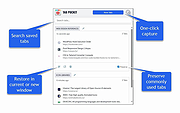 |
| Showing rows 1 to 2 of 2 | Showing Page 1 of 1 | 1 |
OlderGeeks.com Copyright (c) 2026
