|

|
Processed through Paypal No account required. |








Buy our over-priced crap to help pay the bills.



|
|
Processed through Paypal No account required. |
| Files | ||||
| File Name | Rating | Downloads | ||
 |
Long Path Fixer v0.9.0.0 32bit Long Path Fixer v0.9.0.0 32bit Got a "Path Too Long" error in Windows? Try this free utility for moving, copying, renaming and deleting files and folders with Very Long Paths. What does it do? Simply put, Long Path Fixer is a program enables you to "get at" files and folders that Windows Explorer refuses to reach, that is, anything with a path longer than the Windows API can handle (MAX_PATH: 259 actual characters). With Long Path Fixer, you can effortlessly manipulate files and folders with paths of up to 32,767 characters in length. No destination is "Too Long"! How does it work? Long Path Fixer presents you with a simple list of files and folders in the current directory (including "hidden" files and folders). You can drag and drop files or folders onto it and it will navigate directly to path of whatever you dropped. From there, you simply click on the file or folder you want to move, copy, delete, and hit the appropriate button; Move, Copy or Delete. All these options are also available from the context (right-click) menu, as well as rename (I may add a button for that!), delete to recycle bin, copy the path and so on. Just like Explorer windows, F5 refreshes the list. The top item "●●" enables you to go UP, as if you hadn't guessed! There is a drop-down menu at the top with all your available drives listed, so you can start navigating from there, use your up/down arrow keys to switch drives and so on. Having said that, it's usually easier to drag-and-drop items directly from Explorer. Note: if you drag a shortcut, Long Path Fixer will automatically resolve the shortcut to its real location. If you would prefer to have it open at the actual .lnk file's directory, hold drown the <Ctrl> key whilst dropping the item ... |
 |
4,775 | Jan 12, 2022 corz.org 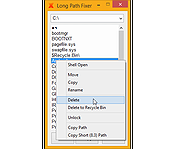 |
|
Long Path Fixer v0.9.0.0 64bit Long Path Fixer v0.9.0.0 64bit Got a "Path Too Long" error in Windows? Try this free utility for moving, copying, renaming and deleting files and folders with Very Long Paths. What does it do? Simply put, Long Path Fixer is a program enables you to "get at" files and folders that Windows Explorer refuses to reach, that is, anything with a path longer than the Windows API can handle (MAX_PATH: 259 actual characters). With Long Path Fixer, you can effortlessly manipulate files and folders with paths of up to 32,767 characters in length. No destination is "Too Long"! How does it work? Long Path Fixer presents you with a simple list of files and folders in the current directory (including "hidden" files and folders). You can drag and drop files or folders onto it and it will navigate directly to path of whatever you dropped. From there, you simply click on the file or folder you want to move, copy, delete, and hit the appropriate button; Move, Copy or Delete. All these options are also available from the context (right-click) menu, as well as rename (I may add a button for that!), delete to recycle bin, copy the path and so on. Just like Explorer windows, F5 refreshes the list. The top item "●●" enables you to go UP, as if you hadn't guessed! There is a drop-down menu at the top with all your available drives listed, so you can start navigating from there, use your up/down arrow keys to switch drives and so on. Having said that, it's usually easier to drag-and-drop items directly from Explorer. Note: if you drag a shortcut, Long Path Fixer will automatically resolve the shortcut to its real location. If you would prefer to have it open at the actual .lnk file's directory, hold drown the <Ctrl> key whilst dropping the item ... |
|
5,394 | Jan 12, 2022 corz.org |
|
Path Length Checker v1.3.30 Path Length Checker v1.3.30 Path Length Checker is a stand-alone app that allows you to specify a root directory, and it gives you back a list of all paths (i.e. files and directories) in that root directory and their lengths. It includes features such as pattern matching and min/max length constraints, as well as the ability to specify a string that should replace the root directory in the results brought back, allowing you to quickly see path lengths if you were to move the files/folders to another location. Running via the GUI (Graphical User Interface) To run the Path Length Checker using the GUI, run the PathLengthCheckerGUI.exe. Once the app is open, simply provide the Root Directory you want it to search and press the large Get Path Lengths... button. Running via the Command Line The PathLengthChecker.exe is the command-line alternative to the GUI. Simply run it without any parameters to see what parameters you can pass to it. Extra Info There is currently a bug with the Path Length Checker tool where it is not able to process paths in Windows restricted directories (e.g. C:\Documents and Settings). In the meantime you can use this PowerShell script by Daniel Schroeder to get those path lengths. Click here to visit the author's website. |
|
5,853 | Jan 12, 2022 Daniel Schroeder 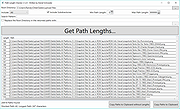 |
| Showing rows 1 to 3 of 3 | Showing Page 1 of 1 | 1 |
OlderGeeks.com Copyright (c) 2026
