|

|
Processed through Paypal No account required. |








Buy our over-priced crap to help pay the bills.



|
|
Processed through Paypal No account required. |
| Files | ||||
| File Name | Rating | Downloads | ||
 |
Mozilla Firefox ESR v153.2.0 Mozilla Firefox ESR v153.2.0 👉 A stable, long-term Firefox release designed for users and organizations that prefer fewer major browser changes. Mozilla Firefox ESR is the Extended Support Release of Mozilla's popular open-source web browser, designed for organizations, businesses, schools, system administrators and users who value stability over frequent feature changes. ESR receives regular security and stability updates while keeping major interface and feature changes on a longer release cycle than standard Firefox. It provides the familiar Firefox browsing experience with strong privacy protections, tracker blocking, private browsing, password management, synchronization, extensions and extensive customization. ESR is especially useful in managed environments where administrators need predictable browser behavior and more time to test compatibility between major releases. Features: • Extended Support Release with a longer major-version lifecycle • Regular security and stability updates without frequent major feature changes • Enhanced Tracking Protection blocks many known trackers automatically • Private Browsing mode with additional protection against tracking • Built-in password manager for storing and managing website logins • Firefox Sync can synchronize bookmarks, passwords, history, tabs and settings between devices • Separate Firefox profiles can keep work, personal and other browsing activities apart • Container support can isolate cookies, logins and tracking data between different browsing activities • Large library of extensions and browser themes • Customizable toolbar, menus and browser appearance • Tabbed browsing with tab search and organization tools • Built-in PDF viewing • Automatic browser updates and security fixes • Support for enterprise policies and centralized browser management • Available in 32-bit, 64-bit and ARM64 builds where supported • Free and open-source Supported operating systems: • Windows 10, Windows 11 • macOS 10.15 or higher • GNU/Linux with glibc 2.17 or higher, GTK+ 3.14 or higher, libglib 2.42 or higher, libstdc++ 4.8.1 or higher and X.Org 1.0 or higher Supported languages: English (US) Changes: v153.2.0 09-13-26 General Firefox now includes a new profile management system that helps you separate your online life into ... |
 |
7,011 | Sep 13, 2026 Mozilla  |
|
Mozilla Firefox Portable v155.0.1 Mozilla Firefox Portable v155.0.1 👉 Take the full Firefox web browser, along with your bookmarks, passwords and settings, anywhere you go. Mozilla Firefox Portable is the popular Firefox web browser packaged by PortableApps.com to run from a USB flash drive, portable hard drive, cloud folder or local folder without a traditional installation. Your bookmarks, saved passwords, extensions, preferences and other personal browser data stay with the portable package, making it easy to carry your familiar Firefox environment between Windows computers. It provides the same Firefox browsing experience, privacy protections, customization, extension support and web standards compatibility as the regular desktop browser while adding the portability provided by the PortableApps.com Launcher. It can also integrate with the PortableApps.com Platform for convenient launching and automatic updates. Features: • Runs from removable drives, cloud folders or local folders without a traditional Firefox installation • Carries your bookmarks, saved passwords, preferences and other Firefox profile data with you • Works with the PortableApps.com Platform for easy launching and automatic updates • Built-in Enhanced Tracking Protection helps block trackers while browsing • Supports Firefox extensions and themes for extensive customization • Includes private browsing for sessions that do not retain local browsing history • Built-in password management and synchronization through a Mozilla account • Supports tab organization, containers and vertical tabs • Built-in translation capabilities for supported languages • PDF viewing and printing are built directly into the browser • Developer Tools provide debugging, inspection and web development features • Supports modern web technologies including WebAssembly, WebRTC, WebTransport and HTTP/3 • Open source and based on Mozilla Firefox • Can coexist with an installed copy of Firefox Supported operating systems: • Windows 10, Windows 11 • WINE (64-bit only) Supported languages: Afrikaans, Arabic, Asturian, Basque, Belarusian, Bulgarian, Breton, Catalan, Chinese (Simplified), Chinese (Traditional), Croatian, Czech, Danish, Dutch, English, Estonian, Finnish, French, Frisian, Gaelic (Scotland), Galician, German, Greek, Hebrew, Hungarian, Icelandic, Indonesian, Irish, Italian, Japanese, Korean, Lithuanian, Norwegian ... |
|
11,462 | Sep 13, 2026 Mozilla & John T. Haller |
|
Mozilla Firefox v155.0.1 Mozilla Firefox v155.0.1 👉 A fast, customizable web browser with strong privacy protections, security features and a huge library of extensions. Mozilla Firefox is a free, open-source web browser developed by Mozilla with an emphasis on privacy, security, performance and user control. Firefox includes built-in tracking protection, private browsing, password management, tab organization, synchronization across devices and extensive customization through themes and add-ons. Its independent Gecko browser engine provides an alternative to Chromium-based browsers, while frequent security and feature updates keep the browser current with modern web standards. Features: • Enhanced Tracking Protection blocks many social media trackers, cross-site tracking cookies, fingerprinters and cryptominers • Private Browsing automatically removes browsing information such as cookies and history when sessions are closed • Built-in password manager saves and securely fills website logins • Firefox Sync can synchronize bookmarks, passwords, history, open tabs and settings across devices • Extensive add-on support lets you expand Firefox with thousands of extensions and themes • Customizable toolbar and browser interface • Picture-in-Picture lets you watch videos in a floating window while browsing other pages • Reader View removes distracting page elements for easier reading • Built-in PDF viewer lets you view and work with PDF documents without additional software • Tab search and management tools make large numbers of open tabs easier to handle • Automatic updates deliver security fixes and browser improvements • Developer tools provide inspectors, debugging, network analysis and responsive-design testing • Supports modern web standards using Mozilla's independent Gecko browser engine • Import tools help transfer bookmarks, passwords and other browser data from other browsers • Available for Intel, AMD and ARM-based systems depending on operating system Supported operating systems: • Windows 10, Windows 11 • macOS 10.15 or higher • Linux 64-bit, Linux ARM64/AArch64 Supported languages: English (US) Changes: v155.0.1 09-04-26 Fixed Firefox becoming unresponsive on some pages that use CSS blur and backdrop filters together. Fixed the sidebar not reappearing after restarting Firefox when the "Hide ... |
|
12,770 | Sep 13, 2026 Mozilla |
 |
NirLauncher v1.30.25 NirLauncher v1.30.25 👉 Portable launcher package containing more than 200 NirSoft freeware utilities for Windows. NirLauncher is a package of more than 200 portable freeware utilities for Windows, all developed for the NirSoft website. It can be used from a USB flash drive without installation, saves each utility's configuration into .cfg files when run from removable media, and automatically runs x64 versions of supported tools on x64 systems. NirLauncher also makes it easy to run utilities, open their help files, jump to each utility's webpage, and add additional software packages beyond the main NirSoft collection. Features: • Includes more than 200 portable NirSoft freeware utilities • Runs without installation from a USB flash drive or local folder • Saves utility configuration files to the drive when used portably • Automatically launches x64 versions of utilities on x64 systems when available • Lets you run tools, view help files, or open each utility's webpage • Can add extra software packages in addition to the main NirSoft package • Can generate BartPE plugin files for use from a bootable live Windows CD • Contains no spyware, adware, malware, toolbars, browser plugins, or bundled third-party software Supported operating systems: • Windows 2000, Windows XP, Windows Server 2003, Windows Vista, Windows 7, Windows 8, Windows 8.1, Windows 10 • x64 systems supported Supported languages: • English, Dutch, French, German, Italian, Japanese, Polish, Russian, Simplified Chinese, Spanish, Traditional Chinese, Greek, Romanian, Czech, Slovak, Hungarian Changes: v1.30.25 08-15-26 Not Provided Read this. It's important: This file contains hacking software. Hacking software for you to use to hack your own computer. This is for doing things like retrieving a lost password. Because of this, Anti-virus software WILL treat it as dangerous because, in the wrong hands, it is dangerous. This zip file has always been password protected by Nir Sofer so it can be downloaded without being blocked. The password is nirsoft9876$. Click here to visit ... |
|
24,432 | Aug 19, 2026 Nir Sofer 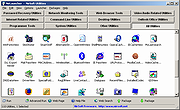 |
|
No Crappy Passwords v11.39 No Crappy Passwords v11.39 Takes your crappy password and makes it non-crappy Hashes, encrypts, and encodes lousy passwords based information from initial hashes, combined with user provided offsets. Creating easy to memorize systems of passwords and offsets, the possibilities are endless, with never a need to file your passwords to disc or entrust them to a password manager. Features Takes five seconds to figure out "No Crappy Passwords will take an input, presumably a crappy password, hash the crap out of it, and return an eighty five character password. It takes little imagination to come up with a system of easy to remember passwords and offsets that will produce these unbreakable final passwords." 'When you send a password to a website or database or other software which requires it, your password is not actually stored on the remote server, a _hash_ of your password is stored. A hash is like one way encryption, any string of text (or a file for that matter) will produce the exact same hash every time. However, you cannot determine what the string of text was that actually produced the hash in the first place, which is why companies store the hash of the users' passwords, it's much more secure, because while they can compare the hash created by your password to the hash on file, they don't know your actual password." "Wannabe hackers that brute force sites can send thousands of common passwords in attempts find crappy ones, and if the server in question isn't salting, or is improperly salting passwords, that can be a problem." "No Crappy Passwords eliminates this possibility by simply turning your crappy password into a ridiculously long and random password through hashing. Additionally, no two crappy passwords will be hashed in the same way, as the script doesn't determine how many ... |
|
3,027 | Sep 19, 2023 Dana Booth 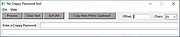 |
|
PearPass v2.1.0 PearPass v2.1.0 👉 Peer-to-peer password manager with private, device-to-device syncing. PearPass is an open-source password manager that prioritizes privacy and user control by avoiding centralized servers. Built on Pear Runtime, it uses peer-to-peer technology to sync your credentials directly between your devices, ensuring your data remains private, secure, and fully under your control. Instead of relying on cloud storage, PearPass keeps your information encrypted and shared only between your authorized devices. With a clean and minimal interface, it provides a straightforward way to manage passwords while maintaining modern security practices and full data ownership across desktop and mobile devices. Features: • Peer-to-peer syncing between devices with no central server • Built on Pear Runtime for decentralized application architecture • End-to-end encryption to protect all stored credentials • Local-first storage with no mandatory cloud dependency • Open-source codebase for transparency and independent auditing • Secure device-to-device authorization for syncing • No tracking, telemetry, or third-party data collection • Simple vault-style organization for managing credentials • Clean, minimal interface focused on ease of use • Fast access and retrieval of stored passwords • Designed for full user ownership and control of sensitive data • Lightweight application with low resource usage • Cross-platform support including desktop and mobile devices Supported operating systems: • Windows 10, Windows 11 • macOS • Linux • Android • iOS Supported languages: English Changes: v2.1.0 05-20-26 New features TOTP support: including OTP-to-login matching, duplicate-code warnings, and account search. Vault Deletion: Local vault removal with automatic cross-device syncing. Bitwarden Import: Support for encrypted vault imports. UI & UX Improvements UX improvements: Cleaned up core UI flows (Home, Settings, Autofill, Passkeys). Stability & Performance Faster Diagnostics: Optional local logs for monitoring for quicker bug fixes. Reliable Sync: Fixed Home screen vault name updates and improved cross-device syncing. This download is for the Windows 64bit version (very bottom of page). All ... |
|
860 | Sep 16, 2026 Tether Data, S.A. de C.V. 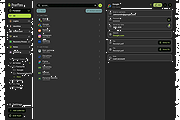 |
|
Strong Passwords Need Entropy v19.0 Strong Passwords Need Entropy v19.0 A free password strength and survivability checker, and a strong password generator. Features: • 16 rules to be respected when it comes to password policy and security • Password properties • Search passwords in worst list (10,032 passwords) • 12 different modules: - Guid - Mac adress - Random - Serial - Prononceable - Morse code - Emoticons - Cryptocode - Leetspeak - Hexspeak - Complex words - Piece of poetry Tools: - WPA2 key generator - Password versus Password - Pick up your pseudo - Hash detector Changes: Version 19.0 - Update from 23rd of May 2024 • Real-time data binding. The ‘Enter’ key is no longer required (section: Your password) • Better layout of certain elements • Improvement of design (certains modules) • Adding hashes: SHA-384, SHA-512 • Optimisation of certain features • Module Hexpseak: more entropy • Module Morse: more entropy • WPA2-PSK. Generate multi-keys • Many new complex words added in the module dictionary • Many new pseudos added • Before: MaxLength password 64. Now: Maxlength password 99 (certains modules) • New function: Add to list • Correction of minors bugs Use 7-Zip to unzip this file. Click here to visit the author's website. |
|
5,254 | May 27, 2024 ProtoSoftware 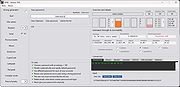 |
|
Yadabyte Passwords v1.0 Yadabyte Passwords v1.0 A very simple, local password manager. Features: • Very Secure AES 256 Encryption • Works from any USB Key, floppy, hard drive… • Simple Minimal Interface with “Nokia” browsing. • Unencrypted data is never stored anywhere • Includes portable Pocket PC version, that works seamlessly on the same Passwords file. Click here to visit the author's website. |
|
2,185 | Mar 06, 2023 Yadabyte  |
| Showing rows 1 to 8 of 8 | Showing Page 1 of 1 | 1 |
OlderGeeks.com Copyright (c) 2026
