|

|
Processed through Paypal No account required. |








Buy our over-priced crap to help pay the bills.



|
|
Processed through Paypal No account required. |
| Files | ||||
| File Name | Rating | Downloads | ||
 |
Mini Diarium v0.6.3 Mini Diarium v0.6.3 👉 An encrypted offline journal app for private daily writing. Mini Diarium is a private offline journal app designed for users who want to keep a personal diary without relying on cloud services, online accounts, or telemetry. It stores your entries locally in an encrypted SQLite database and encrypts each entry with AES-256-GCM before it is written to disk, helping keep your writing under your control. Mini Diarium is built for daily journaling with a rich text editor, auto-save, calendar navigation, writing statistics, automatic backups, and import/export tools. It can import from Mini Diary, Day One, and jrnl, and export your journal to JSON or Markdown so your data is never locked in. It also supports password-based protection and optional key file authentication for an added layer of security. Features: • Offline-only journal with no cloud, no telemetry, and no network calls • AES-256-GCM encryption for entries stored on disk • Local-first encrypted SQLite database storage • Rich text editor with bold, italic, headings, lists, spellcheck, and auto-save • Calendar navigation for quickly jumping between entry dates • Import support for Mini Diary JSON, Day One JSON and TXT, and jrnl JSON • Export support for JSON and Markdown • Automatic backups of the encrypted database • Writing statistics including word count, streaks, active days, and total entries • Optional key file authentication in addition to password-based access • Keyboard shortcuts for faster journal navigation • Open source under the MIT License Supported operating systems: • Windows • macOS • Linux Supported languages: English Changes: v0.6.3 07-27-26 This release completes the in-app navigation migration with header day controls and a ⋮ menu, adds timeline display preferences and a donation page, and fixes Linux spell check. Internally, the backend is now a three-crate open-core workspace with a sealed API faηade, and the Microsoft Store update pipeline is live. Added Website donation page: added a donation page at mini-diarium.com/donate/, reachable from ... |
 |
775 | Jul 29, 2026 Francisco J. Revoredo 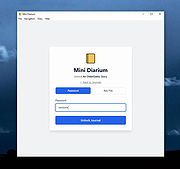 |
|
Mini Diary v3.0.0 Mini Diary v3.0.0 Simple and secure journal app Simple and intuitive Mini Diary features a beautiful and clean design with no distractions, letting you fully focus on your writing. Private and secure You're in control of your data. The journal is encrypted with a password and stored locally on your device. Portable Mini Diary makes it easy to import your existing journal from other apps or export your data in various file formats. Completely free and open source The app is and always will be free, and its source code can be viewed on GitHub. Features Light and dark themes Encryption Basic text formatting Full-text search Localization in multiple languages Statistics Import from various apps and formats Export to various formats (PDF, Markdown, etc.) This download is for the Windows version. If you need the MacOS version, download here. Changes: v3.0.0 Add spellchecking (#2, 7cf7f2e) Add word count to toolbar (#34, 10a3aa0) Add "Go to date" dialog (#57, 2153628) Move toolbar to bottom of editor (524e934) Add "First day of the week" option (#56, 6f68086) Add shortcuts for "Go to date" and "Go to today" (cc0561a) Improve word count accuracy (handling of punctuation marks and CJK characters, 70f1ddd) Enforce min/max dates (94f32e2) Fix "entries per week" count (bbdc84f) Various UI improvements Click here to visit the author's website. |
|
4,436 | Mar 10, 2020 Samuel Meuli 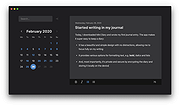 |
 |
Mini Inventory Control System v1.0.8 Mini Inventory Control System v1.0.8 A simple inventory control software where you can manage incoming products, outgoing products and the current quantity in your inventory. You must have Microsoft Office 2010 or newer installed on your computer to use this. You can manage your inventory and don’t need internet connection or SQL Server (Just Office installed on your PC). You can manage incoming products, outgoing products and the current quantity in your inventory. Also, you can record the location of the product, the price of every item and who put it into the system. If you need it, you can generate barcodes or QR codes to your product or packages. Requirements: You must have Microsoft Office 2010 or newer installed on your computer Windows 7 64bit or newer (OPTIONAL) Install .NET 6.0 Runtime for desktop apps (OPTIONAL) Install Microsoft Access Database Engine Changes: v1.0.8 Update background color Update Code Generator with new features Click here to visit the author's website. |
|
2,968 | Jul 05, 2023 Lextrack 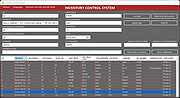 |
|
PHP Mini SQL Admin v1.9.240801 PHP Mini SQL Admin v1.9.240801 Lightweight alternative to heavy phpMyAdmin for quick and easy MySQL databases access. PHP Mini SQL Admin - Lightweight alternative to heavy phpMyAdmin. Extremely small (~30Kb) standalone php script. Easy to Install, simple to use. No SQL knowledge required for basic operations. Features • full MySQL support • extremely small (~42Kb) • just in one php file How to Install 1) Download phpminiadmin.php file (very bottom of page) 2) Copy/Upload it to your webserver public directory (www or public_html or etc.) 3) Open in your browser https://yoursite.com/phpminiadmin.php Recommended: For additional security you may edit phpminiadmin.php file and set some password (see $ACCESS_PWD variable) Dependencies: • The only required php extension is mysqli. Therefore if you got a white screen install it: • sudo apt-get install php-mysql on Debian or enable extension=php_mysqli.dll in php.ini on Windows Config file (optional) You can also create phpminiconfig.php in the same directory as phpminiadmin.php with database credentials or password. This way you can easily install future releases of phpminiadmin.php In the directory samples you'll find phpminiconfig.php for known OpenSource packages • See phpminiconfig.php for an empty example • See phpminiconfig.magento.php to read Magento its app/etc/local.xml ($ACCESS_PWD is required) • See phpminiconfig.sugarcrm.php to read SugarCRM its config.php ($ACCESS_PWD is required) • See phpminiconfig.wordpress.php to read Wordpress its wp-config.php ($ACCESS_PWD is required) • See phpminiconfig.vtiger.php to read Vtiger its config.inc.php ($ACCESS_PWD is required) IMPORTANT: Right-click on the download link below and choose to save the link. Otherwise you will just be opening the php file and that will not work. Click here to visit the author's website. |
 |
1,765 | Aug 02, 2024 Oleg Savchuk 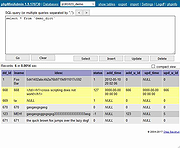 |
| Showing rows 1 to 4 of 4 | Showing Page 1 of 1 | 1 |
OlderGeeks.com Copyright (c) 2026
