|

|
Processed through Paypal No account required. |








Buy our over-priced crap to help pay the bills.



|
|
Processed through Paypal No account required. |
| Files | ||||
| File Name | Rating | Downloads | ||
 |
MAGDA v0.19.0 MAGDA v0.19.0 👉 Free, open-source DAW (Digital Audio Workstation) with AI-assisted music production. MAGDA is a free, open-source digital audio workstation designed for modern music creation, recording, editing, sound design, and live production workflows. Built using the JUCE framework and the Tracktion Engine, MAGDA combines traditional DAW functionality with advanced AI-assisted workflow tools to help musicians, producers, and creators work faster and more creatively. MAGDA features a flexible production environment with session, arrangement, and mixer views, allowing users to compose music, arrange clips, automate effects, and mix tracks using a streamlined interface. The application supports both audio and MIDI production and includes built-in instruments, modulation systems, automation lanes, plugin support, MIDI controller integration, and scripting capabilities. One of MAGDA’s standout features is its integrated AI assistant, which allows users to control parts of the DAW using natural language commands. Users can also access an embedded DSL console for advanced workflow customization and scripting. Additional tools such as the Drum Grid, Piano Roll editor, modulation rack, FAUST-powered effects bank, and macro systems provide deep sound-shaping and performance options for electronic music production, live performance setups, and studio recording. Features: • Multi-view workflow with session, arrangement, and mixer layouts • Hybrid tracks supporting both audio and MIDI content • AI-powered assistant with natural language interaction • Embedded DSL console for command execution and automation • Built-in 4OSC subtractive synthesizer instrument • Integrated Drum Grid with independent plugin chains per pad • Piano Roll editor with velocity, pitchbend, and MIDI CC editing • Advanced automation modes including Write, Touch, and Latch • Modulation system with LFOs, macros, curve shapers, and modulators • FAUST integration with built-in effects processing bank • Plugin scanning and plugin management support • Rack-based workflow for reusable instrument and effect chains • MIDI Learn support for rapid hardware controller mapping • Lua scripting support for two-way DAW protocols and customization • Session recording and clip launching workflow tools • ... |
 |
668 | Sep 22, 2026 Conceptual Machines 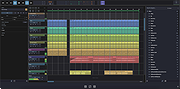 |
|
Midi Sheet Music for Linux Ubuntu 2.6 Midi Sheet Music for Linux Ubuntu 2.6 Midi Sheet Music is a free program that simultaneously: Converts MIDI Files to Sheet Music Plays MIDI music files Highlights the piano notes Highlights the sheet music notes Highlight the Sheet Music Highlight the piano notes Display the note letters Color-code the notes Select which MIDI tracks to play Split one MIDI track into two staffs Sheet Music Features Displaying sheet music from MIDI music files Printing the Sheet Music Saving the Sheet Music as PNG images or PDF file Displaying the note letters next to each note Displaying the notes in different colors Selecting which MIDI Tracks to display Combining MIDI Tracks into two staffs (left hand and right hand) for piano songs Adjusting the key signature, time signature, and measure length Transposing the notes up or down Displaying the measure numbers Playback Features Playing the MIDI music Highlighting the piano notes as the music is played back Highlighting the sheet music notes as the music is played back Adjusting the speed of the playback Selecting which MIDI Tracks to play Selecting the instruments to use for each MIDI Track Playing a subset of measures in a continuous loop What's new in version 2.6 Show list of recently opened MIDI files Support drag-and-drop of MIDI files Fix error where there's no sound (tracks are muted) Fix error where lyrics are ... |
 |
6,882 | Jan 04, 2016 Madhav Vaidyanathan 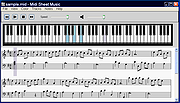 |
 |
Midi Sheet Music for Mac OS X 2.6 Midi Sheet Music for Mac OS X 2.6 Midi Sheet Music is a free program that simultaneously: Converts MIDI Files to Sheet Music Plays MIDI music files Highlights the piano notes Highlights the sheet music notes Highlight the Sheet Music Highlight the piano notes Display the note letters Color-code the notes Select which MIDI tracks to play Split one MIDI track into two staffs Sheet Music Features Displaying sheet music from MIDI music files Printing the Sheet Music Saving the Sheet Music as PNG images or PDF file Displaying the note letters next to each note Displaying the notes in different colors Selecting which MIDI Tracks to display Combining MIDI Tracks into two staffs (left hand and right hand) for piano songs Adjusting the key signature, time signature, and measure length Transposing the notes up or down Displaying the measure numbers Playback Features Playing the MIDI music Highlighting the piano notes as the music is played back Highlighting the sheet music notes as the music is played back Adjusting the speed of the playback Selecting which MIDI Tracks to play Selecting the instruments to use for each MIDI Track Playing a subset of measures in a continuous loop What's new in version 2.6 Show list of recently opened MIDI files Support drag-and-drop of MIDI files Fix error where there's no sound (tracks are muted) Fix error where lyrics ... |
|
6,742 | Jan 04, 2016 Madhav Vaidyanathan |
|
Midi Sheet Music for Windows 2.6 Midi Sheet Music for Windows 2.6 Midi Sheet Music is a free program that simultaneously: Converts MIDI Files to Sheet Music Plays MIDI music files Highlights the piano notes Highlights the sheet music notes Highlight the Sheet Music Highlight the piano notes Display the note letters Color-code the notes Select which MIDI tracks to play Split one MIDI track into two staffs Sheet Music Features Displaying sheet music from MIDI music files Printing the Sheet Music Saving the Sheet Music as PNG images or PDF file Displaying the note letters next to each note Displaying the notes in different colors Selecting which MIDI Tracks to display Combining MIDI Tracks into two staffs (left hand and right hand) for piano songs Adjusting the key signature, time signature, and measure length Transposing the notes up or down Displaying the measure numbers Playback Features Playing the MIDI music Highlighting the piano notes as the music is played back Highlighting the sheet music notes as the music is played back Adjusting the speed of the playback Selecting which MIDI Tracks to play Selecting the instruments to use for each MIDI Track Playing a subset of measures in a continuous loop What's new in version 2.6 Show list of recently opened MIDI files Support drag-and-drop of MIDI files Fix error where there's no sound (tracks are muted) Fix error where lyrics are not ... |
|
6,959 | Jan 04, 2016 Madhav Vaidyanathan |
|
MuseScore v4.7.4 MuseScore v4.7.4 👉 Free and open-source music notation and composition software. MuseScore is a powerful and easy-to-use music notation program designed for writing, editing, and printing sheet music. It provides composers, arrangers, teachers, and students with a complete environment for creating professional-quality scores. The program includes a flexible notation editor, playback with high-quality instrument sounds, and support for a wide range of musical symbols and notation standards. MuseScore allows users to input notes using a mouse, keyboard, or MIDI controller, and offers real-time playback so compositions can be heard while being written. Scores can be exported to a variety of formats including PDF, MusicXML, MIDI, and audio formats, making it easy to share music with others or use it in other music production tools. The software supports a broad range of musical styles and ensembles, from simple lead sheets and piano scores to full orchestral arrangements. MuseScore also integrates with the online MuseScore community where users can share scores, download music, and collaborate with other musicians around the world. Features: • Professional music notation editor with extensive symbol library • Note input via mouse, keyboard, or MIDI controller • Real-time playback with integrated soundfonts and instrument sounds • Support for multiple staves, voices, and complex score layouts • Import and export support for MusicXML, MIDI, PDF, audio, and more • Built-in mixer and playback controls for balancing instrument parts • Flexible layout tools for printing high-quality sheet music • Plugin support for extending functionality • Integration with the MuseScore online community for sharing scores Supported operating systems: • Windows 10, Windows 11 • macOS 12 Monterey or higher • Linux Supported languages: English, Arabic, Basque, Catalan, Chinese Simplified, Chinese Traditional, Czech, Danish, Dutch, Finnish, French, German, Greek, Hungarian, Indonesian, Italian, Japanese, Korean, Norwegian, Polish, Portuguese, Portuguese Brazilian, Romanian, Russian, Slovak, Spanish, Swedish, Turkish, Ukrainian, Vietnamese Changes: v4.7.4 07-07-26 New instruments This update adds the following instruments to the New Score dialog: ... |
|
7,804 | Jul 24, 2026 MuseScore BVBA 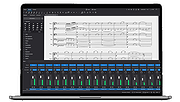 |
|
Opcode (Music Quest) Midi Engine 8 port/SE driver Opcode (Music Quest) Midi Engine 8 port/SE driver for Windows 95 & 98. 8portse.zip |
|
10,028 | Mar 28, 2009 Opcode (Music Quest) |
|
PolyHostInterface v3.1.1 PolyHostInterface v3.1.1 👉 A lightweight, portable Windows host for loading, chaining and controlling VST2 and VST3 audio plugins. PolyHostInterface is a standalone and VST3 plugin host designed for musicians, synthesizer programmers and audio users who want a compact way to load multiple instruments and effects without the overhead of a full DAW. Plugins are organized in tabs, with synths operating in parallel and effects arranged in a serial processing chain. The routing view provides an overview of each loaded plugin and lets you reorder, bypass, mute, solo and select individual tabs. PolyHostInterface can also operate as a VST3 plugin inside another host. Its 128 host-visible macros can be mapped to parameters of hosted plugins, allowing those parameters to be automated from a DAW. A built-in MIDI Monitor displays notes, CC messages, pitch bend, aftertouch, system messages and other incoming MIDI data, with filtering, copy and export capabilities. A distinctive feature is Pointer Control, which lets a MIDI controller manipulate the mouse pointer over a plugin interface. MIDI controls can move the pointer horizontally and vertically and adjust the parameter beneath it using scrolling or dragging. Editable Pointer Maps provide reusable jump points for individual plugins, including multiple maps for plugins with different skins, pages or layouts. The standalone application can record audio to WAV files or MIDI to MID files. Presets can store plugin configurations, and a missing-plugin repair function helps locate moved plugins when loading an existing preset. PolyHostInterface is fully portable, keeping its settings alongside the program instead of using AppData or the Windows Registry. Features: • Hosts multiple VST2 and VST3 plugins in a tabbed interface • Available as a standalone Windows application and a VST3 plugin for use inside other hosts • 64-bit VST2 and VST3 plugin support • Separate 32-bit standalone version supports 32-bit VST2/VST3 plugins • Routing view shows plugin order, synth/effect type, bypass ... |
|
91 | Oct 14, 2026 sl2365 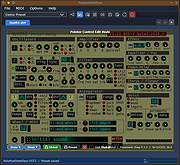 |
|
Q Light Controller+ v5.2.2/v4.14.4 Q Light Controller+ v5.2.2/v4.14.4 👉 Free, cross-platform DMX lighting control software for live shows, stage productions, DJs, and installations. Q Light Controller+ (QLC+) is a free and open source lighting control application designed to control DMX and analog lighting systems. It provides a complete lighting console environment with support for moving heads, dimmers, LED fixtures, scanners, RGB devices, and more. QLC+ includes tools for creating scenes, chasers, shows, virtual consoles, audio-triggered effects, and live playback, making it suitable for professional lighting designers, DJs, theaters, churches, clubs, and hobbyists alike. Version 5 features a redesigned interface and workflow, while the mature Version 4 branch continues to receive maintenance updates for users who prefer the classic interface. Features: • Control DMX and analog lighting systems • Create scenes, chasers, sequences, and complete lighting shows • Virtual Console with customizable buttons, sliders, cue lists, and widgets • Fixture editor with support for hundreds of lighting devices • Audio playback with synchronized lighting effects • Show Manager for timeline-based programming • RGB Matrix effects generator • MIDI, OSC, Art-Net, sACN (E1.31), and DMX input/output support • Audio beat detection and programmable lighting reactions • Support for multiple universes and external controllers • Scripting and automation capabilities • Cross-platform operation with identical project compatibility Supported operating systems: • Windows 10 or later • macOS 12 or later • Linux (Ubuntu/Debian 24.04 or equivalent, and other supported Linux distributions) Supported languages: • English, Italian, French, German, Spanish, Portuguese, Dutch, Russian, Czech, Polish, Turkish, Chinese (Simplified), Chinese (Traditional), Japanese, Korean, Hungarian, Finnish, Danish, Swedish, Norwegian, Greek, Romanian, Slovak, Slovenian, Ukrainian, Catalan, Basque, Galician, Arabic, Hebrew and additional community translations. Compatibility: https://qlcplus.org/discover/compatibility Tutorials: https://qlcplus.org/discover/tutorials Changes: v5.2.2 06-14-26 improve engine timer accuracy and universe composition efficiency (#1979) restore fixture remapping feature (including VC slider/xypad/audiotriggers) improve VC Animation widget to override RGB Matrix rather than modifying it add Show Manager cut/insert time ... |
|
3,140 | Jun 22, 2026 Massimo Callegari  |
| Showing rows 1 to 8 of 8 | Showing Page 1 of 1 | 1 |
OlderGeeks.com Copyright (c) 2026
