|

|
Processed through Paypal No account required. |








Buy our over-priced crap to help pay the bills.



|
|
Processed through Paypal No account required. |
| Files | ||||
| File Name | Rating | Downloads | ||
 |
MarkdownPad v2.5.0.27920 MarkdownPad v2.5.0.27920 Markdown is a text-to-HTML conversion tool for web writers. Markdown allows you to write using an easy-to-read, easy-to-write plain text format, then convert it to structurally valid XHTML (or HTML). The goal for Markdown’s formatting syntax is to be as readable as possible. A Markdown-formatted document should be publishable as-is, as plain text, without looking like it’s been marked up with tags or formatting instructions. In short, you can create beautiful HTML documents without knowing any HTML. Features: Instant HTML Preview Easy formatting with keyboard shortcuts Fully Customizable Use your own CSS HTML Export Distraction-free Mode MarkdownPad 2.5 Released Full Changelog: New Markdown Processor: CommonMark! CommonMark is a new Markdown processor aimed at unifying and standardizing the Markdown specification. Added: Task Lists support in the GitHub Flavored Markdown (Offline) processor. Added: Emoji support in the GitHub Flavored Markdown (Offline) processor. :smile::sparkles: Added: Option to customize how many spaces are inserted when the “Use spaces instead of tabs” feature is enabled under Tools → Options → Editor tab. Added: Customization of GitHub Flavored Markdown rendering mode (Enhanced: used in Pull Requests, Issues, and Comments; Standard: Used in READMEs). This option is available under Tools → Options → Markdown tab → Select “GitHub Flavored Markdown”, then locate “Markdown Rendering Mode”. New Language: Norweigan (Norway), thanks to Řystein Bjřrke! Improved: Command line arguments now persist across updates if manually triggering the update from the status bar. Improved: Timestamps in MarkdownPad should respect your locale/culture settings by default. These can still be customized under Tools → Options → Editor tab. Fixed: Code syntax highlighting was recently broken due to changes at GitHub. Fixed: When MarkdownPad was opened via command line, relative file paths ... |
 |
9,232 | Oct 16, 2019 Evan Wondrasek 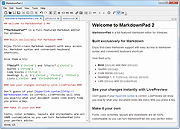 |
| Showing rows 1 to 1 of 1 | Showing Page 1 of 1 | 1 |
OlderGeeks.com Copyright (c) 2026
