|

|
Processed through Paypal No account required. |








Buy our over-priced crap to help pay the bills.



|
|
Processed through Paypal No account required. |
| Files | ||||
| File Name | Rating | Downloads | ||
 |
Battle for Wesnoth v1.18.7 Battle for Wesnoth v1.18.7 👉 A free, open source turn-based fantasy strategy game with deep campaigns, multiplayer battles, and extensive custom content. Battle for Wesnoth is an open source, turn-based tactical strategy game with a high fantasy theme. You build armies from a wide range of unit types, develop inexperienced recruits into seasoned veterans, and carry surviving units forward into later battles. The game features a large world of lore-rich campaigns, online and hotseat multiplayer, random and custom maps, and a built-in path for downloading additional community-made content. Features: • Turn-based tactical combat set in a high fantasy world • Large single-player experience with many story-driven sagas and adventures • Recruit units from a broad pool of specialists and match them to terrain and enemy types • Units gain experience and become stronger as they advance • Persistent veteran units can be recalled in later scenarios and campaigns • Online multiplayer and hotseat multiplayer support • Support for up to eight players in multiplayer battles • Dozens of multiplayer maps and many downloadable scenarios • Random map generation for added replay value • Fog of War for more strategic battlefield planning • Built-in map editor for creating custom battlefields • Powerful markup language for creating maps, factions, scenarios, and full campaigns • Hundreds of campaign scenarios available through the official add-ons server • Massive worldbuilding with hundreds of years of in-game history • Large roster with over three hundred unit types, twenty races, and six major factions • Free and open source software released under the GNU GPL • Strong community support with downloadable user-made content and ongoing updates • Broad cross-platform availability across major desktop operating systems Supported operating systems: • Windows 10 version 1903 or later, 64-bit only • macOS 10.12 or later • GNU/Linux distributions Supported languages: • Bahasa Indonesian, Chinese (Traditional), Chinese (Zhongwen), Czech, English (GB), English (US), Estonian, Finnish, French, Galician, German, Hungarian, Italian, Japanese, Polish, Portuguese, Portuguese (Brazil), Russian, Serbian, ... |
 |
7,556 | Apr 09, 2026 David White 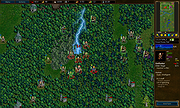 |
|
Enigeo v4.2.0 Enigeo v4.2.0 👉 Learn countries, capitals and flags with fun geography quizzes. Enigeo is a free geography learning program that helps you study countries, capitals, flags and national anthems around the world. You can answer questions in a highly customizable quiz mode or explore the world freely in explorer mode to learn about different countries. Features: • Two modes: quiz mode and explorer mode • Highly customizable geography quizzes • Choose between different types of questions • Limit quizzes by continent • Limit quizzes by country area or population • Detailed quiz statistics and highscores • Question types include country name, capital, map position, flag and national anthem • Free to use Supported operating systems: • Windows 11, Windows 10, Windows 8.1, Windows 8, Windows 7, Windows Vista, Windows XP, Windows 2000 Supported languages: English, German, Italian, Spanish, Chinese (simplified), Chinese (traditional), Polish, French, Swedish, Portuguese, Russian, Czech, Tagalog, Vietnamese, Greek Changes: v4.2.0 - Added Kosovo and Palestine (marked as disputed) - Updated the name of North Macedonia - Updated the name of Eswatini in some languages - Updated the capital of Burundi - Updated the capital of Kazakhstan - Updated the capital of Palau - Changed the capital of Sri Lanka to Sri Jayawardenepura Kotte - Updated the flag of Malawi - Updated the flag of Mauritania - Updated the flag of Afghanistan - Corrected several other flags - Updated several links to Wikipedia - Updated area and population data for all countries - Updated Portuguese translation - Fixed a bug that could cause enigeo to crash Click here to visit the author's website. |
|
594 | May 29, 2026 enigeo-Team 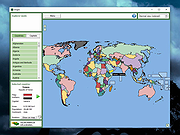 |
 |
HateArena v0.0.3 HateArena v0.0.3 👉 A fast-paced multiplayer and singleplayer arena shooter built on the Cube engine. HateArena is a free and open source arena FPS focused on speed, movement and classic deathmatch-style combat. Built from the original Cube engine, it offers wall-jumping, shotgun-boosting, Quake-style ground blasts, bots, dedicated server support, modernized visuals and a built-in map editor for creating and editing arenas. Features: • Fast-paced multiplayer and singleplayer arena shooter gameplay • Built on the original Cube engine • Wall-jumping, forward boosts and recharge-based movement • Quake-style ground blasts and shotgun-boosting combat • Deathmatch, team deathmatch and infected game modes • Server-side bots for offline or low-player matches • Master server support and dedicated game server support • Modern HUD with animations and TrueType font support • Native 1080p renderer with god rays, FXAA, MSAA, bloom and improved shading • MD2 model support with MD3 support in progress • Built-in map editor with texture eyedropper, mass select and cube editing • RCON/server administration support including ban, kick, list and maxping options • Dynamic crosshair and improved scoreboard rendering • GPL-3.0 free and open source license Supported operating systems: • Windows x64 • Linux x86_64 • macOS arm64 Supported languages: English Changes: v0.0.3-b 06-11-26 Improved server stability with numerous networking and packet handling fixes. Added macOS compatibility improvements and app bundle generation. Added initial Windows build support with additional Windows-specific fixes. Migrated the project to a CMake-based build system with automated release workflows. Improved server-side bots by fixing memory corruption and buffer overflow issues. Updated player assets, including retextured player models and improved glow effects. Added weapon and gameplay fixes, including improved ammo switching behavior. Improved water visual effects and sound handling. Enhanced server administration and intermission behavior. Updated documentation, packaging and build scripts with numerous maintenance improvements. This download is for the Windows version (very bottom of page). If you need the macOS version, download here. If you need the Linux version, download here. Click here to visit the author's website. |
|
522 | Jun 19, 2026 endseven 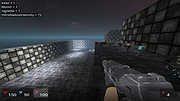 |
|
Inkscape v1.4.4 Inkscape v1.4.4 👉 Professional quality vector graphics editor for illustrations, logos, diagrams, icons, maps and web graphics. Inkscape is a free and open source vector graphics editor that uses SVG as its native file format. It is built for creating and editing scalable artwork such as illustrations, icons, logos, diagrams, maps, charts, technical drawings, line art and web graphics. Features: • Create and edit SVG vector graphics • Draw with pencil, pen and calligraphy tools • Use rectangles, ellipses, stars, polygons, spirals and 3D boxes • Edit paths and nodes with precision • Boolean path operations including union, difference, intersection and exclusion • Layers and object organization • Text tools with text on path support • Gradients, patterns, markers, clones, clipping and masking • Bitmap tracing for converting raster images to vector paths • Import and export many common vector and image formats • PDF import and export support • Extensions and command line options for advanced workflows Supported operating systems: • Windows 10, Windows 11, Windows on Arm • macOS • Linux Supported languages: English, Basque, Brazilian Portuguese, Bulgarian, Croatian, Dutch, Finnish, French, German, Hebrew, Hungarian, Italian, Latvian, Polish, Portuguese, Romanian, Russian, Simplified Chinese, Slovenian, Spanish, Swedish, Traditional Chinese, Ukrainian, Vietnamese Changes: v1.4.4 05-06-26 Maintenance and bugfix release. 20 crash fixes. More than 25 bug fixes and performance improvements. A couple small new features. 26 updated translations. First release to provide packages for Windows on Arm. Faster zooming in documents with many paths. Faster copy and paste of large numbers of objects with gradients. Faster Layers and Objects dialog when many objects are selected. Faster Object Properties dialog when selecting paths. Faster Gradient Tool editing. New button to rotate selected stars or polygons into an upright position. Added Elementary OS color palette. Fixed multiple crashes involving startup, recent files, graphics tablets, pages, PDF files, broken SVG markers, export dialog use, raster image sizing, Tweak tool, Connector Tool, PowerStroke Live Path Effect, Corners Live Path Effect, gradients, Break Apart and raster tracing. Windows on Arm builds ... |
|
7,859 | May 07, 2026 Inkscape  |
|
Scancode Map v1.11 Scancode Map v1.11 An easy, portable tool to re-map your keyboard keys. From the author: "It all stated by me getting annoyed with F1 key. As it is only a registry change, I did it manually; easy enough. But then I got another laptop that had no context key (damn you HP). So I remapped Right Alt to Context menu. But I also wanted F1. And for my media computer with a strange small keyboard, I wanted to do other mappings too. Quite soon it was obvious that I might as well create application instead of calculating mappings by hand. This application gives you ability to remap any hardware key to another using the Scancode Map registry value. Once configuration is written (and computer rebooted), application doesn’t need to be running for mapping to work. Additionally, if you want to use manual mapping, it is useful to get scancode information for a key and there is standalone Scancode Viewer included too." Changes: 1.11 (2019-11-17) Using TLS 1.3 for upgrade and feedback. Click here to visit the author's website. |
|
3,477 | Apr 12, 2021 Josip Medved 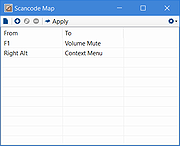 |
| Showing rows 1 to 5 of 5 | Showing Page 1 of 1 | 1 |
OlderGeeks.com Copyright (c) 2026
