|

|
Processed through Paypal No account required. |








Buy our over-priced crap to help pay the bills.



|
|
Processed through Paypal No account required. |
| Files | ||||
| File Name | Rating | Downloads | ||
 |
LibreOffice Portable v26.2.4 LibreOffice Portable v26.2.4 👉 LibreOffice Portable can run from a cloud folder, external drive, or local folder without installing into Windows. LibreOffice Portable is a full-featured office suite -- including a word processor, spreadsheet, presentation tool, drawing package and database -- that's compatible with Microsoft Office, Word Perfect, Lotus and other office applications. It's easy-to-use and feature-rich, performing nearly all of the functions you'd expect in an office suite, but at no cost. Additional functionality including the Base database and document creation wizards is enabled by installing the jPortable portable Java runtime environment. Features: • Portable version runs without installation from USB or external drive • Includes Writer (word processor), Calc (spreadsheet), Impress (presentations), Draw (vector graphics), Base (database), and Math (formula editor) • Compatible with Microsoft Office file formats (DOCX, XLSX, PPTX) • Supports OpenDocument Format (ODF) as its native standard • Built-in PDF export and document signing • Extensive formatting, styles, and templates for professional documents • Macro support and scripting for automation • Extensions and add-ons available to expand functionality • Multi-language interface and spellchecking support • Cross-platform compatibility with consistent interface • Offline use with no cloud dependency • Regular updates from The Document Foundation Supported operating systems: Windows 7, 8, 10, 11 and WINE Supported languages: English, Afrikaans, Albanian, Amharic, Arabic, Armenian, Assamese, Asturian, Azerbaijani, Basque, Belarusian, Bengali, Bosnian, Breton, Bulgarian, Burmese, Catalan, Chinese (Simplified), Chinese (Traditional), Croatian, Czech, Danish, Dutch, Dzongkha, English (UK), Esperanto, Estonian, Finnish, French, Galician, Georgian, German, Greek, Gujarati, Hebrew, Hindi, Hungarian, Icelandic, Indonesian, Irish, Italian, Japanese, Kannada, Kazakh, Khmer, Korean, Kurdish, Lao, Latvian, Lithuanian, Macedonian, Maithili, Malayalam, Marathi, Mongolian, Nepali, Norwegian (Bokmεl), Norwegian (Nynorsk), Occitan, Odia, Persian, Polish, Portuguese, Portuguese (Brazil), Punjabi, Romanian, Russian, Sanskrit, Scottish Gaelic, Serbian (Cyrillic), Serbian (Latin), Sinhala, Slovak, Slovenian, Spanish, Swedish, Tamil, Telugu, Thai, Tibetan, Turkish, Ukrainian, Urdu, Uyghur, Uzbek, Vietnamese, Welsh Writer Edit all kinds of documents Writer has all the features you need ... |
 |
9,500 | Jul 26, 2026 The Document Foundation & PortableApps.com 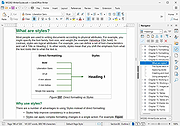 |
|
LibreOffice Productivity Suite v26.8.0 LibreOffice Productivity Suite v26.8.0 👉 Free and powerful open-source office suite for documents, spreadsheets, presentations, and more. LibreOffice is a full-featured, open-source productivity suite that includes applications for word processing, spreadsheets, presentations, drawings, databases, and mathematical formulas. Designed as a powerful alternative to commercial office software, LibreOffice offers broad file format compatibility, including native support for OpenDocument Format (ODF) and strong interoperability with Microsoft Office file types. LibreOffice includes Writer for documents, Calc for spreadsheets, Impress for presentations, Draw for vector graphics and diagrams, Base for database management, and Math for formula editing. It provides a customizable interface, extensive template support, advanced formatting tools, and a large extension ecosystem to expand functionality. Writer Edit all kinds of documents Writer has all the features you need from a modern, full-featured word processing and desktop publishing tool. It's simple enough for a quick memo, but powerful enough to create complete books with contents, diagrams, indexes, and more. You're free to concentrate on your message, while Writer makes it look great. Calc The spreadsheet for everyone Calc is the free spreadsheet program you've always needed. Newcomers find it intuitive and easy to learn, while professional data miners and number crunchers appreciate the comprehensive range of advanced functions. Built-in wizards guide you through choosing and using a comprehensive range of advanced features. Or you can download templates from the LibreOffice template repository, for ready-made spreadsheet solutions. Impress Presentations done right In Impress, creating and editing slides is very versatile thanks to different editing and view modes: Normal (for general editing), Outline (for organizing and outlining your text content), Notes (for viewing and editing the notes attached to a slide), Handout (for producing paper-based material), and Slide Sorter (for a thumbnail sheet view that lets you quickly locate and order your slides). Draw Eye-popping graphic documents Draw lets you produce anything from a quick sketch to a complex plan, and ... |
|
12,590 | Aug 30, 2026 The Document Foundation |
 |
Lilidog v26.06.05 Lilidog v26.06.05 👉 Lightweight Debian Trixie-based Linux distro using the Openbox desktop environment. Lilidog is a lightweight, full-featured Linux distribution based on Debian Trixie. It uses the Openbox window manager with tint2, Thunar, xfce4-terminal, custom themes, useful desktop tools, and a ready-to-use selection of applications. Lilidog is designed to stay fast and simple while still offering a polished daily-driver desktop experience. The Lilidog Trixie build includes a polished Openbox desktop, welcome utilities, theme customization tools, application installers, and a carefully selected software package lineup intended to provide a fast yet comfortable Linux experience. Features: • Based on Debian Trixie • Lightweight Openbox desktop environment with tint2 panel integration • Includes Firefox web browser and LibreOffice productivity suite • Ships with Geany text editor and xfce4-terminal • Thunar file manager with custom right-click actions • Jgmenu application launcher with desktop customization support • Fastfetch and inxi system information utilities included • Optional window managers available through built-in installer scripts • Theme switching tools for icons, GTK themes, cursors, and wallpapers • Welcome utility providing quick access to setup and maintenance tools • Optional software installers for Ghostty, VirtualBox, Snap, Google Earth, and more • Picom compositor support with transparency and visual effects • Conky chooser with multiple desktop monitoring layouts • Dunst notification system integration • Audio and multimedia playback support included • Debian package compatibility with apt package management • Lightweight resource usage suitable for older and modern hardware • Custom desktop scripts and utilities for daily system management Supported operating systems: • Linux x86_64 Supported languages: English Changes: v26.06.05 06-05-26 Updated Lilidog Trixie ISO build. README.md updated for this release. Create bootable USB flash drive: Use Rufus or Live-usb-maker to create a bootable flash drive. Click here to visit the author's website. |
|
2,813 | Jun 09, 2026 sleekmason 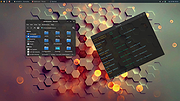 |
 |
StaticDesktopRuler v1.06 StaticDesktopRuler v1.06 👉 Add customizable on-screen guide rulers that make it easy to visually follow rows, columns, and align desktop objects. StaticDesktopRuler is a free, portable desktop utility that places one or more customizable rulers on your screen as visual reference guides. Its primary purpose is not measuring distances, but making it easier to keep your eyes on the correct row or column while working with large spreadsheets, databases, documents, source code, CAD drawings, image editors, and other information-dense applications. As shown in the example below, horizontal and vertical rulers can be positioned over a worksheet so you can instantly locate the exact cell where a row and column intersect, dramatically reducing the chance of reading or entering data on the wrong line. Each ruler can be customized with its own color, thickness, transparency, and ghost mode, allowing the guides to remain visible without blocking the content beneath them. Because it is portable, StaticDesktopRuler can be launched anywhere without installation. Features: • Place multiple horizontal and vertical guide rulers anywhere on the desktop • Easily follow spreadsheet rows and columns to the correct cell intersection • Reduce reading and data-entry mistakes in large worksheets and tables • Keep your place while reading databases, documents, logs, and source code • Customize each ruler's color, thickness, and transparency • Ghost mode keeps guides visible while allowing you to see and work through them • Portable application requiring no installation • Lightweight and uses very little system resources Supported operating systems: • Windows 7, Windows 8, Windows 8.1, Windows 10, Windows 11, Windows Server 2012, Windows Server 2016, Windows Server 2019, Windows Server 2022 Supported languages: • German, English, Traditional Chinese, Korean, French, Russian, Italian, Japanese, Spanish, Portuguese Changes: v1.06 08-26-26 • StaticDesktopRuler language file update • Minor fine-tuning in StaticDesktopRuler for all Windows operating systems. 👉 This download is for the Windows portable version (very bottom of page). All other download ... |
|
613 | Oct 04, 2026 Nenad Hrg 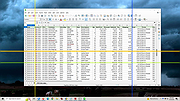 |
| Showing rows 1 to 4 of 4 | Showing Page 1 of 1 | 1 |
OlderGeeks.com Copyright (c) 2026
