|

|
Processed through Paypal No account required. |








Buy our over-priced crap to help pay the bills.



|
|
Processed through Paypal No account required. |
| Files | ||||
| File Name | Rating | Downloads | ||
 |
Large System Tray Clock v1.0.0.4 Large System Tray Clock v1.0.0.4 Replace the original clock in the Windows System Tray with a larger one to improve visibility. Large System Tray Clock also includes several accessibility features related to clock visibility. Microsoft provides very few customization options for the appearance of the Windows 10/11 system tray clock. There are also no accessibility settings available for customizing its appearance. The idea for the Large System Tray Clock came from a few visually impaired users who requested a highly visible clock that could replace the default system tray clock. Features: • The Large System Tray Clock appears in the notification area of the taskbar. This ensures that the large, easy-to-read clock is always available. In full-screen mode (e.g., YouTube videos), the clock remains hidden together with the taskbar. • All taskbar functions remain available. When necessary, the clock hides automatically and reappears after a user-defined delay. • Besides taskbar mode, the software can display the clock in the screen corners or in full-screen mode. • The Large System Tray Clock is completely free to use and contains no restrictions. It does not collect data, display advertisements, or perform any harmful background operations. • The software consists of a single executable file (largetrayclock.exe) and does not require installation. Clock Display Components: • System Tray: The clock displayed in the taskbar notification area. You can customize the font, font size, and horizontal position. By default, the clock uses the full width of the notification area. When the mouse cursor is placed above the taskbar, the clock hides for a short (configurable) time, making the entire notification area accessible. • Full Screen: After a configurable period of inactivity, the clock appears in full-screen mode. Full-screen mode can be disabled or adjusted. ... |
 |
1,132 | Dec 28, 2025 Peter Panisz  |
 |
Large Text File Viewer 5.2 Large Text File Viewer 5.2 Have you ever felt frustrated when you just want to look at the content of a large text file but it takes forever for Notepad or Word to open it? This program was designed for viewing large (>1GB) text files. It uses little memory and is able to open a gigabyte file instantly. Background file indexing makes browsing even faster. It opens files that are currently being written by other programs, and automatically checks and reads the files if new contents have been appended. It supports view split. The user may split the view either horizontally or vertically, and have each side show different portion of the same file. It allows the user to perform high-speed complex text search by means of plain text or regular expression. The regular expression syntax is slightly different from the standard ones. Please click here for details. The regular expressions for finding the following items have been provided as preset for the convenience of the users: quoted string hexadecimal integer floating-point number date of any format time of any format domestic phone number (US & Canada) social security number IP address email address http address ftp address ... |
|
6,172 | Oct 23, 2019 swiftgear.com 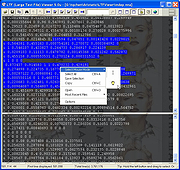 |
|
PilotEdit Lite v21.5.0 PilotEdit Lite v21.5.0 👉 Free text and hex editor designed for working with large files and advanced text processing tasks. PilotEdit Lite is a lightweight yet powerful text and source code editor built for users who need to handle large files, perform advanced search and replace operations, edit hex data, and manage coding projects efficiently. The Lite edition provides many of the core editing and file management tools found in the full version while remaining free for personal use. It is especially useful for programmers, web developers, log file analysis, and anyone working with very large text files that standard editors may struggle to open or process smoothly. Features: • Open and edit large text files • Syntax highlighting for multiple programming languages • Hex editor mode for binary file editing • Advanced multi-line search and replace • Column mode editing • Regular expression support • File compare functionality • FTP and SFTP file transfer support • Unicode and UTF-8 support • Customizable text encoding options • Line sorting and duplicate removal tools • Powerful file search across directories • Bookmark support for quick navigation • Word wrap and split window editing • Configurable keyboard shortcuts • Session and workspace management • Automatic file backup support • Portable version available Supported File Types: AHK Script, ASP, ASP.NET, AngularJS TypeScript, Apache Pig Latin Script, Assembly, AutoIt Script, BAT/CMD, C#, C/C++, COBOL, CSS, CSV, Conf, D Programming, DSV, Eiffel, Erlang, F#, Go, Groovy, HTML, Haskell, INF, INI, Inno Setup Script, J#, JSON, JSP, Java, Javascript, LESS, LISP, LaTex, Log, Lua, MATLAB, Markdown, MicroBasic Pro, PHP, Pascal, Perl, PilotEdit Script, PowerShell Script, Python, R Programming, REXX, RHTML, Ruby, SQL, Scala, TCL/TK, TSV, Text, Textile, UNIX/Linux Shell, VC++ Resource, Visual Basic, XHTML, XML Supported operating systems: • Windows 7, Windows 8, Windows 10, Windows 11, Windows Server 2008, Windows Server 2012, Windows Server 2016, Windows Server 2019, Windows Server 2022 Supported languages: Arabic, Dutch, English, Finnish, French, German, Hindi, Italian, ... |
|
9,966 | Oct 07, 2026 PilotEdit 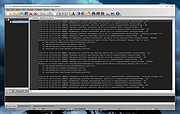 |
|
TED Notepad v6.4.1 TED Notepad v6.4.1 👉 Small, fast and powerful plain-text editor packed with advanced text-processing tools. TED Notepad is a free plain-text editor and Notepad replacement for Windows, built for users who want speed, portability and serious text manipulation without a bulky interface. It includes hundreds of tools for editing, sorting, filtering, transforming, searching and cleaning text, while staying small, quick to launch and easy to carry as a portable utility. Features: • Free, small and portable text editor with no installation required • New 64-bit version for working with very large files • Tested with huge files, including multi-gigabyte documents • 457 text-processing functions and editor features • Grep, Sort, Cut, Unique, RegEx, Shuffle, Tr and Reverse tools • Search and replace with regular expressions • Selection and search match highlighting • Search and Replace history • Line numbers, line lengths and visible spaces/tabs/newlines • Multi-level Undo and Redo • Auto-save, recovery and backup options • UTF-8 and Unicode auto-recognition • Multiple permanent clipboards and clipboard append tools • Word and line auto-completion • Portable INI file settings Supported operating systems: • Windows 11, Windows 10, Windows 8, Windows 7, Windows Vista, Windows XP, Windows Server 2008, Windows Server 2003, Windows 2000 Supported languages: English Changes: v6.4.1 06-04-26 Introducing a 64-bit version. Added selection highlighter for all occurrences of selected text. Added settings for minimum selection length, match case and highlighter color. Added search highlighter for all Search Bar matches. Added total occurrence count in the Search Bar. Added Search history and Replace history. Added positive and negative look-ahead and look-behind assertions in Regular Expressions. Added setting to include seconds when inserting date/time. Added setting to disable the "Exit without saving" hotkey. Added Session Hard to Close option. Fixed multiple Search Bar, RegEx, Grep, Filters, Sort, Columns, Status Bar and clipboard issues. Improved Unicode file detection, DPI awareness, search routines, clipboard handling and settings validation. This download is for the Windows Unicode 64bit Installer version (very bottom of page). All other download assets are ... |
|
6,175 | Jun 09, 2026 Medvedik, Juraj Simlovic 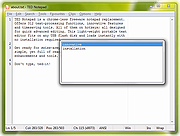 |
| Showing rows 1 to 4 of 4 | Showing Page 1 of 1 | 1 |
OlderGeeks.com Copyright (c) 2026
