|

|
Processed through Paypal No account required. |








Buy our over-priced crap to help pay the bills.



|
|
Processed through Paypal No account required. |
| Files | ||||
| File Name | Rating | Downloads | ||
 |
Bluefin v20261006 Bluefin v20261006 👉 A modern Fedora-based Linux workstation built for everyday use and cloud-native development. Bluefin is a next-generation Linux desktop operating system based on Fedora Atomic and the Universal Blue project. It is designed to provide a stable, secure, and maintenance-friendly workstation experience while still offering modern development tools, gaming support, multimedia features, and a polished GNOME desktop environment. Unlike traditional Linux distributions that rely heavily on manual package management and upgrades, Bluefin uses an immutable image-based system architecture. This allows the operating system to update atomically, reducing the risk of broken updates and making system recovery significantly easier through built-in rollback capabilities. Bluefin is focused on delivering an “install and use” Linux experience with many essential tools already configured. The system integrates Flatpak applications, Homebrew package management, containerized development environments, and modern virtualization technologies directly out of the box. It also includes developer-oriented workflows for Docker, Podman, devcontainers, and cloud-native software development. Features: • Fedora Atomic based immutable operating system • Built on Universal Blue technology stack • Modern GNOME desktop environment with user-friendly layout • Separate standard images for AMD/Intel graphics and NVIDIA graphics hardware • Atomic image-based updates with rollback support • Automatic operating system updates and maintenance • Integrated Flatpak application ecosystem with Flathub support • Homebrew package manager preconfigured for command-line software • Developer-ready environment with container-first workflows • Built-in Podman and Docker support • Devcontainer and cloud-native development integration • Distrobox support for running software from other Linux distributions • Tailscale support for secure mesh networking • WireGuard VPN tools included • Virtualization and container management support • Optimized multimedia codec support • Secure Boot compatible • Wayland-based modern graphics stack • Gaming-friendly Mesa and NVIDIA driver support • Integrated terminal enhancements including Starship prompt • Flatpak management utilities included • Rollback functionality for safer upgrades and experimentation • Designed for developers, power users, creators, and advanced desktop users • Minimal manual maintenance required after installation • Fast deployment and recovery ... |
 |
1,116 | Oct 08, 2026 Project Bluefin and Universal Blue  |
 |
Core Temp v1.21 Core Temp v1.21 👉 Compact CPU monitoring utility for tracking processor temperatures, loads and other vital information. Core Temp is a small, lightweight processor monitoring utility designed to display the temperature of each individual CPU core in real time. It reads the Digital Thermal Sensors built into modern Intel, AMD and VIA x86 processors, providing accurate temperature information directly from the processor rather than relying on motherboard sensors. It can also display processor model information, frequencies, load levels, power-related data and minimum, maximum and average temperature readings. Core Temp offers customizable notification-area monitoring, logging, Mini-Mode and support for plug-ins that can extend its functionality. Features: • Monitors the temperature of individual CPU cores in real time • Reads temperatures directly from the processor's Digital Thermal Sensors • Supports Intel, AMD and VIA x86 processors • Displays processor identification and model information • Shows individual core load information • Displays processor frequency information • Tracks minimum, maximum and average temperature readings • Provides configurable notification-area sensor displays • Includes a battery status indicator for the notification area • Includes a compact Mini-Mode display • Adjustable user-interface zoom • Can log processor temperature and monitoring information • Supports multiple processors and multiple cores • Motherboard-independent temperature monitoring • Provides shared-memory data for other applications • Supports plug-ins and add-ons for expanded functionality • Lightweight design with a small system footprint Supported operating systems: • Windows XP, Windows 7, Windows 8, Windows 8.1, Windows 10, Windows 11 • Windows Server 2003, Windows Server 2008, Windows Server 2012, Windows Server 2016, Windows Server 2019, Windows Server 2022, Windows Server 2025 Supported languages: English, Abkhaz, Armenian, Bulgarian, Simplified Chinese, Traditional Chinese, Catalan, Czech, Danish, Dutch, Finnish, French, Galician, German, Greek, Hebrew, Hungarian, Italian, Japanese, Korean, Norwegian, Polish, Portuguese, Romanian, Russian, Slovak, Slovenian, Spanish, Swedish, Turkish, Ukrainian, Vietnamese Changes: v1.21 10-03-26 - New: Redesign the notification tray configuration dialog. Should now be more intuitive and flexible. - Fix: Notification tray icons issues; missing ... |
|
5,444 | Oct 14, 2026 Arthur Liberman 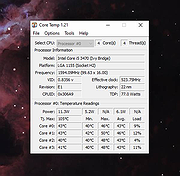 |
|
GIGABYTE Intel ME Critical FW Update Utility vB18.0125.1 GIGABYTE Intel ME Critical FW Update Utility vB18.0125.1 GIGABYTE TECHNOLOGY Co. Ltd, a leading manufacturer of motherboards and graphics cards, has implemented safety measures aligned with Intel®’s response to the Intel Management Engine (ME) and Intel Trusted Execution Engine (TXE) security vulnerabilities, so customers can be reassured their motherboards are fully protected. For all customers who have purchased GIGABYTE motherboards for Intel platforms, please visit the official website to download the latest BIOS versions as well as ME and TXE drivers. The updates for the motherboards will be released starting with the Z370, 200 and 100 series and then previous generation motherboards. GIGABYTE has released a safety update for the user’s convenience. The GIGABYTE Intel ME Critical FW Update Utility on the GIGABYTE website will automatically detect the system's ME version and update it to the latest version. |
|
6,209 | Nov 13, 2019 Gigabyte  |
|
Intel 82801DBM AC\'97 ICH4-M Audio Controller Driver Intel ICH4-M 82801DBM SigmaTel STAC9767 Codec Driver for Windows XP |
 |
10,132 | Jul 17, 2009 Intel |
 |
Intel Extreme Tuning Utility v7.14.2.14 Intel Extreme Tuning Utility (Intel XTU) v7.14.2.14 Overclock, monitor, and stress a system. Intel XTU is a Windows-based performance-tuning software that enables novice and experienced enthusiasts to overclock, monitor, and stress a system. The software interface exposes a set of robust capabilities common in most enthusiast platforms along with new features available on new Intel® application processors and Intel® motherboards. Supported operating systems: Windows 11* (23H2), Windows 11* (22H2), Windows 11* (21H2), Windows 10* (22H2) This download is valid for the product(s) listed below. Intel® Core™ i9-12950HX Processor (30M Cache, up to 5.00 GHz) Intel® Core™ i9 processor 14900KS (36M Cache, up to 6.20 GHz) Intel® Core™ i9 processor 14900HX (36M Cache, up to 5.80 GHz) Intel® Core™ i7 processor 14700HX (33M Cache, up to 5.50 GHz) Intel® Core™ i7 processor 14650HX (30M Cache, up to 5.20 GHz) Intel® Core™ i5 processor 14450HX (20M Cache, up to 4.80 GHz) Intel® Core™ i5 processor 14500HX (24M Cache, up to 4.90 GHz) Intel® Core™ i9 processor 14900KF (36M Cache, up to 6.00 GHz) Intel® Core™ i9 processor 14900K (36M Cache, up to 6.00 GHz) Intel® Core™ i7 processor 14700KF (33M Cache, up to 5.60 GHz) Intel® Core™ i7 processor 14700K (33M Cache, up to 5.60 GHz) Intel® Core™ i5 processor 14600KF (24M Cache, up to 5.30 GHz) Intel® Core™ i5 processor 14600K (24M Cache, up to 5.30 GHz) Intel® Core™ i7-12650HX Processor (24M Cache, up to 4.70 GHz) Intel® Core™ i7-12800HX Processor (25M Cache, up to 4.80 GHz) Intel® Core™ i7-12850HX Processor (25M Cache, up ... |
|
12,299 | Jul 23, 2024 Intel 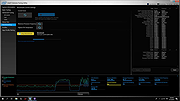 |
 |
Intel Processor Diagnostic Tool v4.1.9.41 Intel Processor Diagnostic Tool v4.1.9.41 The purpose of the Intel® Processor Diagnostic Tool is to verify the functionality of an Intel® microprocessor. The diagnostic tool checks for brand identification, verifies the processor operating frequency, tests specific processor features, and performs a stress test on the processor. Supported Operating Systems: Windows Server 2012 R2 family, Windows 8 family, Windows 8.1 Family, Windows Server 2016 family, Windows Server 2019 family, Windows 10 Family, Windows 11 Family This download is valid for the product(s) listed below. Intel® Core™ i9-12950HX Processor (30M Cache, up to 5.00 GHz) Intel® Core™ i9-12900KF Processor (30M Cache, up to 5.20 GHz) Intel® Core™ i9-12900T Processor (30M Cache, up to 4.90 GHz) Intel® Core™ i9-12900HX Processor (30M Cache, up to 5.00 GHz) Intel® Core™ i9-12900F Processor (30M Cache, up to 5.10 GHz) Intel® Core™ i9-12900 Processor (30M Cache, up to 5.10 GHz) Intel® Core™ i9-12900K Processor (30M Cache, up to 5.20 GHz) Intel® Core™ i9-12900KS Processor (30M Cache, up to 5.50 GHz) Intel® Core™ i9-12900HK Processor (24M Cache, up to 5.00 GHz) Intel® Core™ i7-12850HX Processor (25M Cache, up to 4.80 GHz) Intel® Core™ i7-12700T Processor (25M Cache, up to 4.70 GHz) Intel® Core™ i7-12700KF Processor (25M Cache, up to 5.00 GHz) Intel® Core™ i7-12700F Processor (25M Cache, up to 4.90 GHz) Intel® Core™ i7-12700 Processor (25M Cache, up to 4.90 GHz) Intel® Core™ i7-12700K Processor (25M Cache, up to 5.00 GHz) Intel® Core™ i7-12650H Processor (24M Cache, up to 4.70 GHz) Intel® Core™ i7-12800HX Processor (25M Cache, up ... |
|
3,026 | Jan 16, 2024 Intel 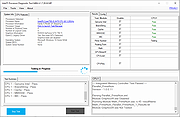 |
|
Intel Processor Identification Utility 5.25 Intel Processor Identification Utility 5.25 This utility is designed to identify current Intel® Processors and technologies, and enables you to run and save a processor ID report. The utility also features a frequency test to make sure that the processor is working at the rated speed. Operating System: Windows XP Professional x64 Edition*, Windows Server 2003 Standard x64 Edition*, Windows Server 2003 Enterprise x64 Edition*, Windows Vista *, Windows Server 2008 *, Windows 7 *, Windows 2000 *, Windows 8*, Windows 8.1*, Windows XP Professional*, Windows XP Home Edition*, Windows Server 2003 Standard Edition* This applies to: Intel® Atom™ Processor Intel® Core™ Duo Processor Intel® Core™ i3 Desktop Processor Intel® Core™ i3 Mobile Processor Intel® Core™ i5 Mobile Processor Intel® Core™ i7 Mobile Processor Intel® Core™ i7 Mobile Processor Extreme Edition Intel® Core™ i7 Processor Extreme Edition Intel® Core™ M Processors Intel® Core™ Solo Processor Intel® Core™2 Duo Desktop Processor Intel® Core™2 Duo Mobile Processor Intel® Core™2 Extreme Mobile Processor Intel® Core™2 Extreme Processor Intel® Core™2 Quad Mobile Processor Intel® Core™2 Quad Processor Intel® Core™2 Solo Processor Intel® Pentium® 4 Processor Extreme Edition Intel® Pentium® 4 Processors Intel® Pentium® D Processor Intel® Pentium® Processor Intel® Pentium® Processor Extreme Edition Intel® Pentium® Processor for Desktop Intel® Pentium® Processor with MMX™ Technology Intel® Processor Identification Utility |
|
7,629 | Jun 20, 2015 Intel  |
|
macOStoUSB v1.1.0 macOStoUSB v1.1.0 👉 Easily download official macOS installers and create bootable USB drives for recovery, upgrades, and clean installations. macOStoUSB is a specialized utility designed to simplify the process of creating bootable macOS USB installation drives using official Apple installer files. Instead of manually hunting for installer packages, entering Terminal commands, or dealing with complicated setup procedures, macOStoUSB provides a clean guided interface that walks users through the entire process from start to finish. The application automatically connects to Apple’s official software catalogs and allows users to select and download supported macOS versions directly from Apple’s servers. Once downloaded, macOStoUSB prepares a USB flash drive and creates a fully bootable installer that can be used for clean installs, macOS upgrades, system recovery, troubleshooting, testing, or maintaining multiple Mac systems. macOStoUSB is especially useful for technicians, IT departments, repair shops, and advanced home users who regularly reinstall or maintain Macs. The software includes intelligent download handling, resume support for interrupted downloads, verification tools, and compatibility support for both Intel-based Macs and Apple Silicon systems. The interface is designed to remain simple enough for beginners while still offering the reliability and functionality expected by experienced Mac users. The app is signed and notarized by Apple for additional security and trust. Features: • Downloads official macOS installers directly from Apple servers • Creates bootable USB installers for macOS deployment and recovery • Supports both Intel-based Macs and Apple Silicon systems • Simplified step-by-step workflow for creating installation media • Automatically detects compatible USB storage devices • Provides access to multiple macOS versions from Apple catalogs • Handles download interruptions with smart resume capability • Verifies installer integrity and USB creation status • Useful for clean installations, upgrades, diagnostics, and repairs • Eliminates the need for manual Terminal commands • Designed for technicians, repair shops, and IT environments • Signed and notarized by Apple for improved security • Modern lightweight interface optimized ... |
|
575 | May 26, 2026 macOStoUSB  |
| Showing rows 1 to 8 of 8 | Showing Page 1 of 1 | 1 |
OlderGeeks.com Copyright (c) 2026
