|

|
Processed through Paypal No account required. |








Buy our over-priced crap to help pay the bills.



|
|
Processed through Paypal No account required. |
| Files | ||||
| File Name | Rating | Downloads | ||
 |
Betterbird v153.5.0esr-bb11 Betterbird v153.5.0esr-bb11 👉 Fine-tuned Thunderbird-based email client with exclusive features, fixes, and productivity improvements. Betterbird is a soft fork of Mozilla Thunderbird that adds exclusive features, bug fixes, and usability improvements while maintaining compatibility with Thunderbird. It can be installed alongside Thunderbird and can use the same profile, making it easy to switch between the two. Betterbird improves everyday email management with features including multi-line message view, full account colors, advanced searching, regular expression searches, searching encrypted messages, improved system tray integration, attachment handling, calendar and feed improvements, and numerous fixes not yet available in Thunderbird. Features: • Fine-tuned Mozilla Thunderbird-based email client • Multi-line message view similar to Outlook, Lotus Notes and Postbox • Full account colors support • Vertical tabs • Attachments displayed on top • Complex search terms • Regular expression searching • Search within encrypted messages • Improved Windows and Linux system tray integration • Minimize to tray and close to tray support • Can be installed alongside Thunderbird • Can use the same profile as Thunderbird • Advanced message and folder management • Improved calendar functionality • Improved feed handling • Enhanced compose and attachment handling • Windows portable version available • Native builds for Windows, Linux and macOS • Intel and Apple Silicon macOS builds available • Language packs work across all supported platforms Supported operating systems: • Windows 10 64-bit, Windows 11 64-bit • Linux Mint 22, Ubuntu 22, Debian 12 Bookworm, compatible 64-bit Linux distributions with GLIBC 2.35 or newer • Linux ARM64 distributions with GLIBC 2.36 or newer • macOS Catalina or higher on Intel x86-64 processors • macOS Catalina or higher on Apple Silicon ARM64 processors, including macOS Ventura, macOS Sonoma 14, macOS Sequoia 15 and later Supported languages: • English (US), English (GB), German, Dutch, French, Italian, Japanese, Spanish (Spain), Portuguese (Brazil), Portuguese (Portugal), Russian, Chinese (Simplified), Czech, Polish, Swedish, Ukrainian Changes: v153.5.0esr-bb11 10-13-26 Based on Thunderbird 153.5.0esr Fixed in this version: FIXED - Regression: Activity Indicator in Unified Toolbar and progress bar in ... |
 |
3,994 | Oct 16, 2026 betterbird.eu & Jorg Knobloch 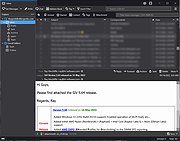 |
|
MailStore Home v26.3.0 MailStore Home v26.3.0 👉 Free email archiving software for home users to securely back up and search emails. MailStore Home is a free email archiving solution designed for private users who want to back up, preserve, and search their emails securely. It allows you to archive emails from various sources into a single, centralized database on your PC, helping protect against data loss while significantly reducing mailbox size. MailStore Home supports archiving from email clients such as Microsoft Outlook, Mozilla Thunderbird, and Windows Mail, as well as directly from POP3 and IMAP mailboxes. Archived emails can be browsed in a structured folder tree or located instantly using a powerful full-text search. MailStore Home preserves the original MIME structure of emails to ensure data integrity and compliance. The program can also create email archives from PST files and other email formats, and it allows users to export archived messages back to email clients or standard file formats if needed. Features: • Archive emails from Microsoft Outlook, Mozilla Thunderbird, Windows Mail, and other clients • Archive directly from POP3 and IMAP mailboxes • Create and manage multiple archive profiles • Fast full-text search across the entire archive • Preserve original email structure and attachments • Reduce mailbox size by deleting archived emails from the server • Export archived emails back to email clients or file formats • Secure storage in a central local archive • Create backup copies of the email archive A Central Archive for All Your Emails Internet mailboxes such as Gmail or Yahoo! Mail Any mailbox via POP3 or IMAP Outlook 2003, 2007, 2010, 2013, 2016 and 2019 Microsoft Exchange Server 2003, 2007, 2010, 2013, 2016 and 2019 mailboxes Mozilla Thunderbird and SeaMonkey PST, EML and other file formats Supported operating systems: • Windows 10 (64-bit), Windows ... |
|
10,779 | Jul 11, 2026 deepinvent Software 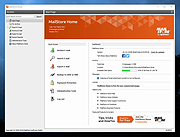 |
|
Pelton v2026.3.2 Pelton v2026.3.2 👉 A privacy-focused open-source email client that keeps your mail under your control. Pelton is a free, open-source desktop email client designed around privacy, speed, and simplicity. Instead of routing your email through third-party services, Pelton connects directly to your existing IMAP and SMTP accounts while storing your data locally in an SQLite database. There is no telemetry, no tracking, and no cloud service standing between you and your email. Built with a modern interface and a keyboard-friendly workflow, Pelton offers fast local searching, offline access, scheduled sending, message snoozing, built-in document previews, customizable themes, and portable configuration backups. Everything runs locally, making it equally suitable for everyday email users and privacy-conscious professionals who want complete control over their communications. Features: • Fast local search using a local SQLite database for instant results, even with large mailboxes. • Cross-platform support for Windows, macOS, and Linux. • Zero telemetry with no tracking or crash reporting. • Connects directly to standard IMAP and SMTP mail providers. • Stores email locally while remaining synchronized with your existing mail provider. • Download messages for offline reading by pinning messages or selecting a date range. • Immediate synchronization using IMAP IDLE for prompt delivery of new mail. • Native desktop notifications for Windows, macOS, and Linux. • Built-in previewer for PDFs, images, and text files. • Snooze messages to return unread at a scheduled time. • Schedule outgoing messages with Send Later. • Export accounts, preferences, and layouts into a portable configuration file. • Eight colored message flags stored locally or synchronized using IMAP keywords. • Extensive customization including themes, layouts, display density, and custom CSS. • Import themes safely with selective importing and automatic removal of remote references. Supported operating systems: • Windows 10, Windows 11 • macOS 13 Ventura or higher (Intel and Apple Silicon) • Linux x86-64 (Debian/Ubuntu, Fedora, and other modern distributions) Supported languages: English, German, French, Dutch, Spanish, Polish Changes: v2026.3.2 08-01-26 • Added ... |
|
256 | Aug 05, 2026 Arne K. 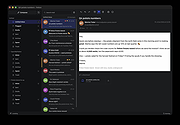 |
| Showing rows 1 to 3 of 3 | Showing Page 1 of 1 | 1 |
OlderGeeks.com Copyright (c) 2026
