|

|
Processed through Paypal No account required. |








Buy our over-priced crap to help pay the bills.



|
|
Processed through Paypal No account required. |
| Files | ||||
| File Name | Rating | Downloads | ||
 |
Advanced PortChecker v2.3.0 Advanced PortChecker v2.3.0 👉 Scan your network for open ports quickly and easily. Advanced PortChecker is a free and open source port checker that lets you scan hosts and networks for open ports in seconds. It supports multiple platforms, offers a clean graphical interface, and can export scan results in HTML, JSON, CSV or plain text formats. Features: • Scan TCP/IP ports on hosts or networks • Check whether ports are open or closed • Fast scanning performance • Export results as HTML, JSON, CSV or plain text • Similar interface across desktop platforms • Theme and preference options • Automatic update control • Open source and free to modify • Privacy-friendly: no ads, trackers or data collection • Can be compiled manually for other platforms Supported operating systems: • Windows • macOS • Linux • Android Supported languages: English, Dutch, French, Spanish, Chinese, Italian, Japanese Changes: v2.3.0 11-15-25 Added Japanese localization. Updated dependencies. Included Linux ARM preview builds and tests. Upgraded Yarn and Rust version. Added minor design upgrades. Changed runner actions. Improved stability across all platforms. This download is for the Windows version (very bottom of page). All other download assets are below: macOS: advanced-portchecker_2.3.0_aarch64.dmg advanced-portchecker_2.3.0_x64.dmg Linux: advanced-portchecker_2.3.0_amd64.deb advanced-portchecker_2.3.0_arm64.deb advanced-portchecker-2.3.0-1.x86_64.rpm advanced-portchecker-2.3.0-1.aarch64.rpm advanced-portchecker_2.3.0_amd64.AppImage advanced-portchecker_2.3.0_aarch64.AppImage advanced-portchecker_x64.app.tar.gz advanced-portchecker_aarch64.app.tar.gz Click here to visit the author's website. |
 |
6,489 | Jun 11, 2026 CodeDead 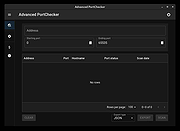 |
|
PolyHostInterface v3.1.1 PolyHostInterface v3.1.1 👉 A lightweight, portable Windows host for loading, chaining and controlling VST2 and VST3 audio plugins. PolyHostInterface is a standalone and VST3 plugin host designed for musicians, synthesizer programmers and audio users who want a compact way to load multiple instruments and effects without the overhead of a full DAW. Plugins are organized in tabs, with synths operating in parallel and effects arranged in a serial processing chain. The routing view provides an overview of each loaded plugin and lets you reorder, bypass, mute, solo and select individual tabs. PolyHostInterface can also operate as a VST3 plugin inside another host. Its 128 host-visible macros can be mapped to parameters of hosted plugins, allowing those parameters to be automated from a DAW. A built-in MIDI Monitor displays notes, CC messages, pitch bend, aftertouch, system messages and other incoming MIDI data, with filtering, copy and export capabilities. A distinctive feature is Pointer Control, which lets a MIDI controller manipulate the mouse pointer over a plugin interface. MIDI controls can move the pointer horizontally and vertically and adjust the parameter beneath it using scrolling or dragging. Editable Pointer Maps provide reusable jump points for individual plugins, including multiple maps for plugins with different skins, pages or layouts. The standalone application can record audio to WAV files or MIDI to MID files. Presets can store plugin configurations, and a missing-plugin repair function helps locate moved plugins when loading an existing preset. PolyHostInterface is fully portable, keeping its settings alongside the program instead of using AppData or the Windows Registry. Features: • Hosts multiple VST2 and VST3 plugins in a tabbed interface • Available as a standalone Windows application and a VST3 plugin for use inside other hosts • 64-bit VST2 and VST3 plugin support • Separate 32-bit standalone version supports 32-bit VST2/VST3 plugins • Routing view shows plugin order, synth/effect type, bypass ... |
|
90 | Oct 14, 2026 sl2365 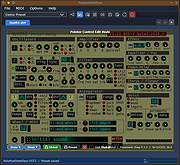 |
|
Tray Host Checker v1.0.3 Tray Host Checker v1.0.3 Tiny application which periodically pings a configured hostname or IP address and displays a tray icon to show success or failure. Installation: Unzip TrayHostChecker.zip to its own folder and run TrayHostChecker.exe. v1.0.2 - 2017-07-03 + Added alerting options to up and down events. (Thanks, webfork) * Moved "Enable host checking" option to the "Host" section. |
|
5,971 | Dec 31, 2018 Jody Holmes 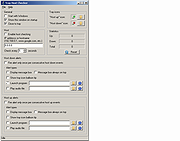 |
 |
VirtualBox v7.2.20 VirtualBox v7.2.20 👉 Run multiple operating systems in virtual machines on a single computer. VirtualBox is a free, open-source virtualization program from Oracle that lets you create and run virtual computers inside your existing operating system. Each virtual machine can be configured with its own processors, memory, storage, display, networking and removable devices, allowing different operating systems to run without replacing or modifying the host system. It is useful for testing software, evaluating operating systems, running older applications, creating isolated development environments and experimenting with system configurations. Virtual machines can be paused, saved, cloned, exported or restored to an earlier snapshot. Features: • Create and run multiple virtual machines on one physical computer • Supports x86-64 virtualization and Arm virtualization on supported Apple silicon hosts • Configurable processors, memory, virtual disks, graphics and network adapters • Run Windows, Linux, BSD, Solaris and other supported guest operating systems • Take snapshots and restore virtual machines to earlier states • Clone, import and export virtual machines • Shared folders for exchanging files between host and guest systems • Shared clipboard and drag-and-drop integration on supported systems • NAT, bridged, internal, host-only and other virtual networking modes • USB device passthrough with the appropriate VirtualBox components • Guest Additions improve display, mouse, clipboard and folder integration • Command-line management through VBoxManage • Supports unattended installation for compatible guest operating systems • Save a running virtual machine and resume it later • Optional Extension Pack adds additional functionality under a separate license Supported operating systems: • Windows 8.1, Windows 10, Windows 11, Windows Server 2012, Windows Server 2012 R2, Windows Server 2016, Windows Server 2019, Windows Server 2022, Windows Server 2025 • macOS 13 Ventura, macOS 14 Sonoma, macOS 15 Sequoia, macOS 26 Tahoe • Supported 64-bit Linux distributions • Oracle Solaris 11 Supported languages: English, Indonesian, Catalan, Czech, Danish, German, Spanish, Basque, French, Croatian, Italian, Lithuanian, Hungarian, Dutch, Polish, Portuguese (Brazil), Portuguese (Portugal), Slovak, Slovenian, Swedish, Turkish, Greek, ... |
|
12,128 | Sep 23, 2026 Oracle 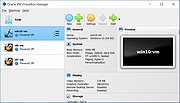 |
| Showing rows 1 to 4 of 4 | Showing Page 1 of 1 | 1 |
OlderGeeks.com Copyright (c) 2026
