|

|
Processed through Paypal No account required. |








Buy our over-priced crap to help pay the bills.



|
|
Processed through Paypal No account required. |
| Files | ||||
| File Name | Rating | Downloads | ||
 |
1by1 v2.16 1by1 v2.16 👉 Small and fast audio directory player with powerful features. 1by1 is a smart and lightweight directory-based audio player for Windows that lets you play tracks directly from folders without needing playlists or a media database. It combines file-manager-style navigation with playback features such as resume play, gapless playback, transition mixing, audio enhancing, bookmarks, cue sheet support, and file tools for organizing tracks while listening. It is also highly configurable, portable, and designed for low resource usage. Features: • Directory Player: directly plays folder contents • Resume play with track and position memory • Multi Resume for the ten recently played folders • Gapless play, transition mixing, and audio enhancing • Folder tree file navigation and Directory finder • MP3 decoding by ACM, mpglib, and BASS • BASS library support for formats such as OGG, WAV, FLAC, AAC, MP4, and CD audio • Optional 24 bit output and 32 bit audio processing • File utilities including copy, move, rename while play, delete, and date change • Scalable Big title view, Rename tool, and Folder compare tool • Cue sheet support, M3U playlist support, and bookmarks • Winamp 2.x input plugin support and WAV export • Track logging, HTTP control and streaming server • Theme presets, global hotkeys, portable operation, and low resource usage Supported operating systems: • Windows • Android • Linux with Wine Supported languages: English, German, Danish, Spanish, French, Italian, Korean, Portuguese (Brazilian), Russian, Serbian, Ukrainian, Chinese (Simplified) Changes: v2.16/v1.39 04-18-26 Windows: Binary changes (GCC build) · Additional languages: Koeran, Serbian, French · Better quit on other instance check · Hang on clearing tree view fixed · Threading issues corrected · Some other corrections and modifications Android: Media key event handling improved Note: This file has one hit on VirusTotal. We have confirmed this to be a false positive. The file is safe. This download is for the Windows version (very bottom of page). If you need the Android version, download here. Click here to ... |
 |
1,857 | Jul 26, 2026 Martin Pesch 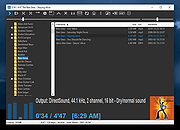 |
 |
Directory Monitor v2.13.1.1 Directory Monitor v2.13.1.1 You can use Directory Monitor for the surveillance of certain directories and it will notify you of file changes, deletions, modifications, and new files in real-time. You can optionally execute an application when a change occurs. Features: Monitor directories for file changes, modifications, deletions and new files in real-time. Monitor local directories or network shares (including hidden shares). Run as a Windows service. Optionally execute an application when an event occurs. Log the user on the network that made the changes. Include/exclude filtering on files being monitored. Quickly tell if a directory is available and being monitored. Balloon notifications whenever an event is fired. Auto updating, import/export and more. Directory Monitor is also available in a portable version. Change Info: 2.13.1.1 - Avoid certain dialogs getting pushed behind the user interface when "Always on top" is enabled. - Better handling of errors when trying to retrieve printers. - Added filtering to the directory list column. System Requirements .NET Framework 4.0 (automatically installed) Windows XP/Vista/7/8/10 Windows Server 2003/2008/2012/2016 Click here to visit the author's website. |
|
8,769 | Dec 21, 2021 Brutal Developer 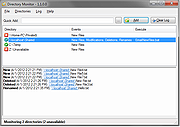 |
|
Directory Size Calculator 1.0 Directory Size Calculator 1.0 Tool for recursively calculating the total size of a directory tree. |
|
6,096 | Dec 21, 2021 LoRd_MuldeR 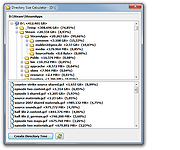 |
 |
DirPrintOK v7.67 DirPrintOK v7.67 👉 Print and export folder contents and directory structures. DirPrintOK is a free Windows utility for printing, previewing, and exporting the contents of folders and directory structures. It includes a print preview with variable aspect ratio and export options for XLS, HTML, CSV, and TXT files. Features: • Print folder contents and directory structures • Print preview with variable aspect ratio • Export to XLS, HTML, CSV, and TXT • Tree-list, tree-list-plus, filters, and console views • Group by file extension, modification time, size, or folders • Multi-tab support for opening another folder in a new tab • Print individual file details, including MP3 ID3 tags • Print directory lists from cmd.exe • Portable version available • Multilingual interface Supported operating systems: • Windows XP, Windows Vista, Windows 7, Windows 8.1, Windows 10, Windows 11, Windows Server 2016, Windows Server 2019 Supported languages: Multilingual, 34 languages Changes: v7.67 07-06-26 • Minor fixes for Microsoft Windows 11 and Windows 10 • Language file update in Dir-Print, for all Windows operating systems This download is for the Windows 64bit version (very bottom of page). If you need the Windows 32bit version, download here. Click here to visit the author's website. |
|
6,120 | Jul 08, 2026 Nenad Hrg 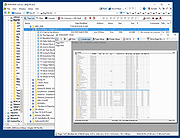 |
|
FastCopy v5.12.0 FastCopy v5.12.0 👉 High-speed file copy and backup software for Windows. FastCopy is a fast file copy and backup utility for Windows designed to maximize transfer performance by using multi-threaded read, write, and verify operations together with Overlapped I/O and Direct I/O. It supports Unicode file names, paths longer than MAX_PATH, and include or exclude filtering using UNIX-style wildcards. FastCopy is built to reduce the load on other running applications while delivering very high copy performance on modern storage devices. Features: • Fast file copy and backup software for Windows • Verification support for more reliable copying • Can record hash values for each file • Uses multi-threaded read, write, and verify processing • Uses Overlapped I/O and Direct I/O for high performance • Supports Unicode file names • Supports file paths longer than MAX_PATH (260 characters) • Supports include and exclude filters using UNIX-style wildcards • Lightweight design built with Win32 API only Supported operating systems: • Windows 7, Windows 8, Windows 8.1, Windows 10, Windows 11 • Windows Server 2012, Windows Server 2012 R2, Windows Server 2016, Windows Server 2019, Windows Server 2022, Windows Server 2025 Supported languages: • English, Japanese, Chinese Changes: v5.11.3 08-18-26 Added an option to Shell Extension to replace Explorer's standard drag & drop / paste with FastCopy. (Default: OFF) Various security enhancements. - Enabled CET Shadow Stack (/CETCOMPAT). - Enabled Control Flow Guard (/guard:cf). - Stricter DLL loading (added /DEPENDENTLOADFLAG:0x800). - (Already enabled: /GS, /NXCOMPAT (DEP), /SAFESEH (x86), /DELAYLOAD, /DYNAMICBASE, /HIGHENTROPYVA, SetDefaultDllDirectories) Note: This file has one hit on VirusTotal. We have confirmed this to be a false positive. The file is safe. Note: If you need the portable version, use the "Extract" button in the installer. Click here to visit the author's website. |
|
12,522 | Aug 21, 2026 SHIROUZU Hiroaki 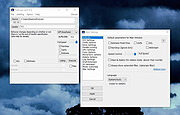 |
| Showing rows 1 to 5 of 5 | Showing Page 1 of 1 | 1 |
OlderGeeks.com Copyright (c) 2026
