|

|
Processed through Paypal No account required. |








Buy our over-priced crap to help pay the bills.



|
|
Processed through Paypal No account required. |
| Files | ||||
| File Name | Rating | Downloads | ||
 |
Agent DVR v7.9.2.0 Agent DVR v7.9.2.0 👉 A powerful, self-hosted video surveillance and monitoring platform. Agent DVR is a full-featured video surveillance application designed for local and remote monitoring of cameras and microphones. It supports a wide range of devices including IP cameras, USB webcams, and audio inputs, and provides advanced functionality such as motion detection, recording, alerts, and remote access through a web-based interface. Features: • Supports IP cameras, USB webcams, RTSP streams, and audio devices • Compatible with ONVIF devices for easy camera discovery and setup • Browser-based interface with no client software required • Remote access from anywhere via secure web portal • Motion detection with adjustable sensitivity, zones, and filters • AI object detection including people, vehicles, animals, and custom models • Facial recognition support (with configured AI services) • License plate recognition (via integrations) • Continuous, motion-triggered, and scheduled recording modes • Timeline-based playback with fast scrubbing and event markers • Multiple simultaneous camera streams with grid and custom layouts • PTZ control including presets, tours, and auto-tracking (supported cameras) • Audio recording, live listening, and two-way audio support • Alerts and notifications via email, SMS, push, webhook, and API triggers • Smart alerts based on AI detection events • Event logging with searchable history • User accounts with roles, permissions, and access restrictions • HTTPS support for secure connections • No port forwarding required using built-in remote access services • Local storage with configurable retention policies • Cloud upload support including FTP, SFTP, and third-party services • Automatic cleanup and disk management options • Multi-server support for distributed camera setups • Plugin system for extending functionality • Integration with home automation systems and external APIs • Support for hardware acceleration (GPU) to improve performance • Cross-platform support via .NET and Docker containers • Import/export configuration and backup settings • Supports multiple layouts, themes, and UI customization • Snapshot capture and image archiving • Privacy masking zones for sensitive areas • Time-lapse recording and export • Multi-language interface support (where available in ... |
 |
4,580 | Aug 19, 2026 iSpyConnect.com  |
|
Audio Fake Detector PRO v8.5 Audio Fake Detector PRO v8.5 👉 Detects fake high-quality audio files by identifying lossy-to-lossless transcodes using advanced spectral and statistical analysis. Audio Fake Detector PRO detects fake “high quality” audio files, including lossy sources such as MP3 or AAC that have been transcoded or disguised as lossless formats like WAV or FLAC. Audio Fake Detector PRO uses a hybrid analysis engine combining spectrogram-based detection and statistical verification depending on the file type. Lossy formats are analyzed using frequency cutoff behavior, abrupt endings, stereo anomalies, and majority-vote segment analysis, while lossless formats are verified using auCDtect statistical analysis. Each audio file is divided into multiple segments and independently evaluated to reduce false positives and false negatives caused by mixed-quality content. Detailed reports are generated in several formats, and suspicious files can automatically be moved into a dedicated folder while preserving the original folder structure. Features: • Detection of fake 320 kbps MP3 files • Detection of fake lossless audio (FLAC, WAV, APE, AIFF, WV) • Hi-Res / Ultra-Hi-Res PCM analysis (up to 384 kHz and beyond) and native • DSD support (.dsf, .dff), with DSD-to-PCM noise-shaping recognition to avoid false positives on genuine SACD/DSD-derived content • Spectral cutoff and compression artifact detection • Multi-segment frequency analysis • Joint stereo anomaly detection • Selectable lossless verification engines: LAC 2.0.5 + FLAD, AudioAuditorCLI + FLAD, or FlacCompagnonCLI + FLAD • Statistical validation using LAC (Lossless Audio Checker), FLAD, AudioAuditorCLI, and FlacCompagnonCLI for lossless PCM verification • Automatic dependency management (FFmpeg, FFprobe, FLAD, and AudioAuditorCLI when selected) • High-performance spectrogram processing • Detailed reporting: LOG - CSV On selection window, click to cycle: [CSV ( )] → [CSV (,)] → [CSV (;)] → [CSV ( )] • Moves detected files to the ~Fake folder while preserving the original directory structure A file is classified as FAKE in the following cases: • Bitrate < 170 kbps (pre-filter) • Lossy formats (MP3/M4A/AAC/OGG/OPUS/WMA) with a hard cutoff ... |
|
806 | Oct 12, 2026 Alessandro Comito 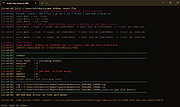 |
 |
BitDefender Antivirus Free Edition v27.0.62.352 BitDefender Antivirus Free Edition v27.0.62.352 👉 Free real-time antivirus protection for Windows PCs. BitDefender Antivirus Free Edition provides lightweight, cloud-powered antivirus protection designed to defend Windows computers against viruses, malware, ransomware, phishing attacks, and other online threats. It uses Bitdefender’s award-winning security technologies while maintaining a simple “install and forget” approach that runs quietly in the background without slowing down your system. The program delivers real-time threat detection, automatic malware scanning, web attack prevention, anti-phishing protection, and malicious website blocking. It also includes integrated Bitdefender VPN access with limited daily encrypted traffic for safer browsing. BitDefender Antivirus Free Edition is optimized for gaming, multimedia editing, and other resource-intensive activities by minimizing system impact while maintaining continuous protection. Features: • Real-time antivirus and malware protection • Cloud-powered threat detection • Advanced anti-phishing protection • Malicious website and scam blocking • Automatic security updates • Lightweight system resource usage • Optimized for gaming and multimedia tasks • Integrated Bitdefender VPN with limited daily traffic • Automatic threat remediation and quarantine • Simple install-and-forget interface • Web traffic scanning • Protection against ransomware and online threats Supported operating systems: • Windows 7 SP1, Windows 8.1, Windows 10, Windows 11 Supported languages: English, German, French, Spanish, Italian, Romanian, Dutch, Swedish, Chinese Traditional, Chinese Simplified, Portuguese, English UK, English AU Changes: v27.0.62.352 08-20-26 Fixed an issue where protection review reports included monitored web and email activity even when the related protection features were disabled Fixed an issue where Bitdefender services were not responding at startup Fixed an issue where Bitdefender services could appear unresponsive while the product remained functional Fixed an issue where SecurePass could not remain disabled in Safepay Fixed an issue causing continuous notifications about webcam access Fixed an issue where the verified links counter reset to zero after rebooting on Windows 11 Fixed an issue causing multiple firewall notifications stating that an application had changed Note: BitDefender Antivirus Free Edition requires you to create a free account. Click here to ... |
|
11,990 | Aug 27, 2026 BitDefender Labs 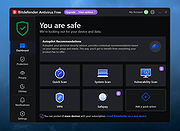 |
|
DeepTaskScan v1.0.0 DeepTaskScan v1.0.0 👉 Portable Windows forensics tool for detecting hidden and persistent scheduled tasks. DeepTaskScan is an advanced Windows scheduled task viewer and forensics tool designed to uncover scheduled tasks that may be hidden from standard Windows utilities. Unlike Task Scheduler, schtasks, PowerShell and similar tools, it uses a different scanning method rather than relying on Windows API calls to discover scheduled tasks. This can help system administrators, technicians and security researchers identify tasks concealed through techniques involving deleted task files or registry keys. The developer notes that such techniques have been used by state-backed Advanced Persistent Threat (APT) groups. DeepTaskScan is completely portable, requires no installation and is available in both 32-bit and 64-bit versions. Features: • Deeply scans Windows for scheduled tasks using an alternative detection method • Detects scheduled tasks hidden through advanced techniques • Does not rely on Windows API calls for scheduled task detection • Helps uncover tasks that may not appear in Windows Task Scheduler • Can detect more scheduled task entries than Task Scheduler, PowerShell and other standard tools • Highlights hidden or persistent entries • Can help detect APT activity involving hidden Task Scheduler entries • Allows discovered information to be extracted to a file • Useful for system administration, troubleshooting and security forensics • Available as separate 32-bit and 64-bit executables • Completely portable with no installation required Supported operating systems: • Windows 7 or newer Supported languages: • English Changes: v1.0.0 08-16-26 Initial release. This download is for the Windows 64bit version (very bottom of page). If you need the Windows 32bit version, download here. Click here to visit the author's website. |
|
352 | Aug 20, 2026 Emir Alp Kocak  |
|
Intel-SA-00086 Detection Tool for Linux Intel-SA-00086 Detection Tool for Linux Purpose The INTEL-SA-00086 Detection Tool will assist with detection of the security vulnerability described in INTEL-SA-00086. Read below for more information. SA00086_Windows.zip - For Windows* Users This download contains two versions of the tool. The first is an interactive GUI tool that discovers the hardware and software details of the device and provides a risk assessment. This version is recommended for a local evaluation of the system. The second version of the tool is a console executable that saves the discovery information to the Windows* registry and/or to an XML file. This version is more convenient for IT administrators wishing to perform bulk discovery across multiple machines to find systems to target for Firmware updates. SA00086_Linuxtar.gz - For Linux* Users The version of the tool is a command line executable that will display a risk assessment for the system being tested. Note: Versions of the INTEL-SA-00086 Detection Tool earlier than 1.0.0.146 did not check for CVE-2017-5711 and CVE-2017-5712. These CVE's only affect systems with Intel Active Management Technology (Intel AMT) version 8.x-10.x. Users of systems with Intel AMT 8.x-10.x are encouraged to install version 1.0.0.146, or later, to help verify the status of their system in regards to the INTEL-SA-00086 Security Advisory. |
|
5,982 | Apr 04, 2019 Intel 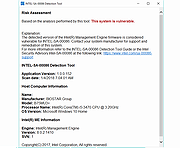 |
|
Intel-SA-00086 Detection Tool for Windows Intel-SA-00086 Detection Tool for Windows Purpose The INTEL-SA-00086 Detection Tool will assist with detection of the security vulnerability described in INTEL-SA-00086. Read below for more information. SA00086_Windows.zip - For Windows* Users This download contains two versions of the tool. The first is an interactive GUI tool that discovers the hardware and software details of the device and provides a risk assessment. This version is recommended for a local evaluation of the system. The second version of the tool is a console executable that saves the discovery information to the Windows* registry and/or to an XML file. This version is more convenient for IT administrators wishing to perform bulk discovery across multiple machines to find systems to target for Firmware updates. SA00086_Linuxtar.gz - For Linux* Users The version of the tool is a command line executable that will display a risk assessment for the system being tested. Note: Versions of the INTEL-SA-00086 Detection Tool earlier than 1.0.0.146 did not check for CVE-2017-5711 and CVE-2017-5712. These CVE's only affect systems with Intel Active Management Technology (Intel AMT) version 8.x-10.x. Users of systems with Intel AMT 8.x-10.x are encouraged to install version 1.0.0.146, or later, to help verify the status of their system in regards to the INTEL-SA-00086 Security Advisory. |
|
6,182 | Apr 04, 2019 Intel |
|
Microsoft Safety Scanner v1.457.193.0 Microsoft Safety Scanner v1.457.193.0 👉 On-demand malware scanner from Microsoft. Microsoft Safety Scanner is a free security tool designed to find and remove malware from Windows systems. It provides on-demand scanning with the latest malware definitions and is intended to complement, not replace, a full-time antivirus solution. The tool can be run directly after download, making it useful for quick system checks or emergency malware removal. Microsoft Safety Scanner uses the same detection engine as Microsoft Defender and allows users to perform quick scans, full system scans, or customized scans of specific folders and drives. Because it is updated frequently, users must download the latest version each time they want to run a scan, as older versions expire after a limited time. Features: • Uses Microsoft Defender malware detection engine • Quick scan, full scan, and custom scan options • Detects and removes viruses, spyware, and other malicious software • Simple interface for easy operation • Frequently updated definitions for current threats • Can be run alongside existing antivirus software • Ideal for troubleshooting infected systems Supported operating systems: • Windows 10, Windows 11, Windows Server 2016, Windows Server 2019, Windows Server 2022 Supported languages: All languages supported by Windows (uses system language) Changes: v1.457.193.0 08-16-26 Not Provided This download is for the Windows 64bit version (very bottom of page). If you need the Windows 32bit version, download here. Click here to visit the author's website. |
|
6,815 | Aug 16, 2026 Microsoft Corp. 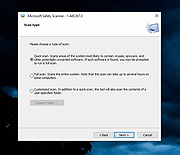 |
|
Nearby Glasses v1.0.8 Nearby Glasses v1.0.8 👉 Detects nearby smart glasses using Bluetooth Low Energy signals. Nearby Glasses is a free, open-source utility designed to detect nearby smart glasses by passively scanning Bluetooth Low Energy (BLE) advertising data. The app identifies supported smart glasses using Bluetooth manufacturer identifiers and can notify you when a compatible device is detected within range. Detection is based solely on publicly broadcast BLE advertising frames and does not establish a connection with other devices or transmit any of your data. The developer notes that false positives and missed detections are possible, as some non-glasses devices may use the same manufacturer identifiers. The project is licensed under the GNU AGPL v3.0 and is available for both Android and iOS. &nbsp;&nbsp;&nbsp;&nbsp; Features: • Passively scans Bluetooth Low Energy (BLE) advertisements • Detects supported smart glasses using manufacturer identifiers • Adjustable RSSI threshold to control detection sensitivity • Configurable notification cooldown • Canary Mode for iOS operation • Optional scan log display • Processes all scan data locally on the device • Does not establish Bluetooth connections or pair with devices • No advertisements or user tracking • Free and open source under the AGPL v3.0 license Supported operating systems: • Android 8.0 (Oreo) or higher • iOS 17.0 or higher Supported languages: English, French, German, Swiss German, Italian, Portuguese (Brazil), Spanish Changes: v1.0.8 07-16-26 added fixes to Russian translation (partly) added support for HeyCyan (Nilox Smart AI Glasses, sold by ALDI/Hofer) added support for RollMe and Rogbird fixed some minor bugs &nbsp;&nbsp;&nbsp;&nbsp; This download is for the Android APK file (very bottom of page). All other download assets are below: F-Droid APK: yj_nearbyglasses_1.0.8-izziFdroid.apk Or: Click here to visit the author's website. |
|
305 | Jul 17, 2026 Yves Jeanrenaud 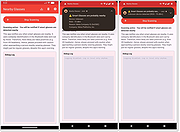 |
 |
Trellix GetSusp v6.0.0.141 Trellix GetSusp v6.0.0.141 👉 Find suspicious files and possible undetected malware using Trellix threat intelligence. Trellix GetSusp is a free, portable malware investigation tool designed for computers where undetected malware is suspected. It uses heuristics together with the Trellix Global Threat Intelligence (GTI) File Reputation database to identify suspicious files without requiring extensive technical knowledge. GetSusp runs as a single executable with no installation required and can operate through its graphical interface, command line or ePO mode. The graphical interface can also scan URLs, documents and PDF files and lets you review suspicious files before submitting selected samples to Trellix for further analysis. Features: • Uses heuristics to locate files that may contain undetected malware • Queries Trellix Global Threat Intelligence File Reputation to evaluate suspicious files • Runs as a single executable with no installation required • Supports graphical interface, command-line and ePO operation modes • Scans URLs, documents and PDF files from the graphical interface • Allows suspicious files to be reviewed before submission to Trellix • Lets you select which files are submitted for further analysis • Records system information and installed Trellix product information • Records the execution date and details about suspected files • Includes GetQuarantine integration with the ePO version • Can be used as an initial investigation tool when malware is suspected but has not been detected by installed security software Supported operating systems: • Windows 7, Windows 8, Windows 8.1, Windows 10 through 21H2, Windows 11 • Windows Server 2008 R2 SP1, Windows Server 2012, Windows Server 2016 Supported languages: • English Changes: Not Provided. This download is for the Windows 64bit version. If you need the Windows 32bit version, download here. Click here to visit the author's website. |
|
6,140 | Aug 16, 2026 Musarubra US LLC 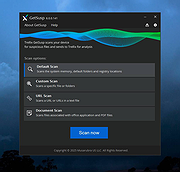 |
|
WhySoSlow Free Home Edition v1.61 WhySoSlow Free Home Edition v1.61 👉 Analyze system performance and identify why your computer is running slowly. WhySoSlow Free Home Edition is a diagnostic utility designed to help users quickly determine the causes of poor system performance. It analyzes your computer in real time and provides insights into issues such as CPU throttling, memory bottlenecks, disk performance problems, and other hardware or software limitations that may be slowing down your system. The program performs a series of checks and presents easy-to-understand results, making it useful for both casual users and more advanced troubleshooting scenarios. It helps pinpoint whether performance issues are caused by hardware limitations, thermal throttling, insufficient RAM, or background processes. Features: • Real-time system performance analysis • Detects CPU speed issues and throttling • Identifies memory and disk bottlenecks • Measures system responsiveness and load • Provides detailed system diagnostics and benchmarks • Helps pinpoint hardware or software causes of slowdowns • Simple interface with clear performance indicators Supported operating systems: • Windows 11, Windows 10 (x86 and x64), Windows 8.1 (x86 and x64), Windows 8 (x86 and x64), Windows 7 (x86 and x64) • Windows 2022 Server, Windows 2016 Server (x86 and x64), Windows 2012 Server (x86 and x64) Supported languages: English Changes: v1.61 10-22-20 Bug Fixed: "this version of WhySoSlow is not compatible with your operating system version" On certain systems, WhySoSlow could display a message "this version of WhySoSlow is not compatible with your operating system version". This has been fixed. Click here to visit the author's website. |
|
4,855 | Mar 24, 2026 Resplendence Software 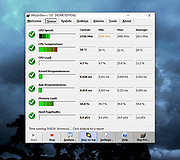 |
| Showing rows 1 to 10 of 10 | Showing Page 1 of 1 | 1 |
OlderGeeks.com Copyright (c) 2026
