|

|
Processed through Paypal No account required. |








Buy our over-priced crap to help pay the bills.



|
|
Processed through Paypal No account required. |
| Files | ||||
| File Name | Rating | Downloads | ||
 |
DISM Tool v2.9 DISM Tool v2.9 A GUI interface for DISM which works on running OS, a mounted WIM or an offline OS - so can be used from Windows PE. Features include: • image capture • apply images • export • list packages / drivers / features / capabilities • add/remove drivers • mount/unmount images • check and repair images • get information • diskpart • mount registry • and more Requires: .NET v4.7.2 Changes: 30/10/24 v2.9 Log file path fix when running under Windows PE Use 7-Zip to unzip this file. Click here to visit the author's website. |
 |
2,260 | Oct 31, 2024 PC Assist Software 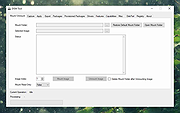 |
|
DISMTools v0.8.1 DISMTools v0.8.1 👉 Graphical interface for managing Windows images using DISM. DISMTools is a free, open-source graphical front-end for Microsoft's Deployment Image Servicing and Management (DISM) tools that makes managing Windows images and installations considerably easier than working entirely from the command line. Its project-based interface stores mounted images, unattended answer files, scratch directories, and other resources together for easier management. The program can work with WIM, SWM, ESD, and FFU images and provides tools for applying, capturing, mounting, unmounting, splitting, optimizing, exporting, and servicing images. It can add or remove packages, drivers, AppX packages, capabilities, and Windows features, perform component cleanup and repair operations, manage Windows editions, work with boot configuration data, and retrieve extensive information about images and installed components. DISMTools can manage both the currently running Windows installation and offline Windows installations on other drives. It also includes tools for creating unattended answer files, generating detailed image information reports, managing mounted images, creating bootable ISO files, preparing Windows PE environments, working with Windows Deployment Services, testing images in virtual machines, and performing Active Directory domain-join tasks. The program uses both the DISM API and DISM executable, allowing it to combine the capabilities of Microsoft's servicing technologies while providing a graphical workflow for technicians, administrators, deployment specialists, and advanced Windows users. Features: • Free and open-source graphical front-end for Microsoft DISM • Project-based interface for organizing mounted images, answer files, scratch directories, and deployment tools • Apply, capture, mount, unmount, split, optimize, export, and service WIM, SWM, ESD, and FFU images • Convert Windows images between WIM and ESD formats • Add and remove Windows packages, drivers, capabilities, features, and provisioned AppX applications • Manage both the currently running Windows system and offline Windows installations • Perform component cleanup and component store repair operations • Retrieve detailed information about images, packages, features, drivers, capabilities, and applications • Generate and save detailed image ... |
|
1,108,245 | Sep 10, 2026 CodingWonders 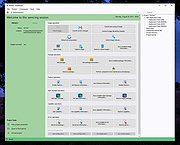 |
|
GUI for DISM v2.0 GUI for DISM v2.0 A portable GUI (graphical user interface) for the command-line DISM from Windows. Features: • Check corresponds to the command CheckHealth - Checks whether there is a component memory corruption. • Scan corresponds to the command ScanHealth - Here errors are searched for, but not corrected yet. • Repair corresponds to the command RestoreHealth - Here errors are search for and automatically repair if possible. (Currently only local check (WinSxS folder) and correction • Analyze - Corresponds to the analyzecomponentstore command. Here the component memory is checked, whether memory space can be released. • Cleanup - Corresponds to the StartComponentCleanup command. The component store is cleaned. • Install Cab - It's possible to install cab files • Repair offline - you need the install.wim from the ISO for your current Windows version (not an older or newer) Use 7-Zip to unzip this file. Click here to visit the author's website. |
|
8,091 | Sep 17, 2025 Dirk Paehl 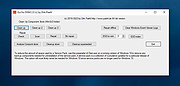 |
| Showing rows 1 to 3 of 3 | Showing Page 1 of 1 | 1 |
OlderGeeks.com Copyright (c) 2026
