|

|
Processed through Paypal No account required. |








Buy our over-priced crap to help pay the bills.



|
|
Processed through Paypal No account required. |
| Files | ||||
| File Name | Rating | Downloads | ||
 |
Media Player Classic Black Edition v1.9.0 Media Player Classic - Black Edition v1.9.0 👉 Lightweight, open-source audio and video player for Windows with built-in codecs. Media Player Classic - Black Edition (MPC-BE) is a free and open-source audio and video player for Microsoft Windows. Based on the original Media Player Classic and Media Player Classic Home Cinema projects, MPC-BE provides a clean, familiar interface with powerful playback features and a wide range of built-in audio and video codecs. It is designed to be lightweight, efficient, and highly compatible with modern multimedia formats while maintaining the classic Windows-style look and feel. Features: • Supports a wide range of video and audio formats using built-in codecs • High-quality video rendering with support for DXVA hardware acceleration • Subtitle support (external and embedded) with customizable styles • Playlist support and favorite files management • Audio switcher and built-in audio renderer • Customizable interface and toolbar • Screenshot capture and preview thumbnails • Video frame stepping and playback speed control • Command line support and extensive configuration options • Available in portable and installer versions Supported operating systems: • Windows 7, Windows 8, Windows 8.1, Windows 10, Windows 11 Supported languages: English, Russian, Ukrainian, Belarusian, German, French, Spanish, Italian, Polish, Czech, Slovak, Hungarian, Dutch, Portuguese (Brazil), Portuguese (Portugal), Romanian, Bulgarian, Greek, Turkish, Chinese (Simplified), Chinese (Traditional), Japanese, Korean Changes: v1.9.0 06-27-26 Splitters: Fixed crashes in some situations. AudioSplitter: Added support for the RF64 format. Fixed reading of channe This download is for the Windows 64bit installer version (very bottom of page). All other download assets are below: 32bit installer 64bit portable 32bit portable Standalone Filters 64bit Standalone Filters 32bit Use 7-Zip to unzip this file. Click here to visit the author's website. |
 |
3,773 | Jul 11, 2026 MPC-BE Devs 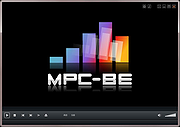 |
|
Shark007 Codecs v20.4.2 Shark007 Codecs v20.4.2 A full suite of free audio and video codec packages with a GUI controller for the installed codecs. Anything Windows Media Player fails to play, will be able to play using these codecs. All you need to do is check the box, [x] WMP suggested settings. Windows Media Player will be able to play 4K HDR video with bitstreamed audio to an AVR. Other media players, such as MPC-HC and MPC-BE are fully supported as well. Features: • Remove all unnecessary code associated with the deprecated codec removal • Re-organize the entire layout to be more intuitive, user friendly and visually appealing • Allow the user to click anywhere on the App to relocate the Settings Application on the screen • Add an Always On Top feature to keep the Settings Application in view • Activate the previous instance of the Settings Application when trying to open a new instance • Require Administrative privileges upon startup eliminating the need to right-click • Current codec setup can be propagated to All user accounts with the click of a button. • Colorize and capitalize important functions to promote their significance • Automatically resize the App relative to the display resolution and use high quality text • A builtin, intelligent, Auto Update feature. • Intuitive command line features. • Add a Save | Restore settings feature to seamlessly return to a previous setup • All functions are performed instantaneously. The moment you select something, the action is performed. • If you ever find yourself broken, simply press the [RESET ALL] button to return to a just installed state. Things Shark007 Codecs does better than others: ... |
|
4,224 | Nov 10, 2025 Shark007 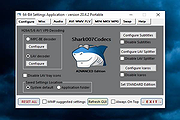 |
 |
Shutter Encoder v20.2 Shutter Encoder v20.2 👉 A free video, audio, and image converter designed by video editors for powerful media encoding and workflow tools. Shutter Encoder is a free media converter and processing tool built around FFmpeg for handling video, audio, and image files. It is designed by video editors to be both accessible and powerful, with support for a very wide range of codecs and formats, along with trimming, subtitle work, watermarking, cut detection, analysis tools, web video downloading, render queue support, file information viewing, batch renaming, FTP upload support, and AI-assisted functions. It also includes professional workflow features such as editing codecs, broadcast codecs, archive codecs, disc burning and ripping, and preset saving for repeatable jobs. Features: • Converts video, audio, and image files using FFmpeg • Designed by video editors for accessible but advanced media work • Supports a very large range of codecs and formats • Includes trimming and cut without re-encoding tools • Lets you replace audio, rewrap, conform, merge, extract, subtitle, and insert video • Supports sound conversion to WAV, AIFF, FLAC, ALAC, MP3, AAC, AC3, OPUS, Vorbis, Dolby Digital Plus, and Dolby TrueHD • Includes editing codecs such as DNxHD, DNxHR, Apple ProRes, QT Animation, GoPro CineForm, and Uncompressed • Includes output codecs such as H.264, H.265, H.266, VP8, VP9, and AV1 • Includes broadcast codecs such as XDCAM HD422, XDCAM HD 35, AVC-Intra 100, XAVC, XAVC Long GOP, and HAP • Supports older codecs including Theora, MPEG-2, MJPEG, Xvid, DV, WMV, and MPEG-1 • Supports FFV1 for archiving workflows • Creates JPEG, JPEG XL, and image outputs • Burns and rips DVD and Blu-ray media • Includes analysis tools such as loudness and true peak, audio normalization, cut detection, black detection, media offline detection, VMAF, and FrameMD5 • Downloads web video content • Includes image adjustment tools for colors, LUTs, and color space conversion • Supports cropping for both images and videos • Can ... |
|
3,680 | Aug 12, 2026 Paul Pacifico 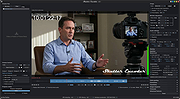 |
|
SMPlayer v26.8.29 SMPlayer v26.8.29 👉 A free media player with built-in codecs that plays virtually all video and audio formats. SMPlayer is a free media player for Windows, Linux and Mac OS with built-in codecs, YouTube playback, subtitle search and download, a thumbnail generator, and audio and video filters. Features: • Plays virtually all video and audio formats • Built-in codecs, no external codec packs required • Remembers playback position and settings for each file • Supports YouTube video playback • Searches and downloads subtitles • Includes video and audio filters • Playback speed control • Audio and subtitle delay adjustment • Video equalizer • Skins and icon themes • Supports Chromecast • Free and open source Supported operating systems: • Windows 8 and above • Windows XP and other 32-bit systems via alternative package • Linux • Mac OS 10.15 and above Supported languages: English, Espaρol, Franηais, Portuguκs, Portuguκs (Brasil), Euskara, Galego, Catalΰ, Lietuvių, Русский, Українська, Hrvatski, Polski, Deutsch, 日本語, 正體中文, 简体中文, 한국어, Bahasa Indonesia, Bahasa Melayu, Tόrkηe, Български, العربية, Dansk, Nederlands Changes: v26.8.29 Added an option to show a thumbnail preview when hovering over the seek bar (Preferences -> Interface). Playlist positions/progress are now remembered between sessions. Added a pause button to the playlist. Added an option to enable/disable secondary subtitles. Fixed zoom behavior. Fixed playlist item numbering after removing items. Playlist is now re-sorted automatically after adding files. Fixed the add black borders option. Improved retrieval of the track (song) title for internet radio streams (icy-title). Fixed video aspect ratio override support. Added support for additional network URI schemes (KDE integration). Forced the xcb backend on Linux to avoid display issues. macOS builds are now available for arm64 (Apple Silicon), in addition to the existing x86_64 builds. Experimental packages compiled with Qt 6 are now available for Windows and macOS. Various translation updates (German, Italian, Spanish, English UK/US, and others) Use 7-Zip to unzip this file. 👉 This download is for the Windows 64bit version (very bottom of page). All other download assets are below: Other Windows: smplayer-26.8.29-win32-qt5.6-unsigned.exe ... |
|
3,468 | Sep 28, 2026 Ricardo Villalba  |
|
STANDARD Codecs for Windows 7 and 8 1.86 STANDARD Codecs for Windows 7 and 8 1.86 STANDARD x64Components for Windows 7 and 8. ADVANCED Codecs and ADVANCED x64Components also available. The installer will automatically remove most other popular codec releases from your computer before installing this concise yet comprehensive package. You won't need to make any adjustments or tweaks to enjoy your media content immediately. Windows Media Player and Media Center will instantly recognize all your files as playable. It does not contain a media player and it does not associate file-types. With this package installed you will be able to use any media player, limited only by the players' capabilities, to play all movies and video clips. Streaming video is supported in several formats in all popular web browsers. Users of the Windows 8 Codecs have the ability to choose what is installed and where to install it using the public redistributable. After installation you can select to remove specific portions without removing the entire package. You can also re-add the removed items at any time. Change Info: - update LAV filters 59.1+ - update DirectVobSub 316 - update MediaInfo DLL 7.66 |
 |
9,491 | Sep 22, 2021 Shark007 |
|
Windows 8 Codecs 1.54 Windows 8 Codecs 1.54 Windows 8 Codecs is an audio and video codec package for Windows 8. The installer will automatically remove most other popular codec releases from your computer before installing this concise yet comprehensive package. You won't need to make any adjustments or tweaks to enjoy your media content immediately. Windows Media Player and Media Center will instantly recognize all your files as playable. It does not contain a media player and it does not associate file-types. With this package installed you will be able to use any media player, limited only by the players' capabilities, to play all movies and video clips. Streaming video is supported in several formats in all popular web browsers. Users of the Windows 8 Codecs have the ability to choose what is installed and where to install it using the public redistributable. After installation you can select to remove specific portions without removing the entire package. You can also re-add the removed items at any time. Changelog: - downgrade LAV filters 55.2+ - update x264 encoder 2273 - improve MKV DLNA playback8 - improve MKV playback Xbox360 MC |
|
9,582 | Sep 22, 2021 Shark007 |
|
Windows 8 Codecs 64 Bit 1.54 Windows 8 Codecs 64 Bit 1.54 Windows 8 Codecs is an audio and video codec package for Windows 8. The installer will automatically remove most other popular codec releases from your computer before installing this concise yet comprehensive package. You won't need to make any adjustments or tweaks to enjoy your media content immediately. Windows Media Player and Media Center will instantly recognize all your files as playable. It does not contain a media player and it does not associate file-types. With this package installed you will be able to use any media player, limited only by the players' capabilities, to play all movies and video clips. Streaming video is supported in several formats in all popular web browsers. Users of the Windows 8 Codecs have the ability to choose what is installed and where to install it using the public redistributable. After installation you can select to remove specific portions without removing the entire package. You can also re-add the removed items at any time. Changelog: - downgrade LAV filters 55.2+ - update x264 encoder 2273 - improve MKV DLNA playback - improve MKV playback Xbox360 MC |
|
9,704 | Sep 22, 2021 Shark007 |
| Showing rows 1 to 7 of 7 | Showing Page 1 of 1 | 1 |
OlderGeeks.com Copyright (c) 2026
