|

|
Processed through Paypal No account required. |








Buy our over-priced crap to help pay the bills.



|
|
Processed through Paypal No account required. |
| File - Download Shutter Encoder v20.2 | ||||||||
| Description | ||||||||
|
Always scroll to the bottom of the page for the main download link. We don't believe in fake/misleading download buttons and tricks. The link is always in the same place. Shutter Encoder v20.2 👉 A free video, audio, and image converter designed by video editors for powerful media encoding and workflow tools. Shutter Encoder is a free media converter and processing tool built around FFmpeg for handling video, audio, and image files. It is designed by video editors to be both accessible and powerful, with support for a very wide range of codecs and formats, along with trimming, subtitle work, watermarking, cut detection, analysis tools, web video downloading, render queue support, file information viewing, batch renaming, FTP upload support, and AI-assisted functions. It also includes professional workflow features such as editing codecs, broadcast codecs, archive codecs, disc burning and ripping, and preset saving for repeatable jobs. 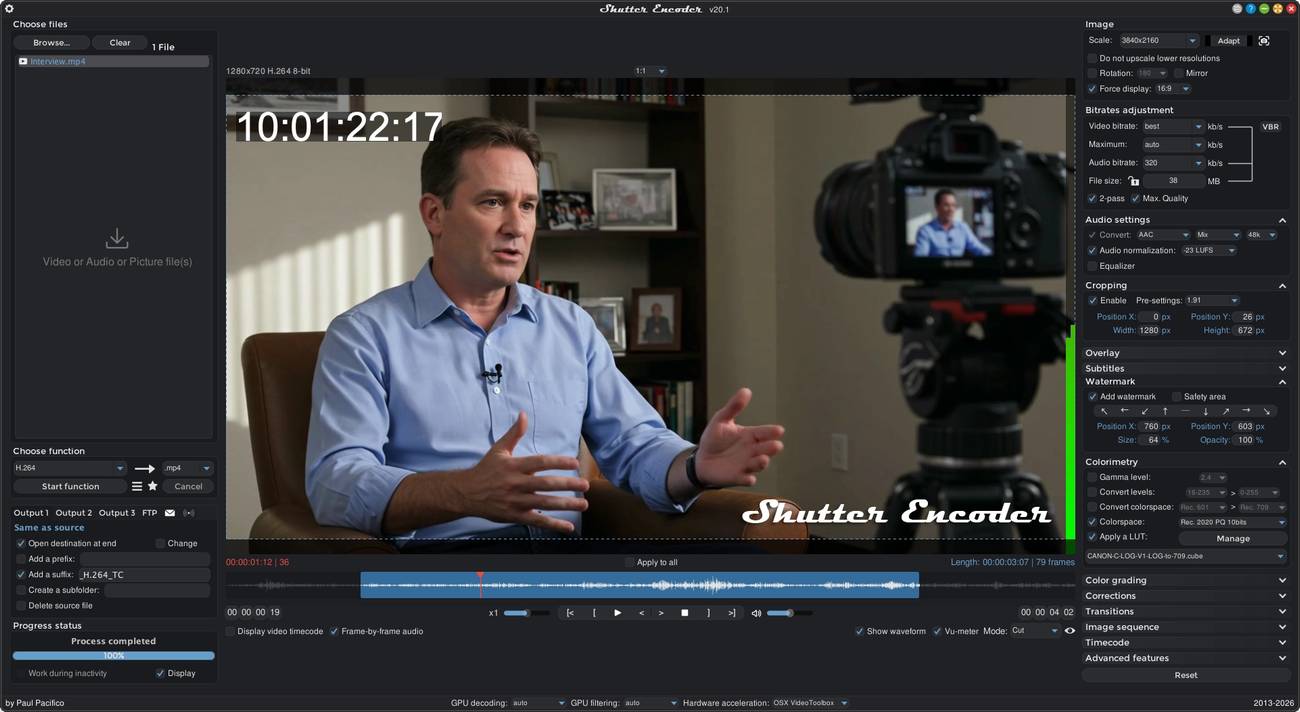 Features: • Converts video, audio, and image files using FFmpeg • Designed by video editors for accessible but advanced media work • Supports a very large range of codecs and formats • Includes trimming and cut without re-encoding tools • Lets you replace audio, rewrap, conform, merge, extract, subtitle, and insert video • Supports sound conversion to WAV, AIFF, FLAC, ALAC, MP3, AAC, AC3, OPUS, Vorbis, Dolby Digital Plus, and Dolby TrueHD • Includes editing codecs such as DNxHD, DNxHR, Apple ProRes, QT Animation, GoPro CineForm, and Uncompressed • Includes output codecs such as H.264, H.265, H.266, VP8, VP9, and AV1 • Includes broadcast codecs such as XDCAM HD422, XDCAM HD 35, AVC-Intra 100, XAVC, XAVC Long GOP, and HAP • Supports older codecs including Theora, MPEG-2, MJPEG, Xvid, DV, WMV, and MPEG-1 • Supports FFV1 for archiving workflows • Creates JPEG, JPEG XL, and image outputs • Burns and rips DVD and Blu-ray media • Includes analysis tools such as loudness and true peak, audio normalization, cut detection, black detection, media offline detection, VMAF, and FrameMD5 • Downloads web video content • Includes image adjustment tools for colors, LUTs, and color space conversion • Supports cropping for both images and videos • Can burn in clip names, text, and timecode • Can embed or burn subtitles and includes a built-in subtitle editor • Can add logos and watermarks with position, size, and opacity control • Can automatically detect cuts and generate EDL files • Includes a render queue for batch processing • Lets you save and share presets with Ctrl+S or Cmd+S • Can upload converted files to FTP servers automatically • Shows detailed file information from the queue • Includes powerful batch renaming tools • Supports hardware from NVIDIA, AMD, Intel, and Apple • Adds in v20.0: OP-Atom format for DNxHR, preview quality options for the video player, Vulkan Video force preset, a new - MANAGE - function, Blur faces, plus interface and bug fixes Supported operating systems: • Windows 64-bit • macOS Intel 64-bit • macOS Apple Silicon • Ubuntu 64-bit (.deb) • Linux 64-bit (AppImage) Supported languages: • French, English, German, Italian, Spanish, Finnish, Romanian, Indonesian, Korean, Arabic, Latin, Hungarian Changes: v20.2 06-28-26 - Added "Intel Quick Sync" hardware acceleration for Linux - Added 'Identify speakers' option for "Audio transcription" function - Improved installer package - Improved video player performance - Improved timecode display with drop-frame videos - Improved naming convention for surround audio files - Fixed splash screen freeze - Fixed bug with file hanging - Fixed bugs with presets loading - Fixed bugs with video player's buffer - Fixed bug with 'Total length of file' option - Fixed bugs with 'Record screen/device' option - Fixed bug with "XAVC" & "XAVC Long GOP" functions - Rollback to XPDF tool for PDF conversion - Removed unused binary architecture for Mac - Various corrections - Various improvements This download is for the Windows 64bit installer version (very bottom of page). All other download assets are below: Other Windows: Shutter Encoder 20.2 Windows 64bits.zip MacOS: Shutter Encoder 20.2 Mac 64bits.pkg Shutter Encoder 20.2 Apple Silicon.pkg Linux: Shutter Encoder 20.2 Linux 64bits.deb Shutter Encoder 20.2 Linux 64bits.AppImage Click here to visit the author's website. Continue below for the main download link. |
||||||||
| Downloads | Views | Developer | Last Update | Version | Size | Type | Rank | |
| 3,680 | 31,195 | Paul Pacifico | Aug 12, 2026 - 12:21 | 20.2 | 157.65MB | EXE |  , out of 74 Votes. , out of 74 Votes. |
|
| File Tags | ||||||||
| subtitles transcoding ShutterEncoder video converter audio converter converter media video converter multimedia codecs compression encoding freeware tools software | ||||||||
Click to Rate File Share it on Twitter → Tweet
|


