|

|
Processed through Paypal No account required. |








Buy our over-priced crap to help pay the bills.



|
|
Processed through Paypal No account required. |
| Files | ||||
| File Name | Rating | Downloads | ||
 |
CleanSweep2 v3.1 CleanSweep2 v3.1 👉 Remove selected Windows junk files and see how much disk space you reclaim. CleanSweep2 lets you select temporary files, caches, logs, and other cleanup targets. It estimates reclaimable space before cleaning and reports the space recovered afterward. A command-line edition supports selective cleaning, logging, silent operation, and scheduled runs through Windows Task Scheduler. Review your selections carefully before removing File History snapshots or the Windows.old folder. Features: • Select cleanup targets individually. • Remove temporary files, temporary setup files, and temporary internet files. • Clear Chrome and Microsoft Edge caches, thumbnail caches, and Microsoft Office cache. • Clean Windows Update logs, error reports, Defender logs, and Delivery Optimization files. • Empty the Recycle Bin or remove Event Viewer logs when selected. • Optionally remove File History snapshots and the Windows.old folder. • See estimated reclaimable space and the amount recovered. • Save logs and remember selections in the graphical edition. • Run selective or scheduled cleaning with the command-line edition. Supported operating systems: • Windows 7, Windows 8, Windows 8.1, Windows 10, Windows 11 Supported languages: English Changes: v3.1 03-12-26 FIX - Multiple file exceptions on load CHANGE - Default to manual check for updates Click here to visit the author's website. |
 |
5,045 | Sep 28, 2026 Thomas Loupe 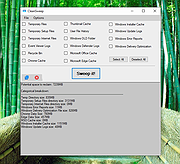 |
| Showing rows 1 to 1 of 1 | Showing Page 1 of 1 | 1 |
OlderGeeks.com Copyright (c) 2026
