|

|
Processed through Paypal No account required. |








Buy our over-priced crap to help pay the bills.



|
|
Processed through Paypal No account required. |
| Files | ||||
| File Name | Rating | Downloads | ||
 |
BIOS Beep Codes Viewer v11.3.1.1992 BIOS Beep Codes Viewer v11.3.1.1992 A free tool for diagnosing computer issues, interprets BIOS beep codes emitted during system checks when a computer starts. It allows users to view their motherboard and BIOS information, navigate a vast beep codes database of various manufacturers, and offers detailed issue descriptions. The Rizonesoft team keeps the database updated, and additional support can be gained from the computer’s official documentation and online communities. The BIOS (Basic Input/Output System) is the cornerstone of your computer’s operational blueprint, performing a self-diagnostic check to ensure all crucial hardware components are in working order every time the system is powered on. A crucial part of this process involves the generation of BIOS beep codes, which are audio signals emitted to indicate the status of essential hardware components. These beep codes act as a preliminary diagnostic tool, signaling any discrepancies or malfunctions that may exist within the system. The Rizonesoft BIOS Beep Codes Viewer is engineered to decipher these audio cues, enabling you to ascertain the health of your computer swiftly. BIOS Beep Codes Viewer Features View Current Motherboard and BIOS Information: This feature enables users to view vital information regarding their current motherboard and BIOS, which includes the manufacturer, model, BIOS version, and date. Having access to this information directly within the software streamlines the process of identifying and decoding relevant beep codes. Comprehensive Database: The software harbors a vast database of BIOS beep codes, covering a multitude of BIOS manufacturers such as AMI, Award, and Phoenix, among others. Ease of Navigation: The user-centric interface facilitates easy navigation through the beep code database, making it accessible for users with varying levels of technical expertise. In-depth Explanations: Each beep code is accompanied by a detailed description, elucidating the nature of ... |
 |
6,583 | Jun 27, 2025 Rizonesoft 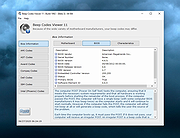 |
|
CloverBootloader v5172g CloverBootloader v5172g 👉 Boot macOS, Windows and Linux in UEFI or legacy mode. CloverBootloader is an open source bootloader for macOS, Windows and Linux on Mac or PC hardware with UEFI or BIOS firmware. Features: • Boot macOS, Windows and Linux in UEFI mode • Boot in legacy mode on Mac or PC with UEFI or BIOS firmware • Boot using UEFI firmware directly • CloverEFI UEFI firmware emulation • Customizable GUI with themes, icons, fonts, background images, animations and mouse pointers • Native screen resolution in GUI • Multilingual help from the boot GUI, depending on configuration • Save preboot logs from the GUI • Show hidden boot entries • Save original OEM ACPI tables • Test DSDT patching • Save screenshots from the GUI • Reset NVRAM • Create custom boot entries • Launch EFI command shell from the GUI Supported operating systems: • Bootloader support: macOS, Windows, Linux • Firmware support: UEFI, legacy BIOS Supported languages: Multilingual interface and help system. The project does not publish an official list of supported languages. Changes: v5172 03-22-26 The release corresponds to commit 6645e05. The release updated for compilation by gcc-15.2 because Xcode compilation is not fully correct. Fix errors in string usage. Changed XString8 -> XStringW for FullTitle and LoaderTitle. Explicit conversion from XString8 and XStringW. Restore old fixes abandoned at 5171. Restore laptop brightness fix. This download is for the ISO version (very bottom of page). A bootable ISO image (compressed with 7-Zip) containing Clover. Typically used to create a bootable CD/DVD or virtual machine boot image. All other download assets are below: EFI file: BOOTX64.efi.zip Contains the standalone BOOTX64.efi UEFI bootloader file. Useful for manually repairing or replacing the EFI boot file on a USB drive or EFI System Partition. macOS installer: Clover_r5172.pkg The macOS installer package. This is what most Hackintosh users running macOS would use to install or update Clover directly from macOS. Clover distribution archive: CloverV2-5172.zip The main Clover distribution archive. Contains the Clover bootloader files for manual installation or updating an existing Clover ... |
|
6,614 | Jun 15, 2026 CloverHackyColor 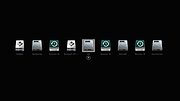 |
|
Grub2Win v3.0.5.2 Grub2Win v3.0.5.2 👉 Safely multiboot Windows and Linux from a Windows-based GRUB setup. Grub2Win is a free and open source Windows application that lets you configure GRUB boot screens and boot options directly from Windows. It includes GNU GRUB 2.12, supports Windows and Linux multiboot setups, and can automatically generate boot configuration files for many popular systems including Windows, Ubuntu, Debian, Fedora, Kali, Manjaro, Mint, PhoenixOS, Android, OpenCore and more. Features: • Includes GNU GRUB 2.12 boot modules and libraries • Configure GRUB boot screens and options directly from Windows • Simple Windows GUI for setting up boot entries • Lets you set EFI firmware boot order from within Windows • Automatically generates config files for Windows and many Linux distributions • Import Linux config files for most other distributions • Supports GPT and MBR disks • Supports extremely large disks and partitions over 40 TB • Works with many filesystems including NTFS, FAT, ext, Btrfs and Mac HFS • Search for and boot partitions by UUID or label • Supports advanced scripting • Customize boot menu wallpaper with included images or your own JPG files • Installs to a small directory on the Windows C: drive • Free and open source with no adware or spyware Supported operating systems: • Windows 11, Windows 10 64-bit EFI • Older Windows versions and BIOS firmware through Grub2Win Legacy Supported languages: • Arabic, Chinese, Croatian, Czech, Danish, Dutch, English, Finnish, French, German, Greek, Hebrew, Hindi, Hungarian, Indonesian, Italian, Japanese, Korean, Norwegian, Polish, Portuguese, Romanian, Russian, Serbian, Slovak, Slovenian, Spanish, Swedish, Thai, Turkish, Ukrainian, Vietnamese and more Changes: v3.0.5.2 10-05-26 Minor updates to the GUI and help files. More Info: Grub2Win is a tool that lets you boot grub2 from your PC's EFI firmware or MBR. It supports Windows 11, Windows 10. Download this simple Windows program and instructions that help you get grub2 booting quickly. All the files for Grub2Win reside on the Windows C: ... |
|
5,964 | Oct 06, 2026 Drummer 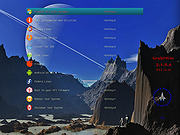 |
 |
Rufus v4.15 Rufus v4.15 👉 Create bootable USB drives easily and quickly. Rufus is a small utility that helps format and create bootable USB flash drives, such as USB keys, memory sticks, and other removable media. It is especially useful for cases where you need to create USB installation media from bootable ISOs, including Windows, Linux, and other operating systems, or when working on systems that lack an optical drive. Rufus is known for its speed and reliability, offering advanced options for power users while remaining simple enough for beginners. It supports UEFI and legacy BIOS, allows selection of partition schemes and file systems, and includes options for handling ISO images with custom settings. Features: • Create bootable USB drives from ISO images • Supports UEFI and legacy BIOS • MBR and GPT partition schemes • FAT32, NTFS, exFAT, UDF, and ReFS file systems • Detects USB devices automatically • Advanced formatting and drive options • Portable, no installation required Supported operating systems: • Windows 8, Windows 8.1, Windows 10, Windows 11 Supported languages: English, French, German, Italian, Spanish, Portuguese, Russian, Chinese (Simplified), Chinese (Traditional), Japanese, Korean, Arabic, Polish, Dutch, Greek, Turkish, Czech, Hungarian, Romanian, Vietnamese, Thai, Indonesian, Ukrainian, Bulgarian, Slovak, Slovenian, Danish, Finnish, Norwegian, Swedish, Hebrew, Persian Changes: v4.15 06-30-26 Add RISC-V 64 support to UEFI:NTFS. Improve the guards for using the "silent" Windows installation option. Improve the ability to cancel during write retries. Improve progress reporting for compressed image extraction. Fix unrestricted XML entity expansion and integer overflow in ezxml parser (courtesy of Eric Sadowski). Fix "silent" Windows installation failing at 75% in most cases. Fix a crash during boot when using UEFI:NTFS on Snapdragon X based ARM64 platforms. Fix first WUE option always being checked by default. Fix an infinite loop when using Windows ISOs that contain multiple WIMs. Fix "Enable runtime UEFI media validation" checkbox not always being properly enabled. Other WUE improvements/fixes for OneDrive removal and username validation (with thanks to @christian8641). Non exhaustive ... |
|
14,360 | Jul 02, 2026 Pete Batard/Akeo 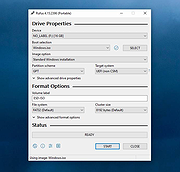 |
|
TimVer v0.14.1 TimVer v0.14.1 👉 Displays Windows version, hardware, drive, graphics, environment, and build history information. TimVer displays the same Windows version information as the built-in Winver command, along with additional system details that Winver does not provide. It can show information about Windows, the computer's hardware, processors, BIOS, memory, disk drives, graphics controllers, environment variables, and Windows build history. TimVer also provides extensive appearance and language options, clipboard functions, portable versions, and settings backup and restore. Features: • Displays Windows version, build number, build branch, architecture, and installation date • Shows computer manufacturer, model, computer name, processor, BIOS, physical memory, and last boot information • Displays logical drive information with optional physical drive details • Shows graphics controller information including adapter name, type, description, resolution, refresh rate, and number of colors • Supports systems with multiple graphics controllers and lets you select each adapter from a dropdown • Displays current environment variables with filtering by variable name • Optionally keeps a history of installed Windows build numbers • Copies an entire supported information page to the clipboard • Copies individual values to the clipboard by right-clicking • Lets you choose the display language • Provides selectable themes, accent colors, fonts, UI sizing, and row spacing • Supports automatic light and dark theme selection when using the System theme • Exports and imports application settings for backup or transfer to another computer • Can open or list the current application settings • Includes an optional check for newer TimVer releases • Runs without elevation for normal system information gathering Supported operating systems: • Windows 10 64-bit, Windows 11 64-bit Supported languages: • English (United Kingdom), English (United States), Spanish, French, Italian, Japanese, Korean, Dutch, Slovak, Thai Changes: v0.14.1 07-25-26 Fixed an issue where mismatched information could be displayed on the Graphics (Video) Information page when two or more video controllers were present. Cleaned up and optimized video controller information retrieval and UI handling. Inactive controllers may show "Not ... |
|
2,285 | Aug 24, 2026 Tim Kennedy 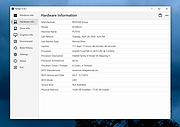 |
| Showing rows 1 to 5 of 5 | Showing Page 1 of 1 | 1 |
OlderGeeks.com Copyright (c) 2026
