|

|
Processed through Paypal No account required. |








Buy our over-priced crap to help pay the bills.


|
|
Processed through Paypal No account required. |
| Files | ||||
| File Name | Rating | Downloads | ||
 |
Astraeus v2.2.3 Astraeus v2.2.3 👉 A native Windows dashboard that unfolds from the edge of your screen with music, system information, quick controls, weather, and everyday tools. Astraeus is a compact dashboard that stays tucked along the top, left, or right edge of your screen until you need it. Hover over the center of its screen edge, press Win+Alt+A, or click its tray icon to open the panel. Move the mouse away, press Esc, or click elsewhere to close it. The dashboard is organized into pages for Home, Media, System, Network, Shelf, and Tools. The page rail can be reordered or customized in Settings. When more than five pages are enabled, the rail scrolls to show the rest instead of compressing the icons. Use the mouse wheel or the arrow keys to move between pages. Astraeus combines desktop widgets and controls in one native application. Its Home page can show media, CPU, memory, weather, and other cards. The Media page controls players that use Windows media controls, including Spotify, browsers, and Media Player. View album art, control playback, use a visualizer, and open a fullscreen player with time-synced lyrics. Lyrics can be resized, switched off, clicked to jump to a point in a song, and displayed across two monitors with the cover on one screen and lyrics on the other. The compact island pill can appear over maximized or tiled windows instead of opening the full panel. It can show what is playing, Windows notifications, or a clock with selected widgets. On laptops, it can also appear when power is connected or disconnected and when the battery gets low. The pill can remain visible on an otherwise empty desktop, and its widget options include weather, battery, CPU, memory, and network information. The System and Network pages provide live information such as CPU and GPU use, memory, top processes, ... |
 |
14 | Nov 01, 2026 Saahil Talha 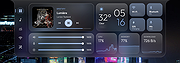 |
| Showing rows 1 to 1 of 1 | Showing Page 1 of 1 | 1 |
OlderGeeks.com Copyright (c) 2026
