|

|
Processed through Paypal No account required. |








Buy our over-priced crap to help pay the bills.



|
|
Processed through Paypal No account required. |
| Files | ||||
| File Name | Rating | Downloads | ||
 |
Accent Color Synchronizer v1.2.1 Accent Color Synchronizer v1.2.1 Automatically synchronize Windows accent colors across apps and system elements. Accent Color Synchronizer is a lightweight utility designed to keep your Windows accent color consistent across system components and supported applications. It monitors the current Windows accent color and applies it where needed, helping maintain a uniform and visually cohesive desktop appearance without manual tweaking. Ideal for users who frequently change themes or rely on dynamic accent colors, Accent Color Synchronizer ensures that supported UI elements remain in sync with the system’s current color selection. Features: • Automatically detects the current Windows accent color • Synchronizes accent color across supported apps and UI elements • Lightweight and portable design • Simple interface with minimal configuration required • Designed to work seamlessly in the background Supported operating systems: • Windows 10 Supported languages: • English Changes: v1.2.1 It is now possible to configure the program to keep changes made to its settings (whether or not the advanced mode is enabled, custom color brightness, etc.) By default, the application now uses your exact accent color as it appears in the Settings app instead of the title bar color which is often slightly different. This change can be reverted in the application options; Fixed a bug that caused the About dialog box to unexpectedly appear in specific scenarios; When a modal dialog is opened (eg. the about dialog) while the application's main window is not visible, the modal dialog no longer appears in the top-left corner of the screen. Click here to visit the author's website. |
 |
6,368 | Feb 15, 2026 Maxime Denis 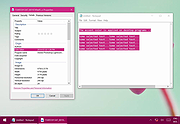 |
|
tacky-borders v1.5.0 tacky-borders v1.5.0 Add colorful, customizable borders to your Windows application windows. tacky-borders is a lightweight open-source utility that adds visible, customizable borders around application windows in Windows. It is designed to make window boundaries easier to see and to give users the ability to style their desktop with colored outlines around active and inactive windows. tacky-borders runs in the background and applies borders dynamically, helping improve window visibility and providing a more personalized desktop experience. Features: • Adds customizable borders around application windows • Supports different border colors and styles • Distinguishes between active and inactive windows • Lightweight and runs in the background • Open-source project hosted on GitHub To Configure tacky-borders: • Run tacky-borders.exe once to generate the config file automatically (created in %userprofile%/.config/tacky-borders/) • Open the config quickly by right-clicking the tray icon and choosing "Show Config" • Edit config.yaml in a text editor, then save: • watch_config_changes: True will automatically reload borders when the config file is modified • global.border_width sets border thickness in pixels • global.border_offset moves the border inwards (negative) or outwards (positive) • global.border_radius can be Auto, Square, Round, RoundSmall, or a numeric value • global.active_color and global.inactive_color support: • Solid colors using a hex value (example: "#ffffff") or "accent" • Gradient colors using a colors list + direction (example direction: 45deg or start/end coordinates) • animations and effects are configurable under global (effects note: they can significantly increase CPU/GPU usage and require rendering_backend: V2) • Per-app overrides: use window_rules to match by Class, Title, or Process (Equals, Contains, or Regex), then override any global setting for just that app • If a border is initialized but not visible for a window, try setting follow_native_border to False in a window rule Supported operating systems: • Windows 10, Windows 11 Supported languages: • English Changes: v1.5.0 04-26-26 Features add theme-aware border colors for Windows by @Louis047 in #74 Bug Fixes fix borders disappearing after waking system from ... |
|
1,113 | Jul 11, 2026 lukeyou05 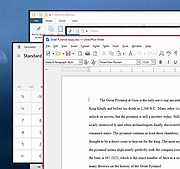 |
| Showing rows 1 to 2 of 2 | Showing Page 1 of 1 | 1 |
OlderGeeks.com Copyright (c) 2026
