FluidVoice v1.5.5 - Free Download


Processed through Paypal
No account required.


Buy our over-priced crap to help pay the bills.

OlderGeeks 2025


Follow us on BlueskyFollow us on XJoin our Facebook groupFollow us on InstagramOur RSS FeedJoin us on TikTokJoin us on LinkedIn


 Home » OlderGeeks.com Freeware Downloads » Office, Home Office, Business and Writing » Text to Speech, Dictation and Transcription » FluidVoice v1.5.5   
File - Download FluidVoice v1.5.5
Description
A plea...
Deanna and I have been running this site since 2008 and lately we're seeing a big increase in
users (and cost) but a decline in percentage of users who donate. Our ad-free and junkware-free
download site only works if everyone chips in to offset the revenue that ads on other sites bring
in. Please donate at the bottom of the page. Every little bit helps. Thank you so much.
Sincerely,
your Older Geeks: Randy and Deanna


Always scroll to the bottom of the page for the main download link.
We don't believe in fake/misleading download buttons and tricks. The link is always in the same place.


FluidVoice v1.5.5
(Formerly Fluid)

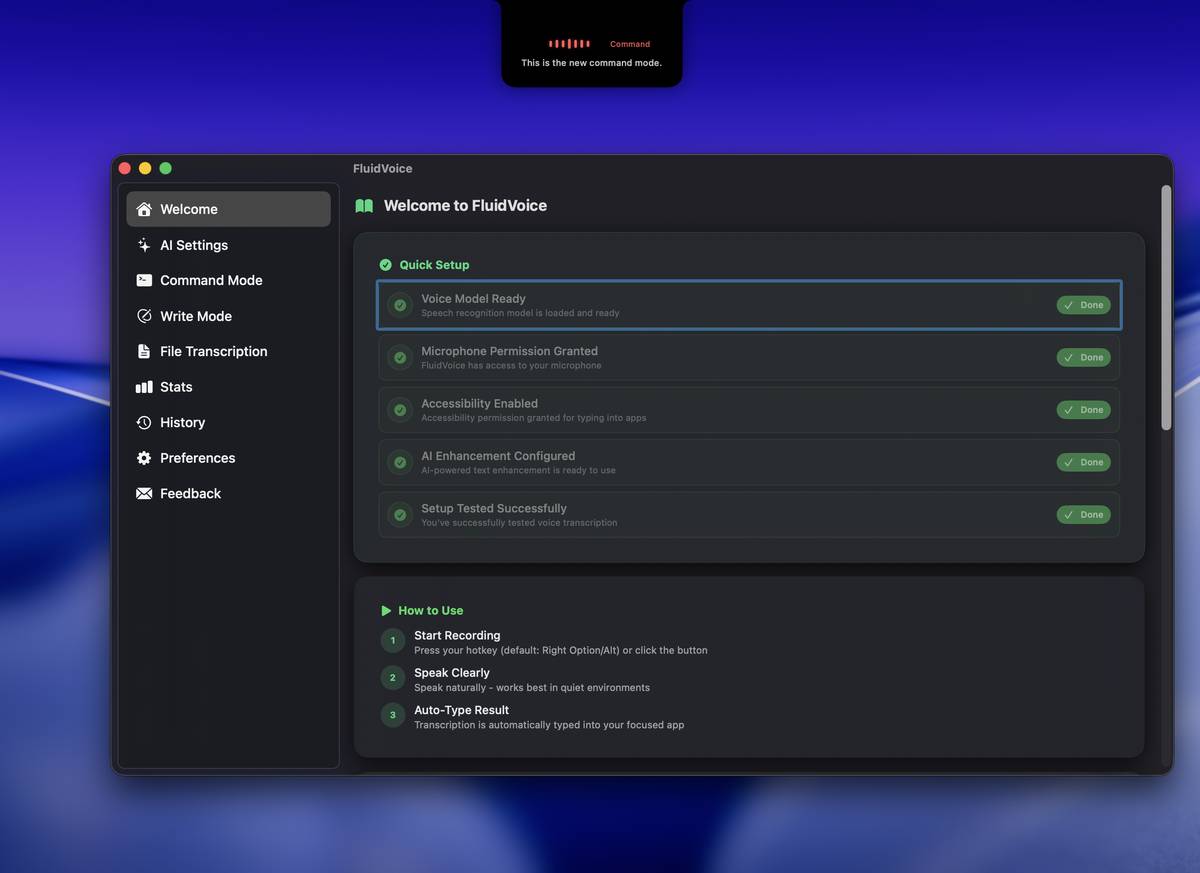
Free, open source voice-to-text dictation app for macOS with AI enhancement.

FluidVoice transforms your voice into text instantly with NVIDIA's fastest AI model, processing locally on your Mac with complete privacy.


Features:
• Live Preview Mode: Real-time transcription preview in overlay
• Multiple Speech Models: Parakeet TDT v3 & v2, Apple Speech, and Whisper
• Real-time transcription with extremely low latency
• AI enhancement with OpenAI, Groq, and custom providers
• Global hotkey for instant voice capture
• Smart typing directly into any app
• Menu bar integration for quick access
• Auto-updates with seamless restart
• Overlay with Notch support
• Command Mode
• Write Mode
• New History stats
• Stats to monitor usage

Note: This is an embedded YouTube video and may contain ads. Avert your eyes.


Quick Start:
• Download the latest release below
• Move to Applications folder
• Grant microphone and accessibility permissions when prompted
• Set your preferred hotkey in settings
• Optionally add an AI provider API key for enhanced transcription, keys are stored securely in your macOS Keychain. Make sure select "Always allow" for permissions

System Requirements:
• macOS 14.0 (Sonoma) or later
• Apple Silicon Mac (M1, M2, M3, M4)
• Intel Macs are supported from 1.5.1 builds using Whisper models!
• Microphone access
• Accessibility permissions for typing

Changes:
v1.5.5 01-26-26
Quality of Life Improvements
Implemented automatic media playback control (start/stop) during dictation and transcription [ Silicon Macs only for now ]
Introduced a download progress indicator for Voice models.
Added a customizable start chime for recording sessions, accessible via preferences.

AI Settings Enhancements
Redesigned the entire AI Settings sidebar into dedicated Voice Engine and AI Enhancements tabs [Hope you like it!]
Added support for the upcoming Fluid-1 fully local model.
Integrated a model list retrieval button to automatically fetch available models from selected providers.
Expanded built-in provider support to include OpenAI, Google, Ollama, Cerebras, Groq, LM Studio, and OpenRouter.
Resolved various bugs and improved the overall stability of AI Settings.
Added direct links to obtain API keys for all supported providers within the settings interface.
Optimized the selection process for FluidVoice Voice Engines used in transcription and dictation.

Custom Dictation Prompts
Added the ability to define custom prompts within AI Settings for specialized tasks such as terminal commands or email templates.
Enabled on-the-fly prompt configuration through the dictation overlay.

Meeting Transcription
Enhanced transcription engine can now process audio files exceeding 5 hours in length.
Improved performance to 160x real-time speed, allowing 5 hours of audio to be transcribed in approximately 2 minutes.

General Improvements and Bug Fixes
Removed the transcription history limit, increasing it from 1,000 entries to unlimited.
Verified compatibility with overlay-based applications such as Raycast.
Updated the UI to hide AI Enhancement menu items when the feature is disabled to reduce interface clutter.

Additional Changes
Added a preference setting to customize the application accent color.


Click here to visit the author's website.
Continue below for the main download link.


Downloads Views Developer Last Update Version Size Type Rank
480 4,339 ALTIC Jan 27, 2026 - 12:55 1.5.5 7.07MB DMG 5/5, out of 18 Votes.
File Tags
FluidVoice  v1.5.5  
      
Ope! Hold on, Speedy.
You gotta read this before you download below:

There are no ads, no fake download buttons and no crapware here.
This website has lived for 18 years solely through donations.
You can download without donating but we use the "Honor System"
here in the Ozarks. If your momma raised you to be honorable,
make your donation to keep things running.
Your momma would be so proud!

Thank you! -Randy & Deanna (The Older Geeks)
Missouri Ozarks, USA

Monthly operating costs = $750
Donations cover operating costs first
then are set aside for future upgrades and/or
handed-over to Deanna for new shoes.


Recent Super Donors ($50+)
Thanks, Teresa
Thanks, Carol
Thanks, Kevin
Thanks, John
Thanks, Jonathan

Recent Donors
Thanks, Reynaldo
Thanks, Michael
Thanks, STVR Computers
Thanks, Dave
Thanks, Owen
Thanks, Douglas
Thanks, Barry
Thanks, Jay
Thanks, W.
Thanks, Alex
PayPal or Credit Card
IMPORTANT: Shows as HCRLLC on bank statement.
Ko-fi
Support us with a coffee
Patreon
Become a monthly patron
Mail a check Payable to:
Home Computer Repair LLC
208 E. Water St.
Mount Vernon, MO 65712


👉 Download Your File

Click to Rate File     Share it on Twitter →


OlderGeeks.com Copyright (c) 2026