|

|
Processed through Paypal No account required. |








Buy our over-priced crap to help pay the bills.



|
|
Processed through Paypal No account required. |
| Files | ||||
| File Name | Rating | Downloads | ||
 |
Application Blocker v2.2.0 Application Blocker v2.2.0 A software restriction tool for Windows. It can block access to selected programs. Application Blocker is very effective and easy to use. You can select any program file and add it to the list. The lock is reliable and very hard to break for normal users. Application Blocker does not work at background so it does not affect your computer's performance. Application Blocker can be used to control your child's computer usage or prevent access to programs on special areas like school computers. You can set an UI password to prevent unauthorized users from blocking and unblocking programs. Features: • Block Apps • Parental Controls • Application Blocker • Password Protected • Application Restrictor • Restrict Programs Supported operating systems: Windows Vista or later. Changes: v2.2.0 The tool now uses Task Dialogs instead of message boxes for a better look. Changes to about box and dialogs for better information. Now you can press Enter on password boxes. Click here to visit the author's website. |
 |
835 | Nov 14, 2025 Emir Alp Koηak 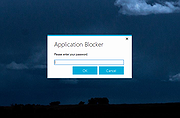 |
 |
HotShots v2.2.0 HotShots v2.2.0 HotShots is an application for capturing screens and saving them in a variety of image formats as well as adding annotations and graphical data (arrows, lines, texts, ...). Version 2.2.0 * Features - Restore last selection in region and freehand grabbing - Add options to display or not dialog before/after download Click here to visit the author's website. |
|
9,475 | Jul 02, 2020 xbee 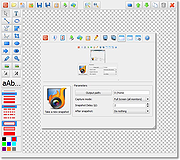 |
|
IPerf2 v2.2.0 IPerf2 v2.2.0 A tool that measures network performance of TCP/UDP including latency for Windows, macOS and Linux A network traffic tool for measuring TCP and UDP performance with metrics around both throughput and latency. The goals include maintaining an active iperf code base across a broad set of platforms and operating systems. This is a multi-threaded design which scales with the number of CPUs or cores within a system. Changes v2.2.1 (as of June 11th, 2024) • don't autoset --tcp-write-prefetch with --trip-times, warn instead • Add Android NDK example, add mingw64 example • set smallest prefetch to 256K • print wait time on server side with --tx-starttime • fix header code #if mismatch of (HAVE_DECL_SO_TIMESTAMP) && (HAVE_DECL_MSG_CTRUNC) per ticket 328 • fix client side bb summing • fix format error in timestamps • 1) Support CSV for isochronous, both UDP and TCP 2) Reorganise CSV report assignement to be more logical. • support milliseconds and microseconds with iperf_formattime, also make sure the leading zeros are printed per the field width • fix multiple pps regressions • csv patches per ticket 320 and 322 • add per direction byte counts with bounceback on client (server side code yet to be done) • fix summing init code per ticket 324 • tcp working load should use full capacity seeking behaviors • fix csv compile breakage on MAC • use append for --ouput vs w, ticket 321 • use --ipg units of seconds • fix settings calculations when -b is given for --burst options • improve port range / traffic thread count (-P) warning • add transferid to recvmsg warning • compute packet pps accounts for interval crossing using that timestamp vs packet timestamp • use object setnow() method to set lastPackeTime in first packet delay • pps calculation needs to include partial gap value with IPGsum ahead of PPS output • minor fixes for DEBUG_PPS support • fix initial udp write delay and reporting • Rerun autoconf • Remove ... |
|
3,211 | Aug 05, 2024 Robert McMahon 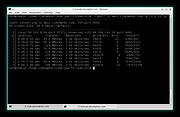 |
|
SwitchExplorer v2.2.0 SwitchExplorer v2.2.0 Switch Explorer and Context Menu between the Windows 11 version and the Windows 10 version. With SwitchExplorer, you can: • Set the default Explorer in Windows 11 to the Windows 10 version (the same one you can access via the Control Panel). • Set the Windows 11 context menu (right-click menu) to the Windows 10 (classic) layout. • You can also use the tool to undo the changes & switch back to the Windows 11 defaults. SwitchExplorer does not install any software. It only sets some user profile registry entries and closes Explorer windows (so the change can take effect). It can be used by both Standard and Administrator users and can be run from a flash drive. There is nothing to install. Just download and run. Changes: v2.2.0 12-08-25 Added an option to Restart Explorer because sometimes Explorer does not switch correctly without killing and restarting it. Click here to visit the author's website. |
|
833 | Dec 09, 2025 LesFerch 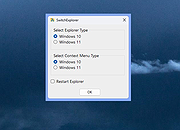 |
|
Tweaking.com - Simple System Tweaker PORTABLE VERSION v2.2.0 ==Official Mirror== Tweaking.com - Simple System Tweaker PORTABLE VERSION v2.2.0 Tweaking.com - Simple System Tweaker is designed to bring only the safest tweaks to your system to increase speed and stability. Windows is setup in a default configuration. By fine tuning your Windows configuration you can increase the speed and snappiness of the operating system. These tweaks are the ones that are safe and shown to cause no side effects with any programs. Each tweak only gives a small performance boost. But they all add up, so the more tweaks you do the more performance you get. For Windows XP, 2003, Vista, 7, 8, 2008 (Supports 32 & 64 bit) What can you expect with this program? It all depends on your current system. You can get faster boot & shutdown times, faster network file sharing, snappier feel to opening Windows and programs, and more stability. The system in all should feel smoother. These tweaks are the same ones I put on my customers machines and have found them to not cause any problems with any programs. Only safe tweaks are in this program. The program also supports a silent command so you can run the program silently. Set the options you want, which will save to the settings.ini file. Run the program with /silent command and the program will apply based on your saved settings then close. When the program is ran for the first time it will backup all the regkeys it changes into a backup.reg file. This way if you ever want to put things back the way they where a double click of that reg file and your good to go. v2.2.0 Updated Registry backup to v2.0.0 Updated multiple controls. Multiple code changes and tweaks. Added the new default v2 color scheme to the program and also changed it to the new default for a new install of the program. ... |
 |
10,327 | Jan 28, 2015 Tweaking.com |
|
Tweaking.com - Simple System Tweaker v2.2.0 ==Official Mirror== Tweaking.com - Simple System Tweaker v2.2.0 Tweaking.com - Simple System Tweaker is designed to bring only the safest tweaks to your system to increase speed and stability. Windows is setup in a default configuration. By fine tuning your Windows configuration you can increase the speed and snappiness of the operating system. These tweaks are the ones that are safe and shown to cause no side effects with any programs. Each tweak only gives a small performance boost. But they all add up, so the more tweaks you do the more performance you get. For Windows XP, 2003, Vista, 7, 8, 2008 (Supports 32 & 64 bit) What can you expect with this program? It all depends on your current system. You can get faster boot & shutdown times, faster network file sharing, snappier feel to opening Windows and programs, and more stability. The system in all should feel smoother. These tweaks are the same ones I put on my customers machines and have found them to not cause any problems with any programs. Only safe tweaks are in this program. The program also supports a silent command so you can run the program silently. Set the options you want, which will save to the settings.ini file. Run the program with /silent command and the program will apply based on your saved settings then close. When the program is ran for the first time it will backup all the regkeys it changes into a backup.reg file. This way if you ever want to put things back the way they where a double click of that reg file and your good to go. v2.2.0 Updated Registry backup to v2.0.0 Updated multiple controls. Multiple code changes and tweaks. Added the new default v2 color scheme to the program and also changed it to the new default for a new install of the program. So ... |
|
10,149 | Jan 28, 2015 Tweaking.com |
| Showing rows 1 to 6 of 6 | Showing Page 1 of 1 | 1 |
OlderGeeks.com Copyright (c) 2026
