|

|
Processed through Paypal No account required. |








Buy our over-priced crap to help pay the bills.



|
|
Processed through Paypal No account required. |
| File - Download ExifToolGUI Portable v6.3.4-2 | ||||||||
| Description | ||||||||
|
Always scroll to the bottom of the page for the main download link. We don't believe in fake/misleading download buttons and tricks. The link is always in the same place. ExifToolGUI Portable v6.3.4-2 Image metadata reader and modifier. ExifTool is a tool for reading, writing and editing meta information in a wide variety of files. ExifTool supports many different metadata formats including EXIF, GPS, IPTC, XMP, JFIF, GeoTIFF, ICC Profile, Photoshop IRB, FlashPix, AFCP and ID3, Lyrics3, as well as the maker notes of many digital cameras by Canon, Casio, DJI, FLIR, FujiFilm, GE, GoPro, HP, JVC/Victor, Kodak, Leaf, Minolta/Konica-Minolta, Motorola, Nikon, Nintendo, Olympus/Epson, Panasonic/Leica, Pentax/Asahi, Phase One, Reconyx, Ricoh, Samsung, Sanyo, Sigma/Foveon and Sony. ExifToolGUI is a frontend for ExifTool. 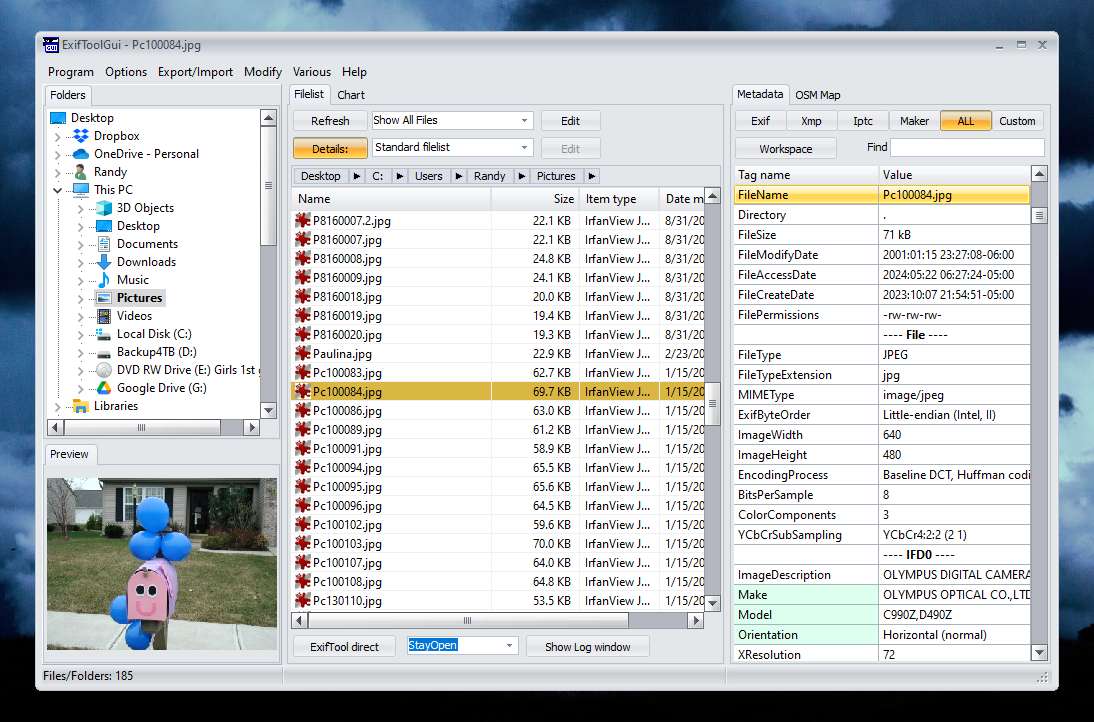 App Notes Changing Languages: ExifToolGUI is multilingual but has no way to change languages in the app itself. If you use it with the PortableApps.com Platform, it will automatically switch languages to match your preferred language. If used alone, run it once and then close it. Then open up the ExifToolGUIPortableSettings.ini file within the ExifToolGUIPortable\Data\settings directory. Set the Language= entry to the 3 letter code of the language you with to use. ENU for English, NLD for Dutch, FRE for French, DEU for German, ITA for Italian, PTB for Portuguese, CHS for Simplified Chinese, or ESP for Spanish. GPS Map: By default, the map function is disabled. It can be enabled within Program - Preferences and check off enable internet access. Close ExifToolGui Portable and then open it again. This feature works on PCs with Microsoft Edge installed, typically Windows 10/11. Supported operating systems: Windows 7, 8, 10, 11 Click here to visit the author's website. Continue below for the main download link. |
||||||||
| Downloads | Views | Developer | Last Update | Version | Size | Type | Rank | |
| 1,350 | 6,416 | Nov 06, 2024 - 13:12 | 6.3.4-2 | 24.99MB | EXE |  , out of 50 Votes. , out of 50 Votes. |
||
| File Tags | ||||||||
| v6.3.4-2 ExifToolGUI Portable | ||||||||
Click to Rate File Share it on Twitter → Tweet
|


