|

|
Processed through Paypal No account required. |








Buy our over-priced crap to help pay the bills.



|
|
Processed through Paypal No account required. |
| File - Download WindTerm v2.5.0 | ||||||||
| Description | ||||||||
|
Always scroll to the bottom of the page for the main download link. We don't believe in fake/misleading download buttons and tricks. The link is always in the same place. WindTerm v2.5.0 A Quicker and better SSH/Telnet/Serial/Shell/Sftp client for DevOps. License Completely FREE for commercial and non-commercial use without limitations. All released source codes (except thirdparty directory) are provided under the terms of Apache-2.0 license. Introduction See Intro Videos https://kingtoolbox.github.io/ Screenshots Main Window (zsh): 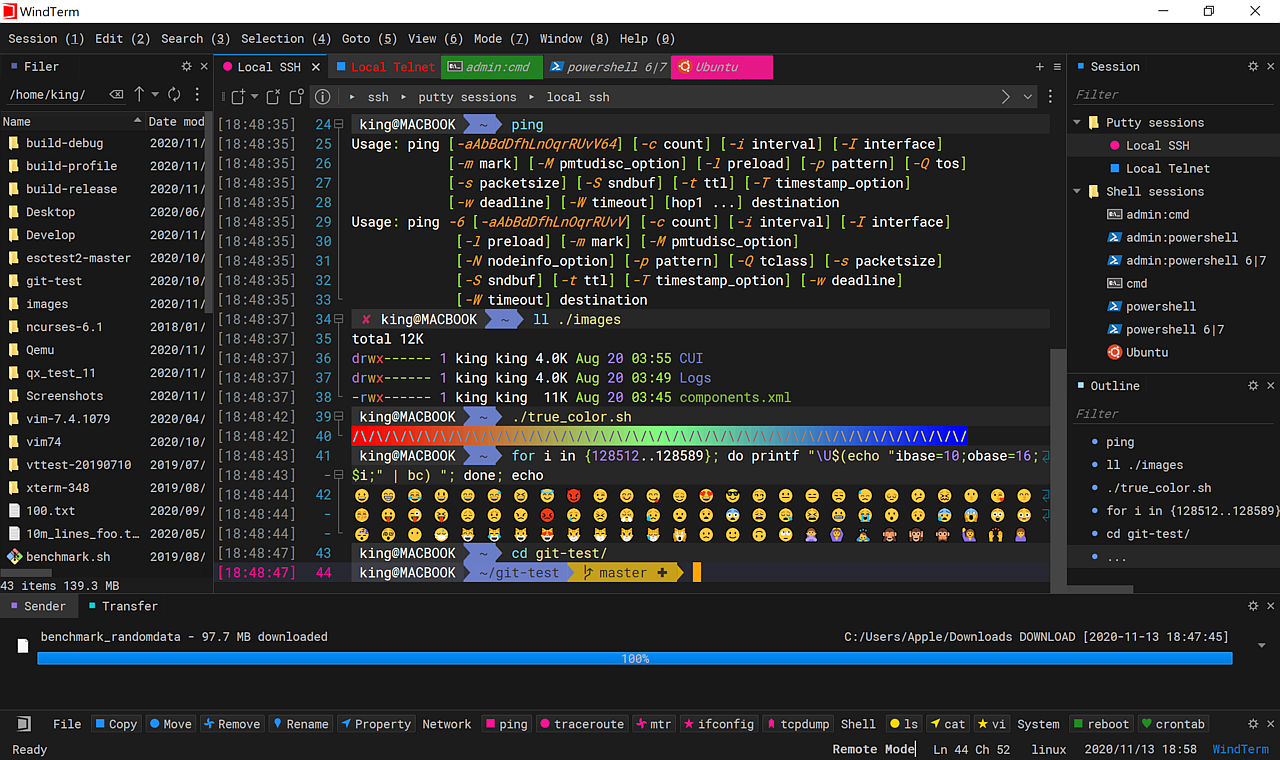 Split views: 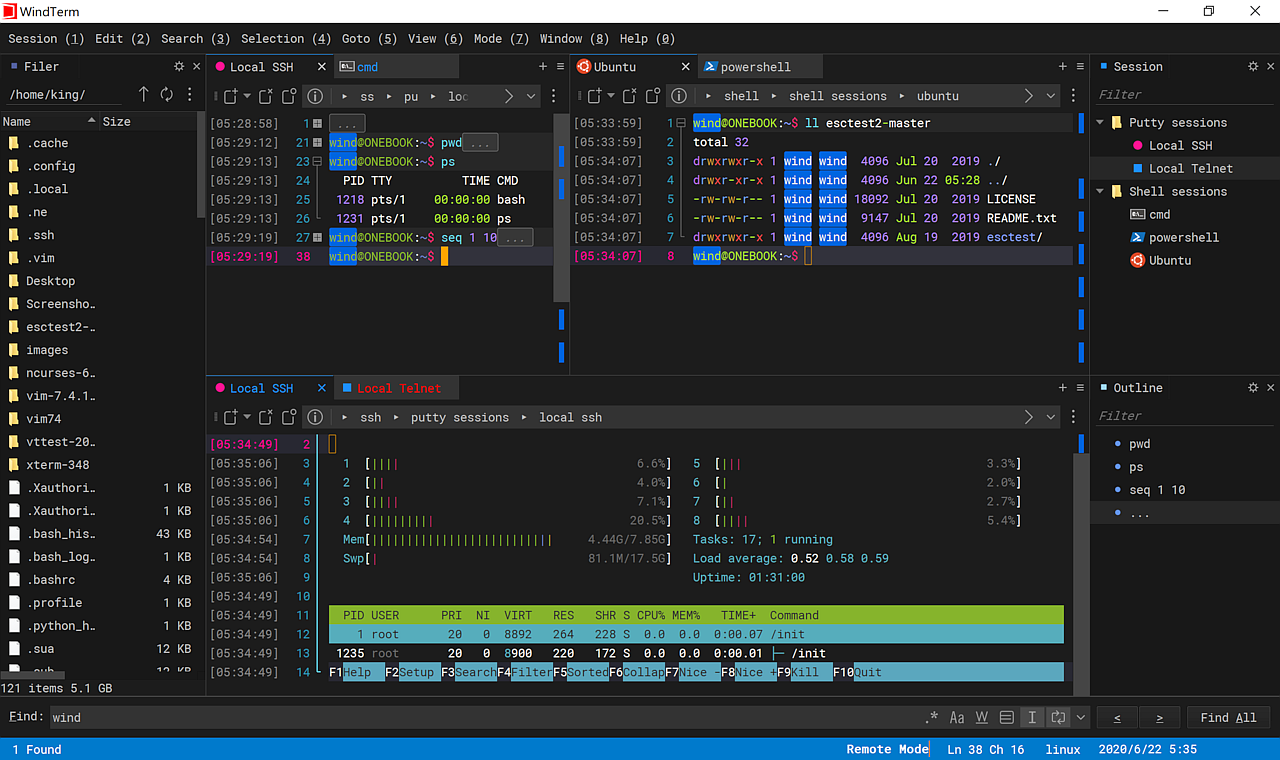 DigeWhite Theme: 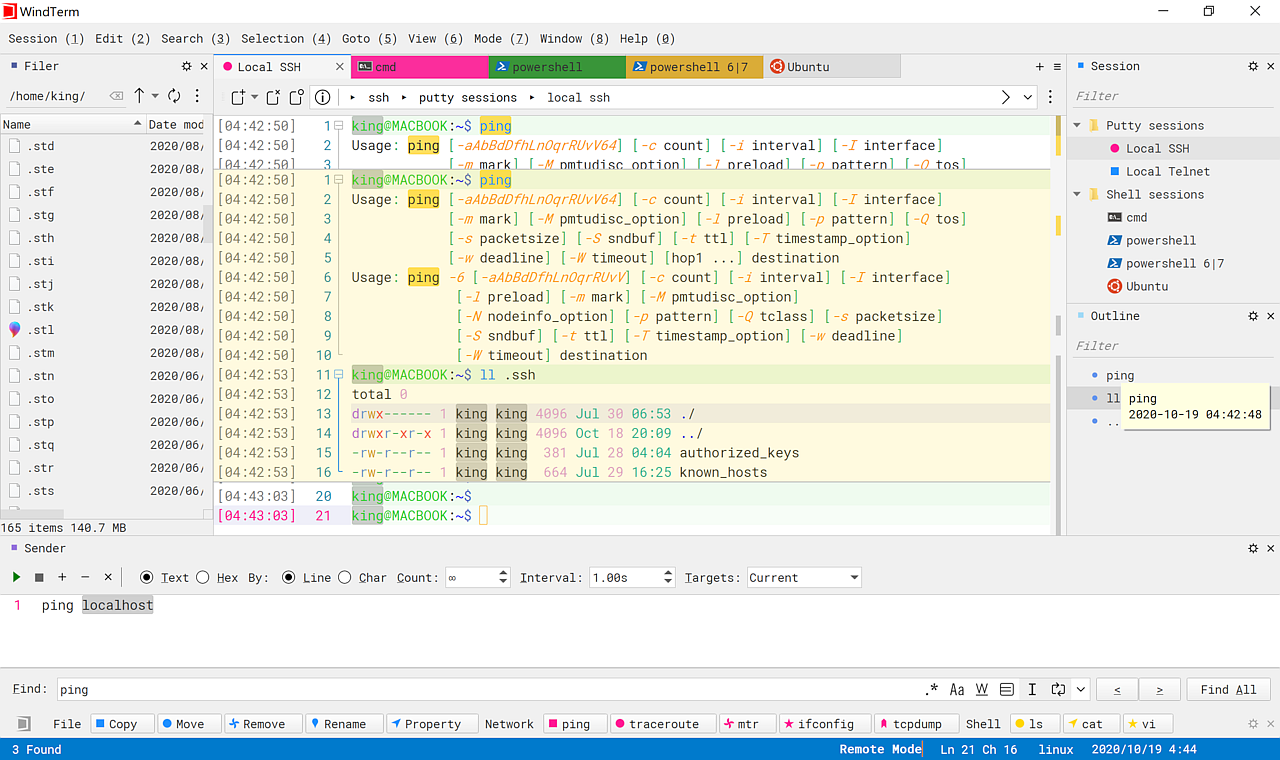 Features SSH, Telnet, Tcp, Shell, Serial SSH v2, Telnet, Raw Tcp, Serial, Shell protocols implemented. Supports SSH auto execution when session authenticated. Supports SSH ControlMaster. Supports SSH ProxyCommand or ProxyJump. Supports SSH agent forwarding. Supports SSH auto login with password, public-key, keyboard-interactive, gssapi-with-mic. Supports X11 forwarding. Supports direct/local port forwarding, reverse/remote port forwarding and dynamic port forwarding. Supports XModem, YModem and ZModem. Integrated sftp, scp client, supports download, upload, remove, rename, make new file/directory and so on. Integrated local file manager, supports move to, copy to, copy from, remove, rename, make new file/directory and so on. Supports Windows Cmd, PowerShell and Cmd, PowerShell as administrator. Supports Linux bash, zsh, powershell core and so on. Supports MacOS bash, zsh, powershell core and so on. GUI Supports Windows, MacOS and Linux. Supports Multilingual User Interface. Supports Unicode 13. Session dialog and session tree. Free Type Mode. Focus Mode. Sync Input. Enhanced protection of the session username and password. Command palette. Command sender. Explorer Pane. Shell Pane. Quick Bar. Paste Dialog. Local and remote modes with vim keybindings. (Using Shift+Enter key to switch between remote and local mode) Supports time stamp, folding, outlining, split views. Supports powerline in Linux and PowerShell, e.g. Oh-My-Zsh, Oh-My-Posh. Supports color schemes like vscode. Supports searching and previewing. Supports highlighting the opening and closing delimiter, such as (), [], {} and the customed delimiters. Supports changing the UI theme. Supports setting the tab color. Supports searching over the opened tabs. Supports closing tabs to the right. Supports setting the windows transparency. Supports select-to-copy, right-click-to-paste or middle-click-to-paste. Supports searching text online with Google, Bing, Github, Stackoverflow, Wikipedia and DuckDuckGo. Supports hiding mouse cursor while typing. Supports locking screen. Term Supports vt100, vt220, vt340, vt420, vt520, xterm, xterm-256-colors. Supports unicode, emojis, true-color, mouse protocol, etc. Supports auto wrap mode. Protocols and terms can be customed. All vttest tests have passed except Tektronix 4014. Session Supports HTTP and SOCKS5 proxy. Supports Jump Server proxy. Supports manual and automated session logging. Rename and duplicate session. Restore last sessions and layouts when restart. Supports opening a specific session or set of sessions on startup. Performance Dynamic memory compression, typically 20% to 90% of the working memory load can be reduced. High performance, low memory, low latency. This download is for the Windows 64 bit version. All other download assets are below: Windows: WindTerm_2.5.0_Windows_Portable_x86_32.zip MacOS: WindTerm_2.5.0_Mac_Portable_x86_64.dmg Linux: WindTerm_2.5.0_Linux_Portable_x86_64.tar.gz Click here to visit the author's website. Continue below for the main download link. |
||||||||
| Downloads | Views | Developer | Last Update | Version | Size | Type | Rank | |
| 2,911 | 14,245 | kingToolbox | May 24, 2023 - 12:06 | 2.5.0 | 27.86MB | ZIP |  , out of 62 Votes. , out of 62 Votes. |
|
| File Tags | ||||||||
| WindTerm v2.5.0 | ||||||||
Click to Rate File Share it on Twitter → Tweet
|


