|

|
Processed through Paypal No account required. |








Buy our over-priced crap to help pay the bills.



|
|
Processed through Paypal No account required. |
| File - Download Power Saver v0.1.0 | ||||||||
| Description | ||||||||
|
Always scroll to the bottom of the page for the main download link. We don't believe in fake/misleading download buttons and tricks. The link is always in the same place. Power Saver v0.1.0 Manages Windows Power Plans automatically based on running process names. The Power Saver will set the power plan to Balanced if the running processes match a provided list, the plan is set to Power Saver otherwise. This can save and regulate the consumed energy of a Windows system to reduce your electricity bill and cooling requirements because the performance is force-throttled if you do not need it. The benefits of an automatic power plan selection can be increased by customizing your Power Saver plan to limit the resource consumption even further (e.g. max CPU usage: 60%). The spawned process is hidden and will react to its changed configuration file automatically. A tray icon is displayed to indicate the current power level (green = saving and orange = balanced). Additionally, the tray icon provides the ability to force a specific power level among other useful options. Configuration The configuration file path is detected as following 1) The first program argument if provided 2) The POWER_SAVER_CONFIG_PATH environment variable, if set. 3) A powersaver.yaml that is located next to the executable. The configuration file is simple: # Process pooling time in seconds interval: 30 # Case insensitive program names that promote the current # power scheme to "Balanced", otherwise "Power Saver" is set. balanced: - Unreal - Blender - devenv File changes are detected automatically and adjust the power plan instantly! 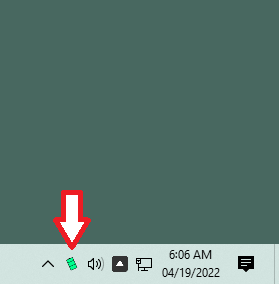 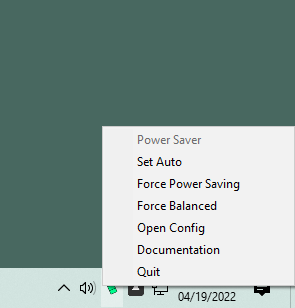 Click here to visit the author's website. Continue below for the main download link. |
||||||||
| Downloads | Views | Developer | Last Update | Version | Size | Type | Rank | |
| 3,014 | 5,835 | Denis Blank | Apr 19, 2022 - 11:23 | 0.1.0 | 736.4KB | ZIP |  , out of 54 Votes. , out of 54 Votes. |
|
| File Tags | ||||||||
| Power Saver v0.1.0 | ||||||||
Click to Rate File Share it on Twitter → Tweet
|


