|

|
Processed through Paypal No account required. |








Buy our over-priced crap to help pay the bills.



|
|
Processed through Paypal No account required. |
| Files | ||||
| File Name | Rating | Downloads | ||
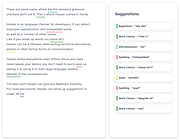 |
Harper v1.3.0 Harper v1.3.0 Private grammar checker and free alternative to Grammarly. Harper is a free English grammar checker designed to be just right. You can think of it as an open-source alternative to Grammarly. Private Harper is completely private, in every sense of the word. Since Harper runs on-device, your data doesn't go anywhere you don't want it to. That means you have 100% certainty we don't violate your copyright by training large language models. Native Everywhere Harper is available as a language server, JavaScript library through WebAssembly, and Rust crate, so you can get fantastic grammar checking anywhere you work. That said, we take extra care to make sure the Visual Studio Code, Neovim, Obsidian, and Chrome integrations are amazing. Wicked Fast Since Harper runs on your devices, it's able to serve up suggestions in under 10 milliseconds. No network request, no massive language models, no fuss. Open Source Harper is completely open source under the Apache-2.0 license. This download is for the Chrome Extension (very bottom of page). If you need the Firefox Extension, download here. If you need the Obsidian plugin: 1) Open Obsidian and navigate to Settings → Community Plugins → Browse. 2) Search for "Harper" in the plugin library. 3) Click "Install" and then "Enable." 4) Start typing in your notes—Harper will automatically highlight errors as you go! Notice Harper expects an up-to-date version of Electron. If you have issues, reinstall Obsidian or otherwise update your Electron version. Click here to visit the author's website. |
 |
1,155 | Dec 26, 2025 Elijah Potter |
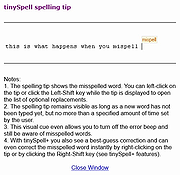 |
tinySpell Free Edition 1.9.64 tinySpell Free Edition 1.9.64 Occasionally you need to check spelling in an application that does not include a spelling checker and you don't want to launch your word processor just for that. This is when tinySpell becomes handy. It is a small utility that allows you to easily and quickly check and correct the spelling in any Windows application. tinySpell can watch your typing on the fly and alert you whenever it detects a misspelled word. It can also check the spelling of text that you copy to the clipboard. tinySpell installs itself in the taskbar notification area for easy access. Option 1: While you are typing, tinySpell watches the text you enter and whenever it detects a misspelled word it beeps and shows a spelling tip, and the tinySpell taskbar icon turns from white to yellow . Option 2: When you copy text to the clipboard tinySpell checks its spelling immediately. If it finds at least one misspelled word in the text it beeps and turns its icon to yellow. Correcting a misspelled word is also simple: When a misspelled word is detected, click the tinySpell taskbar icon or press the hot-key to pop up a list of suggested replacement words. If the misspelled word is detected during on-the-fly checking or after a word is copied to the clipboard you can select a correction from the list. The selected word is inserted into your document, or is copied to the clipboard (so you can paste it in your document), or both (depending on your settings). Features: top tinySpell (totally free - no adware/spyware/nagware/etc.) Checks spelling in any Windows application Checks spelling on-the-fly (alerts if the last typed word was misspelled) Checks spelling of text that is copied to the clipboard Allows you to specify applications for which tinySpell ... |
|
9,353 | Aug 06, 2021 tinySpell |
| Showing rows 1 to 2 of 2 | Showing Page 1 of 1 | 1 |
OlderGeeks.com Copyright (c) 2026
