|

|
Processed through Paypal No account required. |








Buy our over-priced crap to help pay the bills.



|
|
Processed through Paypal No account required. |
| Files | ||||
| File Name | Rating | Downloads | ||
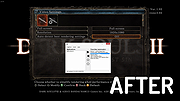 |
Borderless Gaming 9.5.6 Borderless Gaming 9.5.6 Borderless Gaming is a simple tool that will allow you to turn your windowed video games into "fullscreen" applications without all of the negative side effects The project is open source under the GNU General Public License v2.0. Borderless Gaming 9.5.6 Various bug fixes. Click here to visit the author's website. |
 |
7,027 | Dec 20, 2019 Andrew Sampson |
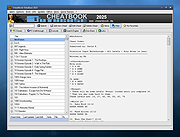 |
CheatBook DataBase 2025 CheatBook DataBase 2025 Cheats, Hints, Tips, Trainer and Cheat Codes. Cheatbook-DataBase 2025 is a cheats code tracker that makes hints, Tricks, Tips and cheats (for PC, Walkthroughs, Playstation, Playstation 2, Playstation 3, Playstation 4, Sega, Nintendo 64, Nintendo DS, DVD, Game Boy Advance, Game Boy Color, N-Gage, Nintendo DS, XBox, XBox 360, XBox One, iPhone, Gamecube, Dreamcast, Super Nintendo, Wii, Wii U, Sony PSP) easily accessible from one central location. If you're an avid gamer and want a few extra weapons or lives to survive until the next level, this freeware cheat database can come to the rescue. Covering more than 28.200 Games Cheats, this database represents all genres and focuses on recent releases. Games are listed alphabetically in the left-hand window. When you click on a game name, the relevant cheat is displayed in a editor window, with convenient buttons that let you print the selection or save any changes you've made. In the latest past many users of the Cheatbook-Database and readers of the monthly being published magazine have sent to us small error messages and suggestions for improvement again and again. First of all we say "Thank you very much!" to all of you! Due to this assistance and the permanent sending in of new and revised cheats the Cheatbook is ever increasing and becoming more and more voluminous. Supported operating systems: Win95/ 98/ 2000/ NT/ XP/ Vista/ Windows 7/8/10/11. Click here to visit the author's website. |
|
14,826 | Feb 26, 2025 Cheatbook |
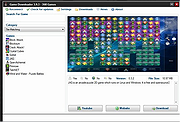 |
Game Downloader 3.9.3 Game Downloader 3.9.3 Game Downloader is a portable and open source download client, which interacts with a server side library for downloading numerous games. With the help of this utility, you can download more than 200 games, by simply selecting a game category then selecting any game from the available list. This makes it easy to obtain games, without having to manually search and download the game via a browser. Features: Over 200+ games to download. Games are added or updated frequently. Customizable user friendly features. Small and Portable. Requires Microsoft .Net Framework. |
 |
9,179 | Apr 25, 2015 Dev-Fire |
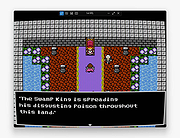 |
Magpie v0.12.1 Magpie v0.12.1 A free, lightweight, real-time window upscaling tool for Windows that applies multiple algorithms and filters to improve visual quality. Magpie is a powerful real time window scaling utility designed to improve the appearance of games and applications that do not natively support high resolutions. It captures a target window and upscales it using modern algorithms such as Anime4K, AMD FSR, CRT shaders, and other image enhancement filters. This allows older games, pixel art software, emulators, and low resolution programs to look significantly sharper and cleaner on modern high DPI displays. Magpie runs with very low overhead, supports hotkeys, multi monitor setups, fullscreen or windowed applications, and provides a modern WinUI interface for selecting and customizing scaling effects. Features: • Real time window capture and upscaling • Multiple scaling algorithms including Anime4K, FSR, CRT shaders and more • Works with games, emulators, video players and standard applications • Fullscreen and windowed mode support • Multi monitor support • Customizable effects and filter chains • Hotkeys for quick activation and control • Modern WinUI interface with theme support Supported operating systems: Windows 10 version 1903 and later, Windows 11 Supported languages: English, Chinese, Japanese, Korean, Russian, Spanish, French, German, Portuguese, Italian, Turkish, Polish, Vietnamese, Indonesian, Ukrainian, Hungarian, Czech, Dutch, Thai, Arabic Changes: v0.12.1 08-27-25 This release adds auto-hide cursor support and fixes several compatibility issues. New Features Added support for automatically hiding the cursor when idle (#1267, #1045) Customizable hide delay Improved auto-scaling mechanism so scaling won’t be interrupted by pop-up windows (#1276) Fixes Fixed an issue where scaling could sometimes stop unexpectedly (#1252, #1244) Fixed an issue where the source window could appear above the scaled window (#1259, #1232) The “Keep scaled window on top” option has been removed, the scaled ... |
|
800 | Feb 02, 2026 Xu Blinue |
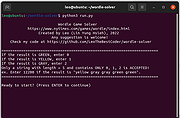 |
Wordle Solver v1.0 Wordle Solver v1.0 Open source Wordle Game Solver A Python3 script for solving Wordle puzzles. No one likes a cheater! Environment Requirements 1) Python3 (Python2 is NOT accepted.) Get it HERE 2) A non-existent sense of fair play and self respect. Demo Video Getting Started 1) clone the repo git clone https://github.com/LeoTheBestCoder/wordle-solver or download the .zip file at the bottom of this page. 2) go into the directory cd wordle-solver or wordle-solver-main if using the .zip file. 3) execute the python script run.py (Please ignore construct.py) python3 run.py It should look like this. Press ENTER to continue. Later, if the result is GREEN (correct character + correct position), enter 0. If the result is YELLOW (correct character + wrong position), enter 1. If the result is RED (wrong character), enter 2. CAUTION!!! If the result isn't correctly entered, the program will be terminated right away. So, refer to the following example or demo video, and be extremely careful when entering the result. It tells you to guess "laxer" as the first attempt, so enter laxer into the wordle game. The result is YELLOW YELLOW GRAY GRAY YELLOW, so enter 11221 in the terminal. Then, go back to website and guess next word, gnarl. The result is GRAY GRAY YELLOW GREEN YELLOW, so enter 22101 in the terminal. Then, go back to website and guess next word, flora. The result is GRAY GREEN GRAY GREEN GREEN, so enter 20200 in the terminal. Then, go back to website and guess next word, ultra. We got the correct answer!! Since the result is all GREEN, so enter 00000 in the terminal and the program will congratulate you! Feeling pretty bad about yourself ... |
|
3,032 | Feb 17, 2022 Leo Hsieh |
| Showing rows 1 to 5 of 5 | Showing Page 1 of 1 | 1 |
OlderGeeks.com Copyright (c) 2026
