|

|
Processed through Paypal No account required. |








Buy our over-priced crap to help pay the bills.



|
|
Processed through Paypal No account required. |
| Files | ||||
| File Name | Rating | Downloads | ||
 |
JMoveIt v1.00 JMoveIt v1.00 👉 A lightweight multi-monitor utility that moves windows between displays while preserving their relative size and position. JMoveIt is a multi-monitor utility designed to solve two common display-management problems: programs changing size when moved between monitors with different scaling or resolution settings, and Windows relocating open programs when a monitor’s power state changes. It can move programs to other monitors while maintaining the same relative size and position, and its optional Monitor Watcher feature can detect monitor power changes and restore windows to their original locations after Windows moves them. JMoveIt runs in the background, supports command line control, global hotkeys, and quick mouse-friendly interaction through a small window. Features: • Move program windows between monitors while preserving relative size and position • Helps prevent programs from growing or shrinking when moved to displays with different scaling or resolution settings • Optional Monitor Watcher detects monitor power state changes • Restores windows to their original monitor locations after Windows moves them • Supports command line options for moving programs • Includes global hotkeys for moving programs quickly • Runs in the background for convenient everyday use • Mouse-friendly interface with a single small window for quick interactions • No installation required, with an optional setup program included • Delphi XE2 source code included Supported operating systems: • Windows XP, Windows Vista, Windows 7, Windows 8, Windows 10 Supported languages: • English Changes: v1.00 04-02-26 First Release Note: This file has three hits on VirusTotal. We have confirmed these to be false positives. The file is safe. Click here to visit the author's website. |
 |
667 | Apr 08, 2026 joejoesoft.com 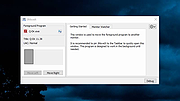 |
|
MJ Registry Watcher v1.2.9.1 MJ Registry Watcher v1.2.9.1 👉 Monitor and protect important registry keys, files, and startup locations. MJ Registry Watcher monitors selected registry keys, files, and directories for changes that could affect Windows startup or system security. It combines hooks, which can report many changes as they happen, with periodic polling to catch changes such as registry key deletions. Its monitored locations and response behavior can be configured, and it keeps a log of detected activity. The program can also monitor process launches and detect DLL injection. It includes registry backup, quarantine, and options for sending alert details by email. The author recommends running it with administrator rights so it can access the registry properly. Features: • Monitors configurable registry keys, files, and directories • Uses system hooks and periodic polling to detect changes • Protects common startup locations, registry values, and system files • Monitors process launches and detects DLL injection • Supports Accept, Reject, and Prompt modes in interactive use • Offers an invisible Windows service mode with Accept and Reject modes • Can send alert details by email and play alert sounds • Includes quarantine and an activity log • Creates periodic registry backups and retains the last 15 snapshots • Stores settings in a configuration file Supported operating systems: Windows 11, Windows 10, Windows 8, Windows 7 Supported languages: English Changes: v1.2.9.1 09-10-26 Latest Features : 64-bit OSes, Service Mode, Process Launch Monitoring, DLL Injection Detection, Emailing of Alerts, Quarantine, Registry Backup. Latest Fixes : Circular registry entries now handled without going into an infinite loop, Windows 11 support, Tray icon colour when loading. How to launch MJ Registry Watcher: Extract the downloaded files with their folder paths preserved, then open the MJRegWatcher folder and run RegWatcher.exe. The author recommends ... |
|
6,311 | Oct 14, 2026 Mark Jacobs 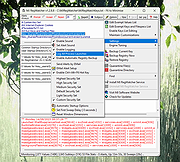 |
 |
Tiny Watcher v2.0.9 Tiny Watcher v2.0.9 Monitors system changes on a Windows machine Tiny Watcher takes a snapshot of important parts of your Windows system: running processes, files, registry, scheduled tasks. Afterwards, it tracks changes - every time you log in, or whenever you run it. When a change is detected, you are notified. Features • Creates a snapshot of running processes, files, registry entries and scheduled tasks • Alerts you if a monitored item is created, modified, or deleted • Super fast scan of your system (quick scan is usually under 10 seconds) • Runs at user logon time (or whenever you want) • Allows customization of monitored items (registry, files, tasks) • Uses SHA-256 hash for detecting changes in files • And more... • For Windows 10, 8.1, 7 (64bit) Click here to visit the author's website. |
|
2,276 | Apr 30, 2023 Olivier Lombart 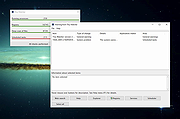 |
|
Wireless Network Watcher v2.45 Wireless Network Watcher v2.45 👉 Scans your wireless network and displays a list of all devices currently connected. Wireless Network Watcher is a lightweight network monitoring tool that scans your wireless network and displays a list of all computers and devices currently connected. The program quickly identifies devices on your network and provides useful information such as IP address, MAC address, device name, network adapter company, and connection status. Wireless Network Watcher can be useful for detecting unauthorized devices connected to your wireless network. It works by scanning a defined IP address range and presenting the results in a clear list, making it easy to identify computers, smartphones, tablets, routers, and other network hardware that are currently active. The utility is portable and does not require installation. It can also play a sound alert when a new device connects to the network and allows exporting the device list to various formats for reporting or monitoring purposes. Features: • Scans wireless networks and detects connected devices • Displays device information including IP address, MAC address, and device name • Identifies network adapter manufacturer from MAC address • Detects computers, phones, tablets, and other network hardware • Sound notification when new devices connect to the network • Export results to HTML, XML, CSV, or text files • Portable application that does not require installation • Simple interface designed for quick network scanning Supported operating systems: • Windows XP, Windows Vista, Windows 7, Windows 8, Windows 10, Windows 11 Supported languages: Arabic, Basque, Brazilian Portuguese, Bulgarian, Catalan, Croatian, Czech, Dutch, Finnish, French, German, Greek, Gujarati, Hebrew, Hellenic, Hungarian, Indonesian, Italian, Japanese, Korean, Latvian, Norwegian, Persian, Polish, Portuguese, Romanian, Russian, Serbian, Simplified Chinese, Slovak, Slovenian, Spanish, Swedish, Traditional Chinese, Thai, Turkish, Ukrainian, Valencian, Vietnamese Changes: v2.45 06-27-26 When a randomized MAC address is detected, it's displayed in the 'Network Adapter Company' column. Updated the internal MAC addresses database. This download is for the ... |
|
12,516 | Jul 01, 2026 Nir Sofer 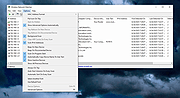 |
| Showing rows 1 to 4 of 4 | Showing Page 1 of 1 | 1 |
OlderGeeks.com Copyright (c) 2026
