|

|
Processed through Paypal No account required. |








Buy our over-priced crap to help pay the bills.



|
|
Processed through Paypal No account required. |
| Files | ||||
| File Name | Rating | Downloads | ||
 |
Password Safe v3.72.2 Password Safe v3.72.2 👉 Secure, open-source password manager for storing logins in an encrypted database. Password Safe helps you securely store usernames, passwords, and other login details in an encrypted database protected by a single master password. Designed by Bruce Schneier, it focuses on simple, local password management while offering tools such as AutoType, password policies, import and export options, database compare and merge functions, filters, reports, and multiple viewing modes for organizing entries. Features: • Stores usernames, passwords, and related notes in an encrypted database • Uses one master password to unlock and access all stored entries • Copies passwords, usernames, notes, and authentication codes from the toolbar • Supports AutoType for entering credentials into other windows • Can browse to a stored URL and execute AutoType • Includes password policy management and password generation options • Supports password history • Lets you organize entries in nested tree or flattened list views • Supports filters, subviews, reports, and search tools • Can import from text, XML, and KeePass V1 databases • Can export to text, XML, and older Password Safe database formats • Includes compare, merge, and synchronize tools for safes • Supports keyboard shortcuts and drag-and-drop style Dragbar entry actions • Open source and designed for straightforward local password management Supported operating systems: • Windows 7 and later • macOS 10.14 Mojave and later • Linux distributions with available packages • FreeBSD Supported languages: Arabic, Czech, Chinese, Danish, Dutch, French, German, Hungarian, Italian, Korean, Polish, Portuguese (Brazilian), Russian, Slovak, Slovenian, Spanish, Swedish, Turkish Changes: v3.72.2 09-06-26 Bugs Fixed GH1898 Arrow keys can now be used to navigate between Custom Value rows. GH1892 Regression: In the Add/Edit dialog's Basic tab, Alt-N (or the equivalent for non-English langauges) set the keyboard focus to the Notes field. SF1636 Minor UI issues in Custom Values display (column width) and edit (use correct font). ... |
 |
8,497 | Sep 15, 2026 Bruce Schneier 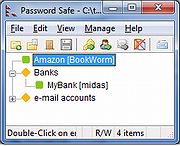 |
|
PearPass v2.1.0 PearPass v2.1.0 👉 Peer-to-peer password manager with private, device-to-device syncing. PearPass is an open-source password manager that prioritizes privacy and user control by avoiding centralized servers. Built on Pear Runtime, it uses peer-to-peer technology to sync your credentials directly between your devices, ensuring your data remains private, secure, and fully under your control. Instead of relying on cloud storage, PearPass keeps your information encrypted and shared only between your authorized devices. With a clean and minimal interface, it provides a straightforward way to manage passwords while maintaining modern security practices and full data ownership across desktop and mobile devices. Features: • Peer-to-peer syncing between devices with no central server • Built on Pear Runtime for decentralized application architecture • End-to-end encryption to protect all stored credentials • Local-first storage with no mandatory cloud dependency • Open-source codebase for transparency and independent auditing • Secure device-to-device authorization for syncing • No tracking, telemetry, or third-party data collection • Simple vault-style organization for managing credentials • Clean, minimal interface focused on ease of use • Fast access and retrieval of stored passwords • Designed for full user ownership and control of sensitive data • Lightweight application with low resource usage • Cross-platform support including desktop and mobile devices Supported operating systems: • Windows 10, Windows 11 • macOS • Linux • Android • iOS Supported languages: English Changes: v2.1.0 05-20-26 New features TOTP support: including OTP-to-login matching, duplicate-code warnings, and account search. Vault Deletion: Local vault removal with automatic cross-device syncing. Bitwarden Import: Support for encrypted vault imports. UI & UX Improvements UX improvements: Cleaned up core UI flows (Home, Settings, Autofill, Passkeys). Stability & Performance Faster Diagnostics: Optional local logs for monitoring for quicker bug fixes. Reliable Sync: Fixed Home screen vault name updates and improved cross-device syncing. This download is for the Windows 64bit version (very bottom of page). All ... |
|
860 | Sep 16, 2026 Tether Data, S.A. de C.V. 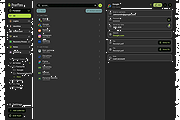 |
|
Vorn v1.0.3 Vorn v1.0.3 👉 Fast, private, crash-safe backup program with advanced features. Vorn is a modern local-first backup application designed to securely protect files without relying on cloud services, subscriptions, accounts, or telemetry. Instead of uploading data to external servers, Vorn stores everything inside a local vault controlled entirely by the user. The software uses content-addressable storage powered by BLAKE3 hashing, allowing duplicate data to be stored only once even across multiple backup sessions. This greatly reduces storage usage while improving backup efficiency. Vorn was built with reliability and data integrity in mind. It uses atomic writes, write-ahead logging, resumable operations, and integrity verification to help prevent corruption during crashes or unexpected shutdowns. Large files are automatically divided into chunks, making backups more resilient and easier to resume if interrupted. Optional gzip compression can reduce storage requirements further while maintaining compatibility with the portable vault format. The application features a clean desktop interface with dark and light themes, portable executables, and cross-platform support for Windows, macOS, and Linux systems. Since the backup vault is self-contained and self-describing, users can move backups between systems or restore files to different locations without depending on proprietary cloud infrastructure. Vorn is designed for users who want complete control of their backups while maintaining speed, privacy, and simplicity. Features: • Local-first backup architecture with no cloud dependency • Fully offline operation with no accounts or telemetry • Content-addressable storage using fast BLAKE3 hashing • Automatic deduplication across all backup sessions • Stores identical file content only once to save disk space • Chunked storage engine for efficient handling of large files • Resumable backup operations after interruptions or crashes • Atomic write protection for safer backup transactions • Write-ahead logging to improve recovery reliability • Self-describing portable vault format • Integrity verification to detect damaged or missing data • Optional gzip compression for reduced storage usage • Smart pruning system for reclaiming unused ... |
|
536 | May 29, 2026 Leonardo Ciaccio 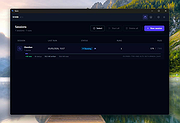 |
| Showing rows 1 to 3 of 3 | Showing Page 1 of 1 | 1 |
OlderGeeks.com Copyright (c) 2026
