|

|
Processed through Paypal No account required. |








Buy our over-priced crap to help pay the bills.



|
|
Processed through Paypal No account required. |
| Files | ||||
| File Name | Rating | Downloads | ||
 |
CpuFrequenz v4.48 CpuFrequenz v4.48 Small tool for exact determination of the CPU frequency. Every now and then the PC becomes slow. Is it probably due to the CPU? Key Features • Fast and clear Frequency Query • Freely selectable Frequency Detection Duration • Real-Time CPU Load and Frequency Display Other Features and Specifications: • Low CPU and RAM Usage • Optional as a Portable Program • Multilingual (Multilingual) Changes: v4.48 // 13 August 2025 • Important improvement to the CPU Frequency Query Tool on Windows 11 This download is for Windows XP and higher (very bottom of page). If you need the Windows 98 version, download here. Click here to visit the author's website. |
 |
5,615 | Aug 17, 2025 Nenad Hrg 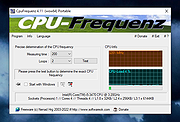 |
|
QuickImageComment v4.48 QuickImageComment v4.48 isplays EXIF, IPTC, and XMP properties of digital images (e.g., JPEG and TIFF as well as some RAW formats) and allows to edit them. These attributes are read from the EXIF, IPTC, and XMP properties of the image and are stored there. Especially editing of user comment and artist (author) is supported by using the last entered or predefined values. Metadata (XMP) in video files are displayed. Overview of features are: Display of all EXIF, IPTC and XMP properties of images, as well as some other file properties such as modification date. Display of meta data (XMP) of video files as well as (depending on the Windows version and, if necessary, installed components) display a frame of the video. Images or videos can be searched via their properties and recording location on map. In addition to the full lists of EXIF, IPTC and XMP properties a list of properties is displayed, which is configurable. In addition to user comment and artist further EXIF, IPTC and XMP properties can be changed. The list of modifiable properties can be configured. Data templates can be defined to set several properties in one step. Via placeholder it is possible to copy values of properties in others. Changes can be carried out simultaneously for two or more files. EXIF, IPTC and XMP properties can be deleted, thereby exceptions can be defined. Single properties can be deleted selectively. Files can be renamed using Exif, IPTC and XMP properties. The EXIF, IPTC and XMP properties contained in the files can be compared. A special mask is used to synchronize the ... |
|
6,347 | Mar 30, 2022 Norbert Wagner 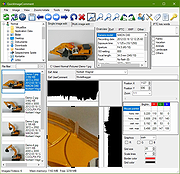 |
| Showing rows 1 to 2 of 2 | Showing Page 1 of 1 | 1 |
OlderGeeks.com Copyright (c) 2026
