|

|
Processed through Paypal No account required. |








Buy our over-priced crap to help pay the bills.



|
|
Processed through Paypal No account required. |
| Files | ||||
| File Name | Rating | Downloads | ||
 |
PDFTK Builder Enhanced v4.1.7 PDFTK Builder Enhanced v4.1.7 A free and open source GUI application for manipulating PDF files PDFTK Builder Enhanced uses the Windows version of PDF Toolkit (PDFtk) - split, merge, stamp, number pages, rotate, metadata, bookmarks, attachments, etc. This project is a fork of PDFTK Builder by Angus Johnson that enhances the user interface, adds functions, and enables use of later versions of PDFtk. OS: Windows. Author: David King. License: GPLv3. Features • Rotate, reorder, extract, delete or insert pages in a PDF document • Merge PDF files or interleave PDF page scans • Split a PDF file into files of N pages or odd/even pages • Apply background watermarks or foreground stamps • Report and add/update PDF bookmarks and metadata • Attach files to PDF documents; extract PDF attachments Changes: v4.1.7, 02 Dec 2024 Bugfix: Fixed an issue with Join Files where pages may be taken from the wrong file when merging or interleaving the pages of multiple PDF documents. This issue affected files below the top file in the Join Files list that had more than one page range entered in their Pages box. For those files, the first page range would be taken from the correct file, but any additional page ranges would be taken from the top file. (Workaround for releases prior to 4.1.7 is to repeat the affected files multiple times in the Join Files list specifying only one of their multiple page ranges each time.) Click here to visit the author's website. |
 |
870 | Dec 05, 2024 David King/Angus Johnson 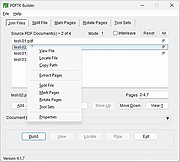 |
 |
Thonny v4.1.7 Thonny v4.1.7 A free Python IDE for beginners. Features Easy to get started. Thonny comes with Python 3.7 built in, so just one simple installer is needed and you're ready to learn programming. (You can also use a separate Python installation, if necessary.) The initial user interface is stripped of all features that may distract beginners. No-hassle variables. Once you're done with hello-worlds, select View → Variables and see how your programs and shell commands affect Python variables. Simple debugger. Just press Ctrl+F5 instead of F5 and you can run your programs step-by-step, no breakpoints needed. Press F6 for a big step and F7 for a small step. Steps follow program structure, not just code lines. Step through expression evaluation. If you use small steps, then you can even see how Python evaluates your expressions. You can think of this light-blue box as a piece of paper where Python replaces subexpressions with their values, piece-by-piece. Faithful representation of function calls. Stepping into a function call opens a new window with separate local variables table and code pointer. Good understanding of how function calls work is especially important for understanding recursion. Highlights syntax errors. Unclosed quotes and parentheses are the most common beginners' syntax errors. Thonny's editor makes these easy to spot. Explains scopes. Highlighting variable occurrences reminds you that the same name doesn't always mean the same variable and helps spotting typos. Local variables are visually distinguished from globals. Mode for explaining references. Variables are initially presented according to simplified model (name → value) but you can switch to more realistic model (name → address/id → value). Code completion. Students can explore APIs with the help of code completion. Beginner friendly system shell. Select Tools → Open system shell to install extra packages or learn handling Python on command line. PATH and conflicts with other Python interpreters are taken care of ... |
|
6,189 | Sep 17, 2025 University of Tartu, Estonia 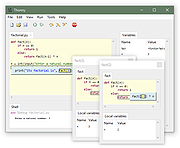 |
| Showing rows 1 to 2 of 2 | Showing Page 1 of 1 | 1 |
OlderGeeks.com Copyright (c) 2026
